Kaizen: Embark on My AI Certification Journey

Today, I’m finally getting recognised by Microsoft as a Microsoft Certified: Azure Artificial Intelligence (AI) Fundamentals.

Nowadays, in many of the industries, we hear words like AI, Machine Learning, and Deep Learning. The so-called AI revolution is here to stay and shows no signs of slowing. Hence, it’s getting more and more important to equip ourselves today for the future of tomorrow with relevant knowledge about AI.

In addition, big players in the AI industry such as Microsoft have made AI learning easier for anyone who has an interest in the AI field. In August 2021, Rene Modery, Microsoft MVP, shared on his LinkedIn profile about how to take a Microsoft Certification exam for free and Azure AI Fundamental certification is one of them. Without the discount, we will need to pay USD 106 just to take the Azure AI Fundamental certification exam in Singapore. Hence, this is a good opportunity for us to take the exam now while the discount is still available.

Why Am I Taking Certification Exam?

One word, Kaizen.

Kaizen is the Japanese term for continuous improvement. I first learnt about this concept from Riza Marhaban, who is also my mentor in my current workplace, in one of the Singapore .NET Community meetups last year. In his talk, Riza talked about how continuous improvement helped a developer to grow and to stay relevant in the ever-changing IT industry.

Riza’s sharing about Kaizen in Singapore .NET Developers Community meetup.

Yes, professional working experience is great. However, continuous learning and having the ability to demonstrate one’s skills through personal projects and certifications is great as well. Hence, after taking the online Azure AI training course, I decided to take the Microsoft Certificate exam, a way to verify my skills and unlock opportunities.

My Learning Journey

After I received my 2nd dose of the COVID-19 vaccination, I took a one-week leave to rest. During this period of time, every day I spent about 2-3 hours on average to go through the learning materials on Microsoft Learn.

To help us better prepared for the exam, our friendly Microsoft Learn has offered an online free learning path that we can learn at our own pace. I finished all the relevant modules within 7 days.

In addition, in order to be eligible for the free exam, I also spent another one day of my leave to attend the Microsoft Azure Virtual Training session on AI Fundamentals.

When I was going through the learning materials, I also took down important notes on Notion, which is a great tool for keeping our notes and documents, for future reference. Taking notes doesn’t only help me to learn better but also provide me an easier exam revision.

Studying for exam is a time of great stress. In fact, I was also busy at work at the same time. Hence, in order to destress, everyday I will find some time to login to Genshin Impact to travel in the virtual world and enjoy the nice view.

Feeling burned out, emotionally drained, or mentally exhausted? Play games with friends to destress! (Image Source: Genshin Impact)

The Exam

The certification exam, i.e. AI-900, has five main sections, i.e.

  • AI workloads and consideration;
  • Fundamental principles of ML on Azure;
  • Computer Vision workloads on Azure;
  • Natural Language Processing (NLP) workloads on Azure;
  • Conversational AI workloads on Azure.

In total, there are 40+ questions that we must answer within 45 minutes. This makes the exam a little difficult.

Based on my experience, as long as one has common sense and fully understands the learning materials on Microsoft Learn, it’s quite easy to pass the exam, which is to score at least 700 points only.

I choose to take the certification exam at NTUC Learning Hub located at Bras Basah. (Image Source: Wikimedia Commons)

WANNA BE Certified by Microsoft?

If you are new to Microsoft Certification and you’d like to find out more about their exams, feel free to check out the Microsoft Certifications web page.

Together, we learn better.

My Vaccination Journey: 2nd Jab

On 3rd of September 2021, Singapore announced to offer 3rd COVID-19 shots to senior citizens. Only one day after that, on 4th of September, I went to the vaccination centre to have my 2nd jab of the vaccine.

I took one week leave in the following week to have some rest. I felt tired and thus I slept as much as I could in the first three days after the vaccination. In order to maintain the body hydration level, I also drank about 2 liters of plain water per day. On top of that, since the weather in Singapore was extremely warm in September, starting from three days before my vaccination day, I also bought a cup of coconut water every day.

Fortunately, to me, there was no other major side effects from the vaccine. Hence, I spent my one-week leave to do many things that I didn’t have the time to do in the normal working days.

Activity 1: Microsoft Virtual Training Day

There are many virtual training sessions available currently. The sessions are all offered by Microsoft for free. You can browse the available training sessions on the Training Days website.

On 6th of September, there was a session about Artificial Intelligence (AI) Fundamentals.

AI Fundamental virtual training session.

In the training session, we learnt about concepts such as, AI in Azure, common AI workloads, challenges and risks with AI, and principles of responsible AI.

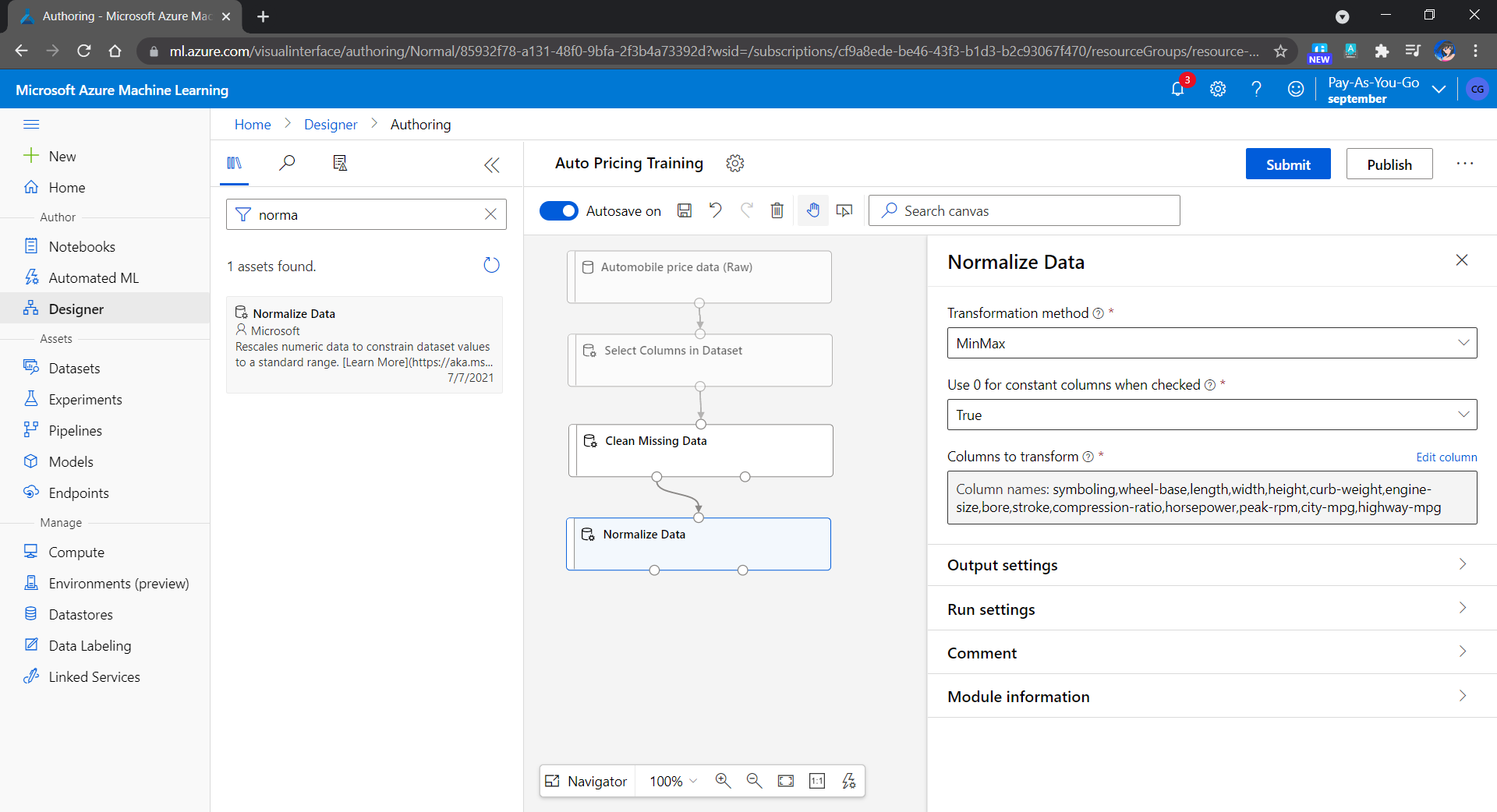
After that, we learnt how to create predictive models by finding relationships in data using Machine Learning (ML). Using Azure ML Designer, we can visually create a ML pipeline in a drag-and-drop manner.

Creating a predictive pricing model with Azure ML Designer.

Finally, we also learnt how to use Azure Cognitive Services to analyse images, recognise faces, perform OCR.

Activity 2: Learning PyQt

I was asked by our Senior IT Architect to learn how to build a dashboard as a desktop application using Python before my leave. Hence, I also read the tutorials about PyQt5 during my leave.

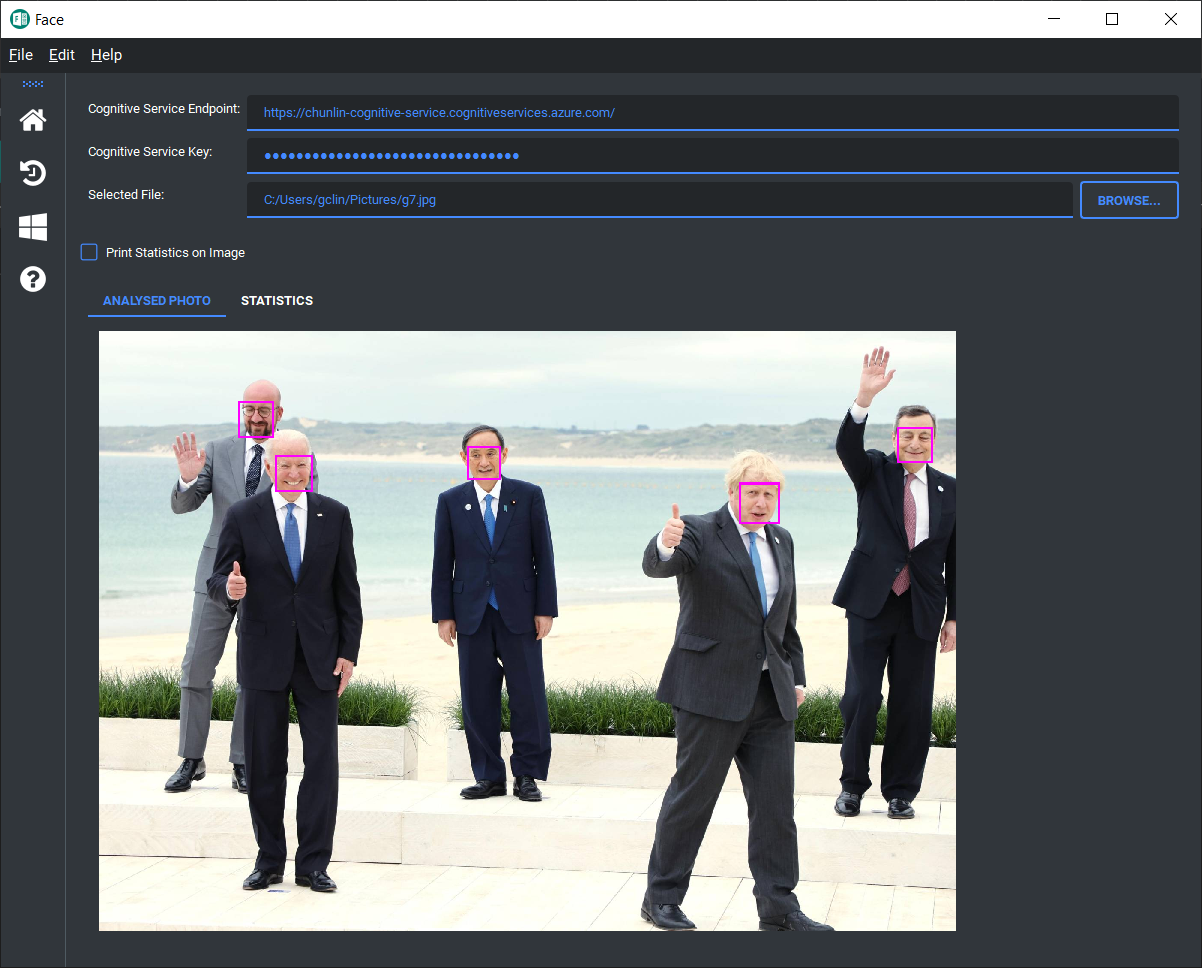
Using the knowledge I learnt from Azure Virtual Training mentioned above, I built a sample PyQt desktop application to perform face detection in a photo. The source code of the application is currently available on my GitHub repo.

Detecting faces in a photo using the Face API in Azure Cognitive Services.

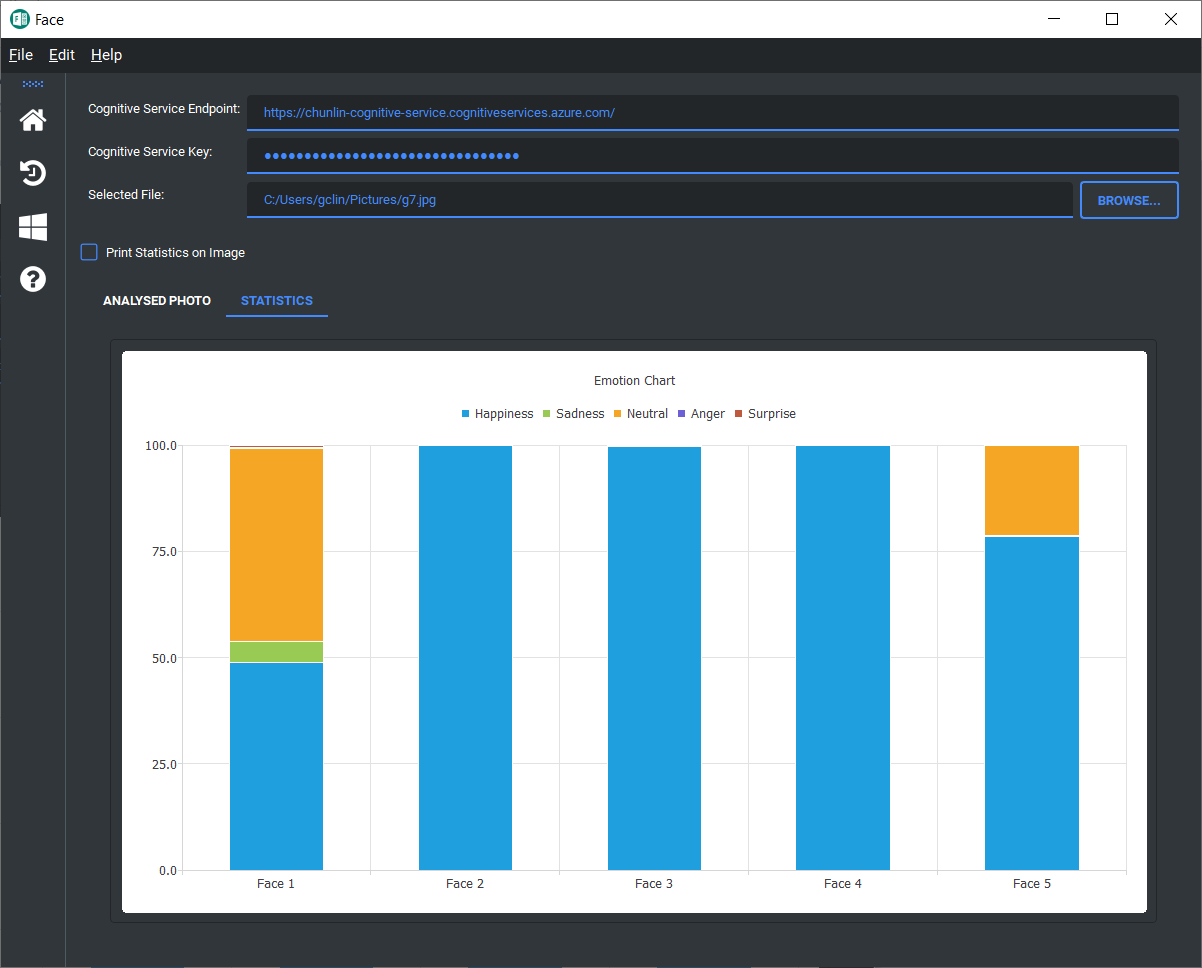
In this learning exercise, I also found out how to apply Material Design theme to a PyQt5 application using library such as Qt-Material. In addition, I also learnt how to draw charts using PyQtChart. For example, emotions of the faces detected in the screenshot above can be drawn as a chart shown in the following screenshot using the Face API.

One of the faces in the photo above looks a bit sad.

Activity 3: Playing Games

Besides coding, I also took some time to play computer games. Since the version 2.1 of Genshin Impact was released just few days before my leave, I got more time to clear the new story and have fun fishing with my friends as well.

Let’s fish together!

One-Week Leave

Yup, that’s all what I had done during my leave. Now, I am thinking how to clear the remaining annual leave I have brought over from the previous year.

[KOSD Series] Ready ML Tutorial One

kosd-azure-machine-learning.png

During the Labour Day holiday, I had a great evening chat with Marvin, my friend who had researched a lot about Artificial Intelligence and Machine Learning (ML). He guided me through steps setting up a simple ML experiment. Hence, I decided to note down what I had learned on that day.

The tool that we’re using is Azure Machine Learning Studio. What I had learned from Marvin is basically creating a ML experiment through drag-and-dropping modules and connecting them together. It may sound simple but for a beginner like me, it is still important to understand some key concepts and steps before continuing further in the ML field.

Azure ML Studio

Azure ML Studio is a tool for us to build, test, and deploy predictive analytics on our data. There is a detailed diagram about the capability of the tool, which can be downloaded here.

ml_studio_overview_v1.1.png
Capability of Azure ML Studio (Credits: Microsoft Azure Docs)

Step 0: Defining Problem

Before we began, we need to understand why we are using ML for?

Here, I’m helping a watermelon stall to predict how many watermelon they can sell this year based on last year sales data.

Step 1: Preparing Data

As shown in the diagram above, the first step is to import the data into the experiment. So, before we can even start, we need to make sure that we have at least a handful of data points.

data.png
Daily sales of the watermelon stall and the weather of the day.

Step 2: Importing Data to ML Studio

With the data points we now have, we then can import them to ML Studio as a Dataset.

datasets.png
Datasets available in Azure ML Studio.

Step 3: Preprocessing Data

Firstly, we need to perform a cleaning operation so that missing data can be handled properly without affecting our results later.

Secondly, we need to “Select Columns in Dataset” so that only selected columns will be used in the subsequent operations.

Step 4: Splitting Data

This step is to help us to separate data into training and testing sets.

Step 5: Choosing Learning Algorithm

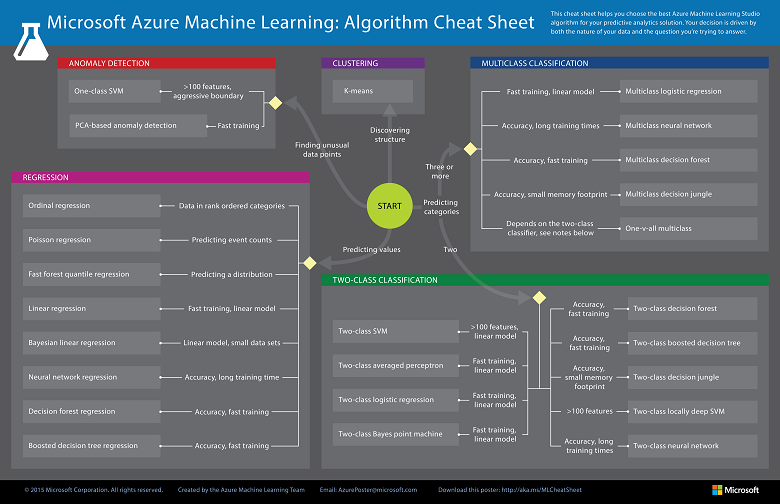
Since we are now using the model to predict number of watermelons the stall can sell, which is a number, we’ll use Linear Regression algorithm, as recommended. There is a cheat sheet from Microsoft telling us which algorithm we need to choose based on different scenarios. You can also download it here.

machine-learning-algorithm-cheat-sheet-small_v_0_6-01.png
Learning algorithm cheat sheet. (Image Credits: Microsoft Docs)

Step 6: Partitioning and Sampling

Sampling is an important tool in machine learning because it reduces the size of a dataset while maintaining the same ratio of values. If we have a lot of data, we might want to use only the first n rows while setting up the experiment, and then switch to using the full dataset when you build our model.

Step 7: Training

After choosing the learning algorithm, it’s time for us to train the data.

Since we are going to predict the number of watermelons sold, we will select the column, as shown in the following screenshot.

train.png
Select the one column that we need to predict in Train Model module.

Step 8: Scoring

Do you still remember that we split our data into two sets in Step 4 above? Now, we need to connect output from Split Data module and output from Train Data module to the Score module as inputs. Doing this step is to score prediction for our regression model.

Step 9: Evaluating

We finally have to generate scores over our training data, and evaluate the model based on the scores.

Step 10: Deploying

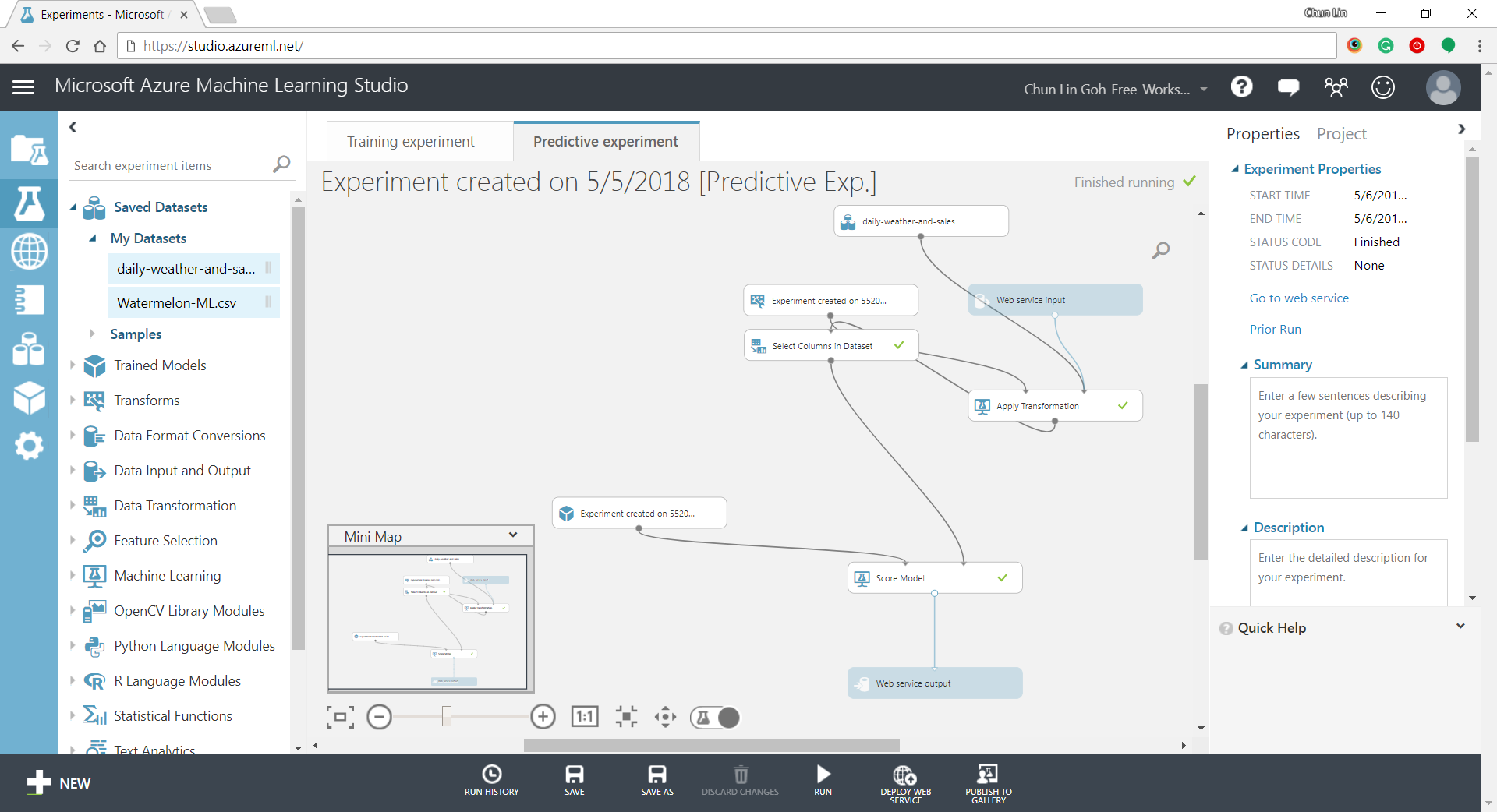
Now that we’ve completed the experiment set up, we can deploy it as a predictive web service.

predictive-experiment.png
Generated predictive experiment.

With that deployed, we then can easily predict how many watermelons can be sold on a future date, as shown in the screenshot below.

testing.png
Yes, we can sell 25 watermelons on 7th May if the temperature is 32 degrees!

Conclusion


This is just the very beginning of setting up a ML experiment on Azure ML Studio. I am still very new to this AI and ML stuff. If you spot any problem in my notes above, please let me know. Thanks in advance!

References:


KOSD, or Kopi-O Siew Dai, is a type of Singapore coffee that I enjoy. It is basically a cup of coffee with a little bit of sugar. This series is meant to blog about technical knowledge that I gained while having a small cup of Kopi-O Siew Dai.