[KOSD] Solving SQL File Encoding Issues on Git with PowerShell

Few days ago, some of our teammates discovered that the SQL files they tried to pull from our GitHub repo had encoding issue. When they did git pull, there would be an error saying “fatal: failed to encode ‘…/xxxxx.sql’ from UTF-16-LE-BOM to UTF-8”.

In addition, on GitHub, the SQL files we committed to the GitHub are all marked as binary files. Thus we couldn’t view the changes we made to those files in the commit.

Cause of the Issue

It turns out that those SQL files are generated from SQL Server Management Studio (SSMS).
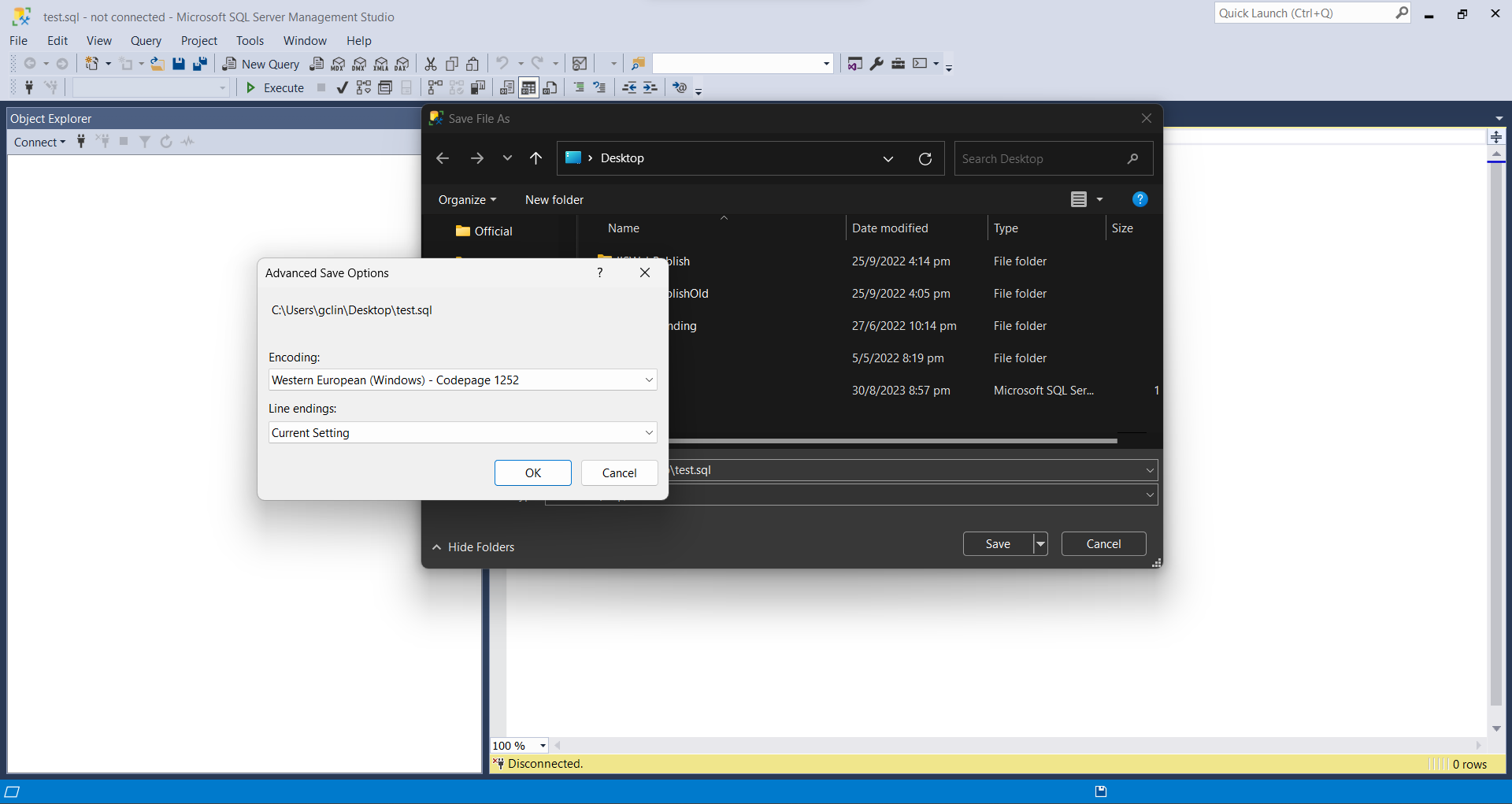
Default file encoding of SSMS is Western European (Windows) – Codepage 1252.

By default, the encoding used to save SQL files in SSMS is UTF-16. For my case, my default encoding is the “Western European (Windows) – Codepage 1252”. Codepage 1252 is a single-byte character encoding of the Latin alphabet that was used in Windows for English and many Romance and Germanic languages. This encoding will cause Git to treat the files as binary files.

Solution

The way to resolve this issue is to force the file to use UTF-8 encoding. We can run the following PowerShell script to change the encoding of all SQL files in a given directory and its subdirectories.

$Utf8NoBomEncoding = New-Object System.Text.UTF8Encoding $False

Get-ChildItem "<absolute directory path>" -Recurse *.sql | foreach {
    $FilePath = $_.FullName
    $FileContent = Get-Content $FilePath
    [System.IO.File]::WriteAllLines($FilePath, $FileContent, $Utf8NoBomEncoding)
}

The BOM (Byte Order Mark), a sequence of bytes at the start of a text stream (0xEF, 0xBB, 0xBF), is used to signal the endianness of an encoding, but since endianness is irrelevant to UTF-8, the BOM is unnecessary. This explains why we pass $False to the constructor of UTF8Encoding to indicate that BOM is not needed.

Wrap-Up

That’s all for a short little PowerShell script we used to solve the encoding issue of our SQL files.

There is an interesting discussion on StackOverflow about this issue, please give it a read too.

KOSD, or Kopi-O Siew Dai, is a type of Singapore coffee that I enjoy. It is basically a cup of coffee with a little bit of sugar. This series is meant to blog about technical knowledge that I gained while having a small cup of Kopi-O Siew Dai.

[KOSD Series] Code Review and VSTS

KOSD, or Kopi-O Siew Dai, is a type of Singapore coffee that I enjoy. It is basically a cup of coffee with a little bit of sugar. This series is meant to blog about technical knowledge that I gained while having a small cup of Kopi-O Siew Dai.

kosd-vsts-azure.png

Code reviews are a best practice for software development projects but it’s normally ignored in startups and SMEs because

  • the top management doesn’t understand the value of doing so;
  • the developers have no time to do code reviews and even unit testing.

So, in order to improve our code quality and management standards, we decided to introduce the idea of code reviewing by enforcing pull requests creating in our deployment procedure, even though our team is very small and we are working in a startup environment.

Firstly, we set up two websites on Azure App Service, one for UAT and another for the Production. We enabled Continuous Deployment feature for two of them by configuring Azure App Service integration with our Git repository on Visual Studio Team Services (VSTS).

Secondly, we have two branches in the Git repository of the project, i.e. master and development-deployment. Changes pushed to the branches will automatically be deployed to the Production and the UAT websites, respectively.

In order to prevent that our codes are being deployed to even the UAT site without code reviews, we created a new branch known as the development branch. The development branch allows all the relevant developers (in the example below, we call them Alvin and Bryan) to pull/push their local changes freely from/to it.

git-flow-on-vsts.png

Once any of the developers is confident with his/her changes, he/she can create a new pull request on VSTS.

creating-pull-request.png
Creating a new pull request on VSTS.

We then proceed to make use of the new capability on VSTS, which is to set policies for the branches. In the policy setting, we checked the option “Require a minimum number of reviewers” to prevent direct pushes to both master and development-deployment branches.

branch-policies.png
Enabled the code review requirement in each pull request to protect the branch.

So for every deployment to our UAT and Production websites, the checking step is in place to make sure that the deployments are all properly reviewed and approved. This is not just to protect the system but also to protect the developers by having a standardized quality checking across the development team.

This is the end of this episode of KOSD series. If you have any comment or suggestion about this article, please shout out. Hope you enjoy this cup of electronic Kopi-O Siew Dai. =)