From Legacy to .NET 8: Migrating with NDepend

Quick note: I received a free license for NDepend to try it out and share my experience. All opinions in this blog post are on my own.

From O2DES.Net to Ea

In 2019, I had the honour of working closely with the team behind the O2DES.NET during my time working at the C4NGP research center in NUS, where I spent around two and a half years. After I left the team in 2022, O2DES.NET has not been actively updated on their GitHub public repository and it is still targeting at .NET Standard 2.1.

While .NET Standard 2.1 is not as old as the .NET Framework, it is considered somewhat outdated compared to the latest .NET versions. In the article “The Future of .NET Standard” written by Immo Landwerth, .NET Standard has been largely superseded by .NET 5 (and later versions), which unify these platforms into a single runtime. Hence, moving to .NET 8 is a forward-looking decision that aligns with current and future software development trends.

Immo Landwerth, program manager on the .NET Framework team at Microsoft, talked about .NET Standard 2.0 back in 2016. (Image Credit: dotnet – YouTube Channel)

Hence, in this article, I will walk you through the process of migrating O2DES.NET from targeting .NET Standard 2.1 to supporting .NET 8. To prevent any confusion, I’ve renamed the project to ‘Ea’ because I am no longer the active developer of O2DES.NET. Throughout this article, ‘Ea’ will refer to the version of the project updated to .NET 8.

In this migration journey, I will be relying on NDepend, a static code analysis tool for .NET developers.

Show Me the Code!

The complete source code of my project after migrating O2DES.NET to target at .NET 8 can be found on GitHub at https://github.com/gcl-team/Ea.

About NDepend: Why Do We Need a Static Code Analysis?

Why do we need NDepend, a static code analysis tool?

Static code analysis is a way of automatically checking our code for potential issues without actually running our apps. Think of it like a spell-checker, but for programming, scanning our codebase to find bugs, performance issues, and security vulnerabilities early in the development process.

During the migration of an older library, such as moving O2DES.NET from .NET Standard 2.1 to .NET 8, the challenges can add up. We are expected to run into outdated code patterns, performance bottlenecks, or even compatibility issues.

The O2DES.NET on GitHub has some of its NuGet references outdated too.

NDepend is designed to help with this by performing a deep static analysis of the entire codebase. It gives us detailed reports on code quality, shows where our dependencies are, and highlights areas that need attention. We can then focus on modernising the code with confidence, knowing that we are not likely introducing new bugs or performance issues as we are updating the codebase.

NDepend also helps enforce good coding practices by pointing out issues like overly complex methods, dead code, or potential security vulnerabilities. With features like code metrics, dependency maps, and rule enforcement, it acts as a guide to help us write better, more maintainable code.

Bringing Down Debt from 6.22% to 0.35%

One of the standout features of NDepend is its comprehensive dashboard, which I heavily rely on to get an overview of the entire O2DES.NET codebase.

Right after targeting the O2DES.NET library to .NET 8, a lot of issues surfaced.

From code quality metrics to technical debt, the dashboard presents critical insights in a visual and easy-to-understand format. Having all this information in one place is indeed invaluable to us during the migration project.

To help us better understand how much effort is needed to fix or improve the codebase, NDepend uses the Debt Ratio and Debt Rating, both of which are part of the SQALE method.

We can configure the SQALE Debt Ratio and Debt Rating.

In the book, the SQALE method for Managing Technical Debt written by Jean-Louis Letouzey, SQALE stands for Software Quality Assessment based on Life Expectations. SQALE is a method used to assess and manage technical debt in software projects. In the context of NDepend, the SQALE method is used to calculate the Debt Ratio and Debt Rating:

Debt Ratio: The percentage of effort needed to fix the technical debt compared to rewriting the code from scratch.

Debt Rating: A letter-based rating (A to E) derived from the Debt Ratio to give a quick overview of the severity of technical debt.

As shown in one of the earlier screenshots, Ea has a Debt Ratio of 6.22% and a B rating. This means that its technical debt is considered moderate and manageable. Nevertheless, it is a signal that it is now time we should start addressing the identified issues before they accumulate.

After just two weeks of code cleanup, we successfully reduced Ea’s Debt Ratio from 6.22% to an impressive 0.35%, elevating its rating to an A. This significant improvement not only enhances the overall quality of the codebase but also positions Ea for better maintainability.

The most recent analysis shows that the Debt Ratio of Ea is down to just 0.35%.

Issues and Trends

In Visual Studio, NDepend also provides interactive UI which indicates the number of critical rules violated and critical issues to solve. Unlike most of the static code analysis tools that show overwhelming number of issues, NDepend has this concept of baseline.

When we first set up an NDepend project, the very first analysis of our code becomes the “baseline.” This baseline serves as a starting point, capturing the current state of our code. As we continue to work on the project, future analyses will be compared against this baseline. The idea is to track how our code changes over time so that we can focus on knowing whether we are improving or introducing more issues to the codebase while we are changing it.

At some point during the code change, we fixed 31 “High” issues (shown in green) while introducing 42 new “High” issues (shown in red).

As shown in the screenshot above, those new issues added since the baseline need to be our priority to fix. This is to make sure the newly written code and refactored code will remain clean.

In fact, when fixing the issues, I get to learn from the NDepend rules. When we click on the numbers, we will be shown the corresponding issues. Then clicking on each of the issue will show us the detailed information about it. For example, as shown in the screenshot below, when we click on one of the green numbers, it shows us a list of issues that have been fixed by us.

As indicated, the issue is one which has been fixed since the baseline.

When we click on the red numbers, as shown in the following screenshot, we will get to see the new issues that we need to fix. The following example shows how the original O2DES.NET has some methods declared with high visibility unnecessarily.

This is an issue that has been newly added since the baseline.

By default, the dashboard also comes with some helpful trend charts. These charts give us a visual overview of how our codebase is evolving over time.

We have made significant progress in Ea library development over the past half month.

These charts give us a visual overview of how our codebase is evolving over time. For those new to static code analysis, think of these charts as the “health check” of the project. During the migration, they help us to track important metrics, like code coverage, issues, or technical debt, and show how they change with each analysis.

Code Dependency Graphs

NDepend offers a Dependency Graph. It is used to visually represent the relationships between different components such as namespaces and classes within our codebase. The graph helps us understand how tightly coupled our code is and how different parts of our codebase depend on each other.

When we are refactoring Ea during the migration, we depend on the Dependency Graph to visually shows us how the different parts of the codebase are connected. We use the insight provided by Dependency Graph to plan how to split components, which will then make the code easier to manage.

A dependency diagram made of all classes in the Ea project.

As shown in the diagram above, we can see a graph made of some entangled classes which are connected with a red bi-directional arrow. This is because in the original O2DES.NET library, there are some classes having circular dependency. This thus makes parts of the code heavily reliant on each other, reducing modularity and making it harder to unit test the code independently.

To further investigate the classes, we can double click the edge between those two classes. Doing so will generate a graph made of methods and fields involved in the dependency between the two classes, as shown in the screenshot below.

The coupling graph between two classes.

This coupling graph is a powerful tool for us as it offers detailed insights into how the two classes interact. This level of detail allows us to focus on the exact code causing the coupling, making it easier to assess whether the dependency is necessary or can be refactored. For instance, if multiple methods are too intertwined, it might be time to extract common logic into a new class or interface.

In addition, the Dependency Matrix is another way to visualise the dependencies between namespaces, classes, or methods. A number in a cell at the intersection of two elements indicates how many times the element in the row depends on the element in the column. This gives us an overview of the dependencies within our codebase.

The Dependency Matrix.

From the Dependency Matrix above, we first should look for cells with large numbers. This is because having large numbers indicating the two methods are highly dependent on each other. We should review those methods to understand why there is so much interaction and to make sure they are not tightly coupled.

If there is a cycle in the codebase, there will be a red square shown on the Dependency Matrix. We then can refactor by breaking the cycle, possibly by introducing new interfaces or decoupling responsibilities between the methods.

Code Metrics View

In the Code Metric View, each rectangle represents a method. The area of a rectangle is proportional to metrics such as the # lines of codes (LOC), cyclomatic complexity (CC), of the corresponding method, field, type, namespace, or assembly.

This treemap shows the # lines of code (LOC) of the methods in our project.

During the migration, the tree view format enables us to navigate our codebase and prioritise areas that require refactoring by spotting those methods that are too big and too complex. In addition, to help quickly identify problem areas, NDepend uses colour coding in the tree view. For example, red may indicate high complexity or large size, while green might indicate simpler, more maintainable code.

The tree view is interactive. Right-clicking on the rectangles provides options such as opening the source code declaration for the selected element, allowing us to navigate directly to the method.

Right-clicking on the rectangles will show the available actions to perform.

Integrating with GitHub Actions

NDepend integrate well with several CI/CD pipelines, making it a valuable tool for maintaining code quality throughout the development lifecycle. It can automatically analyse our code after each build. This ensures that every change in our codebase adheres to defined quality standards before the merge to main branch.

NDepend comes with Quality Gates that enforce standards such as unfixed critical issues. If the code fails to meet the required thresholds, the build can fail in the pipelines.

In NDepend, Quality Gates are predefined sets of code quality criteria that our project must meet before it is considered acceptable for deployment. They serve as automated checkpoints to help ensure that our code maintains a certain standard of quality, reducing technical debt and promoting maintainability.

One of our build failed because there was code violating a critical rule in our codebase.

As shown in the screenshot above, NDepend provides detailed reports on issues and violations after each build. We can also download the detailed report from the CI servers, such as GitHub Actions. These reports help us quickly identify where issues exist in our code.

NDepend report of the build can be found in the Artifacts of the pipeline.

The NDepend report is divided into seven sections, each providing detailed insights into various aspects of your codebase:

  • Overview: It gives a high-level view of the overall code quality and metrics, similar to what is displayed in the NDepend Dashboard within Visual Studio.
  • Issues: A list of source files with unresolved issues. Along with the number of issues, it also shows the “Debt” for each file, which represents the estimated man-time required to resolve the issues.
  • Projects: Similar to the Issues section but focuses on projects instead of individual files. It displays the total issues and associated debt at the project level.
  • Rules: This section highlights the violated rules, showing the issues and debt in terms of the rules that have been broken. Itโ€™s another way to assess code quality by focusing on adherence to coding standards.
  • Quality Gates: This section mirrors the Quality Gates you might have seen earlier in the CI/CD pipelines, such as in GitHub Actions.
  • Trend: The Trend section provides a visualisation of trends over time, similar to the trend charts found in the NDepend Dashboard in Visual Studio.
  • Logs: This section contains the logs generated during NDepend analysis.
Number of un-resolved issues and debt of the files in our project.

As described in the NDpend documentation, it has complete support for Azure DevOps, meaning it can be seamlessly integrated into the CI/CD pipelines without a lot of manual setup. We thus can easily configure NDepend to run as part of our Azure Pipelines, generating code quality reports after each build.

For our Ea project, since it is an open-source project hosted on GitHub, we can also integrate NDepend with our GitHub Actions instead.

To integrate with GitHub Actions, firstly, we need to get associate our NDepend license with our GitHub account (or a copy of 28-day trial activation data). To link the NDepend license (eg. ABC012345) with our GitHub account, we will need to visit the link: “https://www.ndepend.com/activation_githubaction?license=ABC012345”, as demonstrated in the screenshot below.

Linking our NDepend license with our GitHub account.

To introduce NDepend to our GitHub Actions workflow, the very least configuration that we need to add is as follows.

- name: NDepend
uses: ndepend/ndepend-action@ndependv1.0
with:
license: ${{ secrets.NDependLicense }}
GITHUB_TOKEN: ${{ secrets.GITHUB_TOKEN }}

Read More: Complete Build YAML of Ea

Wrap-Up

In conclusion, NDepend has proven to be an invaluable tool in our journey to modernise and maintain the Ea library.

By offering comprehensive static code analysis, insightful metrics, and seamless integration with CI/CD pipelines like GitHub Actions, it empowers us to catch issues early, reduce technical debt, and ensure a high standard of code quality.

NDepend provides the guidance and clarity needed to ensure our code remains clean, efficient, and maintainable. For any .NET individual or development team serious about improving code quality, NDepend is definitely a must-have in the toolkit.
[KOSD] Learning from Issues: Troubleshooting Containerisation for .NET Worker Service

Recently, we are working on a project which needs a long-running service for processing CPU-intensive data. We choose to build a .NET worker service because with .NET, we are now able to make our service cross-platform and run it on Amazon ECS, for example.

Setup

To simplify, in this article, we will be running the following code as a worker service.

using Microsoft.Extensions.Hosting;

using NLog;
using NLog.Extensions.Logging;

Console.WriteLine("Hello, World!");

var builder = Host.CreateApplicationBuilder(args);

var logger = LogManager.Setup()
.GetCurrentClassLogger();

try
{
builder.Logging.AddNLog();

logger.Info("Starting");

using var host = builder.Build();
await host.RunAsync();
}
catch (Exception e)
{
logger.Error(e, "Fatal error to start");
throw;
}
finally
{
// Ensure to flush and stop internal timers/threads before application-exit (Avoid segmentation fault on Linux)
LogManager.Shutdown();
}

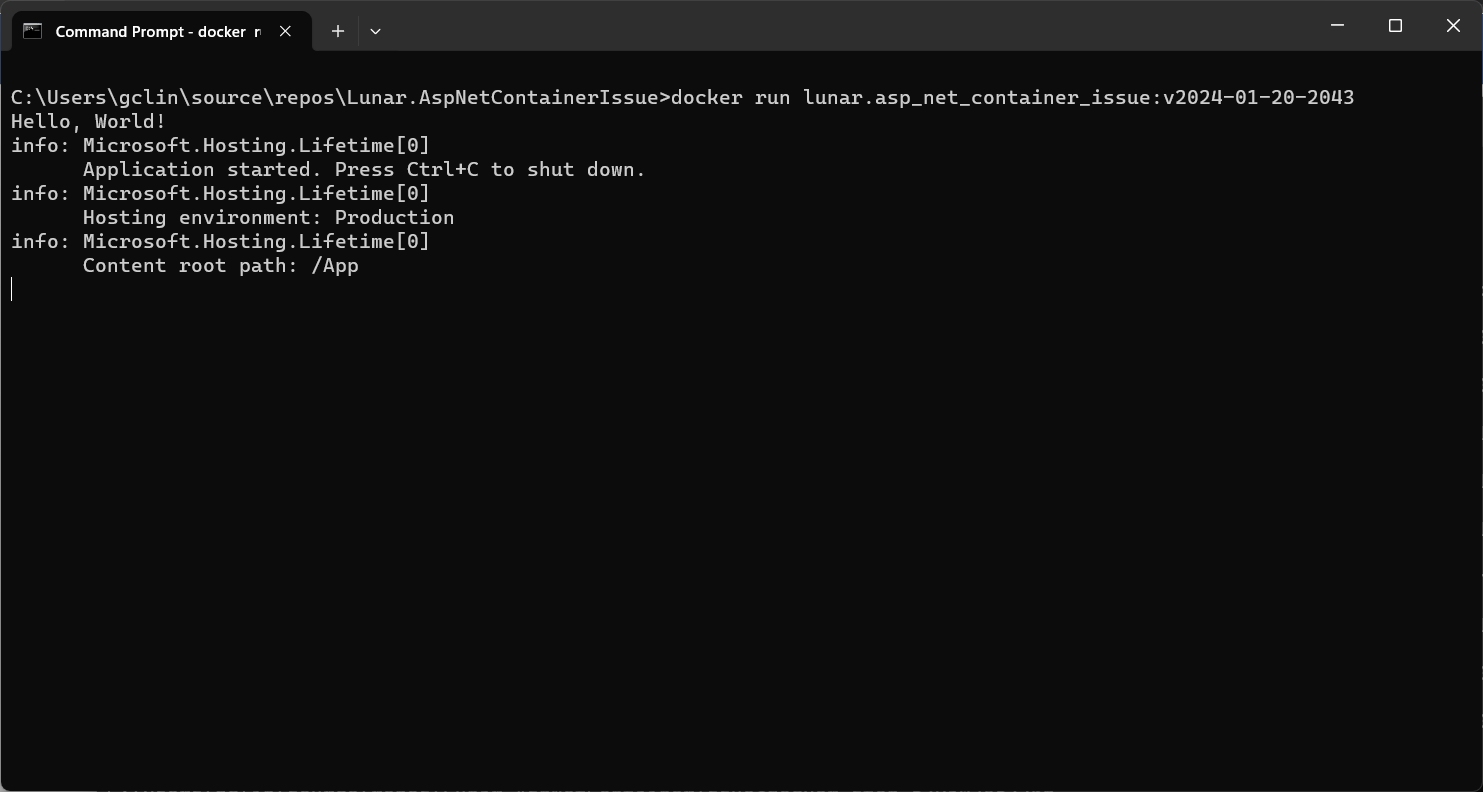
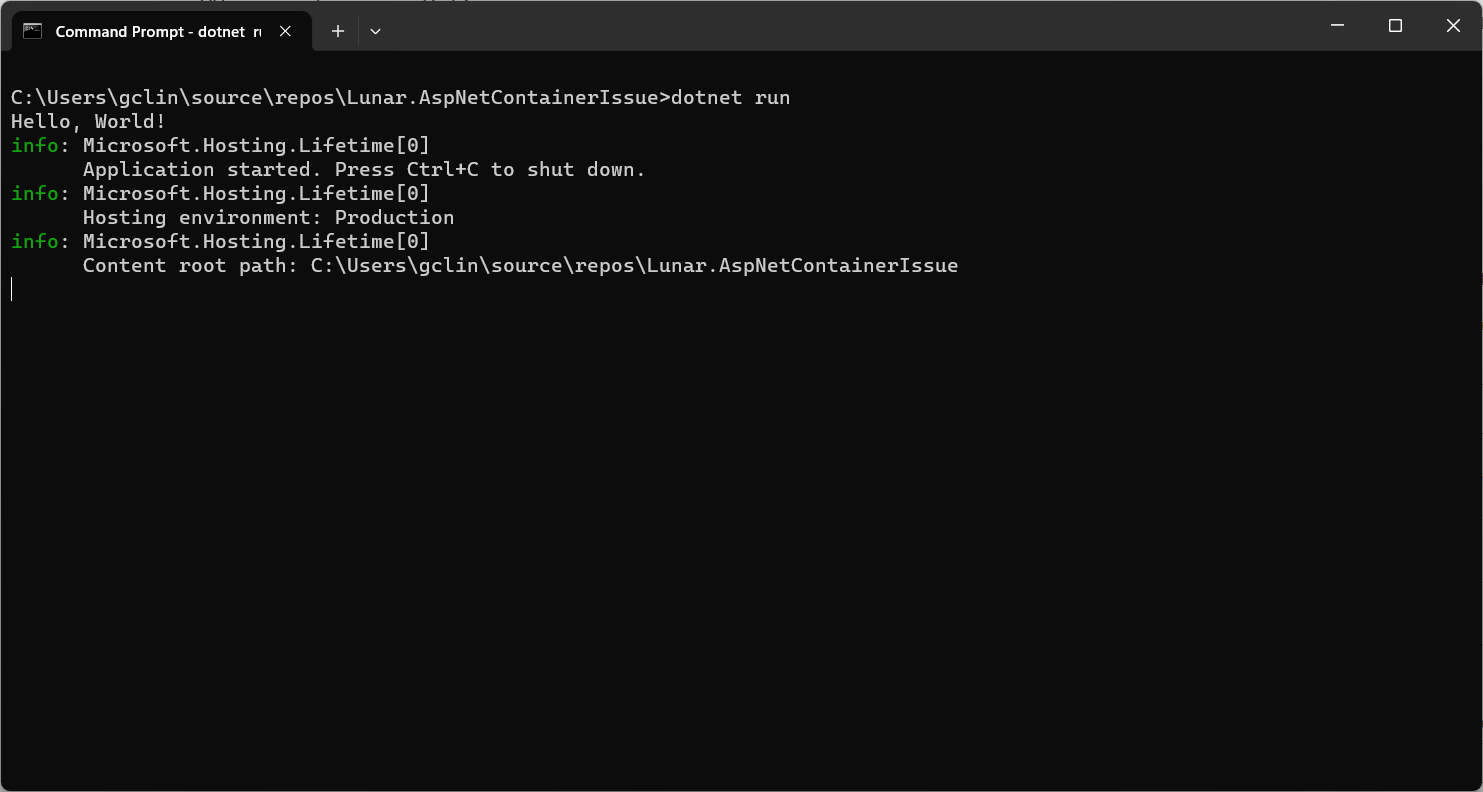
So, if we run the code above locally, we should be seeing the following output.

The output of our simplified .NET worker service.

In this project, we are using the NuGet library NLog.Extensions.Logging, thus the NLog configuration is by default read from appsettings.json, which is provided below.

{

"NLog":{
"internalLogLevel":"Info",
"internalLogFile":"Logs\\internal-nlog.txt",
"extensions": [
{ "assembly": "NLog.Extensions.Logging" }
],
"targets":{
"allfile":{
"type":"File",
"fileName":"C:\\\\Users\\gclin\\source\\repos\\Lunar.AspNetContainerIssue\\Logs\\nlog-all-${shortdate}.log",
"layout":"${longdate}|${event-properties:item=EventId_Id}|${uppercase:${level}}|${logger}|${message} ${exception:format=tostring}"
}
},
"rules":[
{
"logger":"*",
"minLevel":"Trace",
"writeTo":"allfile"
},
{
"logger":"Microsoft.*",
"maxLevel":"Info",
"final":"true"
}
]
}
}

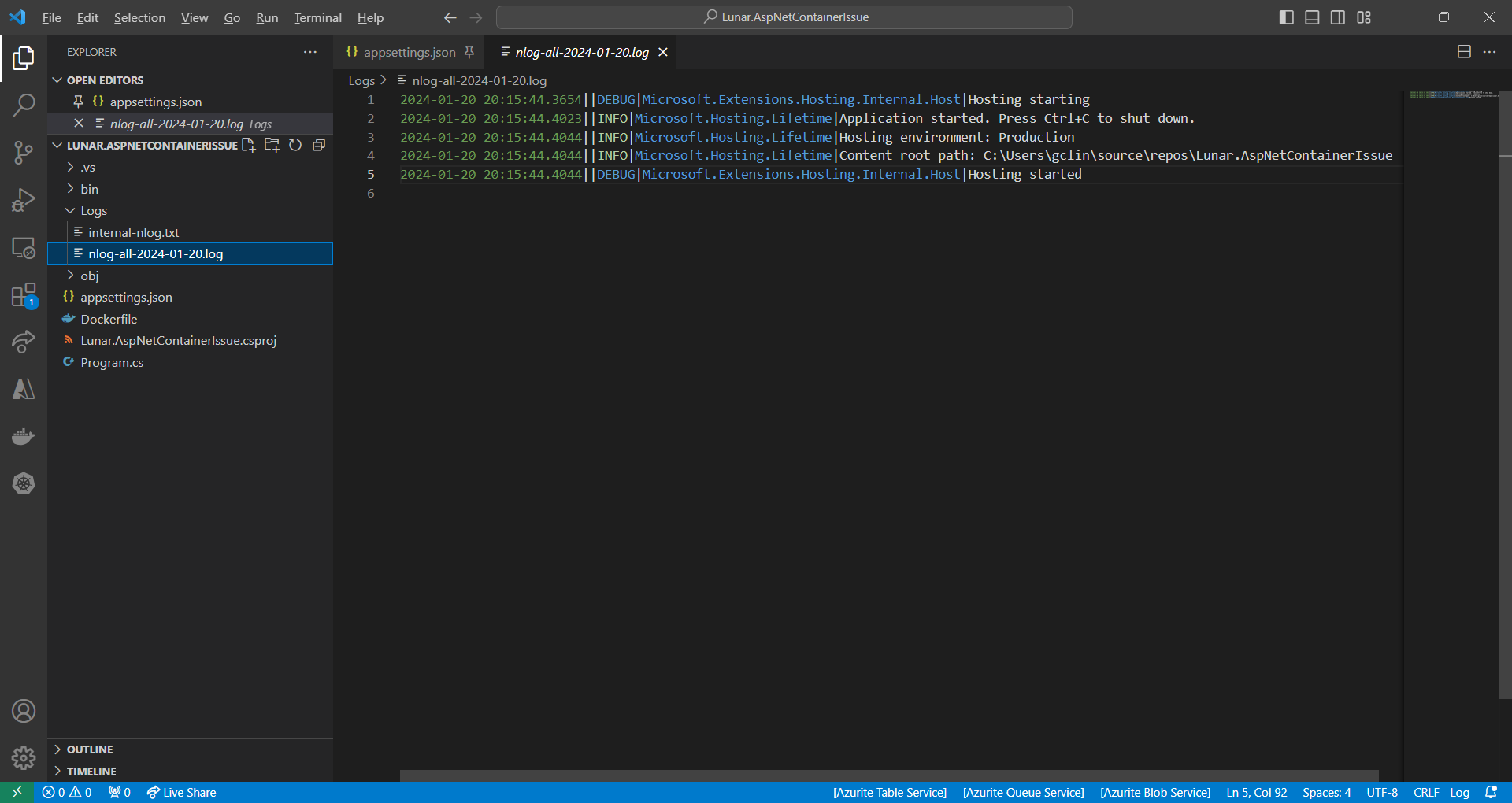
So, we should be having two log files generated with one showing something similar to the output on the console earlier.

The log file generated by NLog.

Containerisation and the Issue

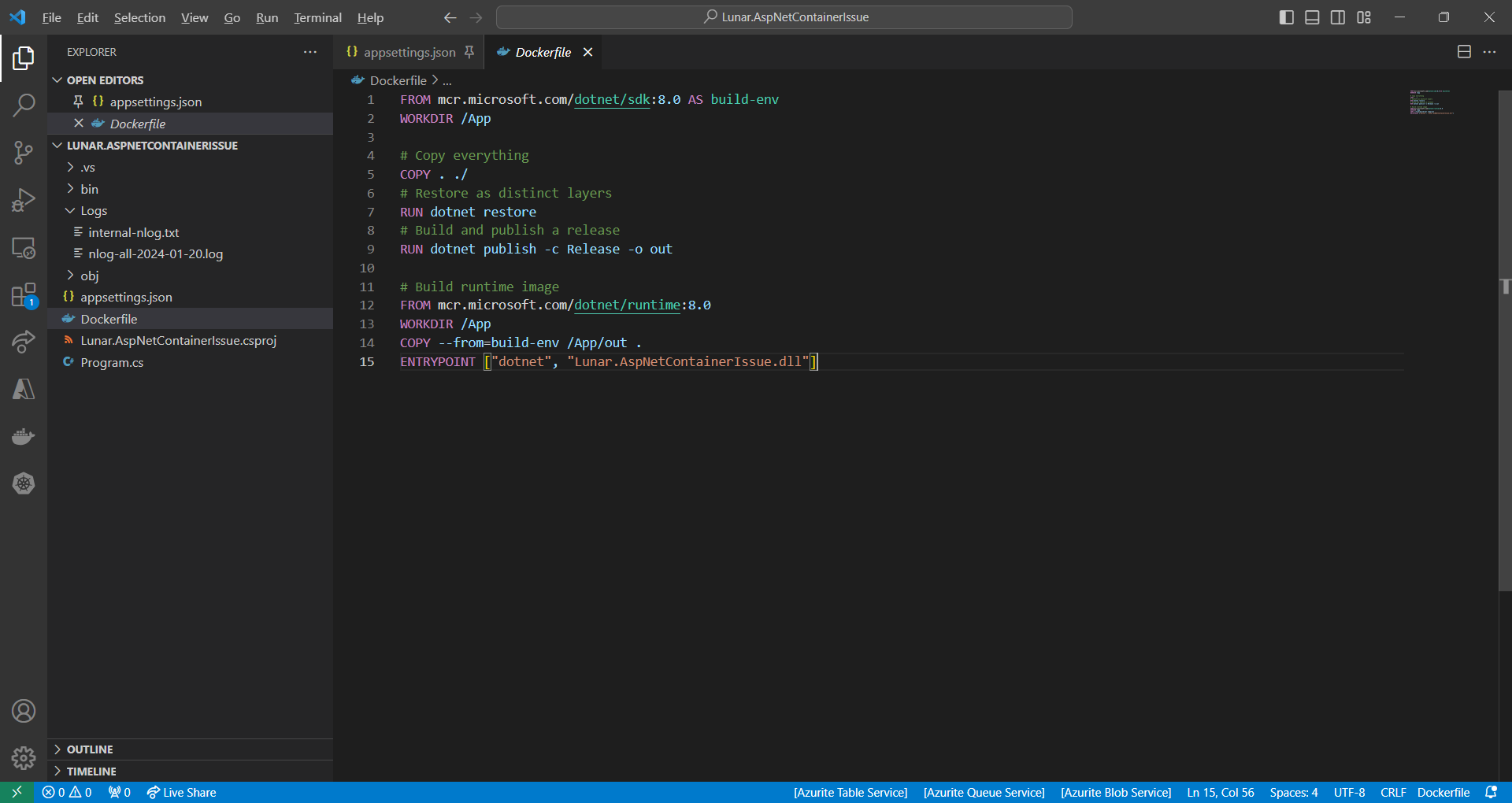
Since we will be running this worker service on Amazon ECS, we need to containerise it first. The Dockerfile we use is simplified as follows.

Simplified version of the Dockerfile we use.

However, when we run the Docker image locally, we receive an error, as shown in the screenshot below, saying “You must install or update .NET to run this application.” However, aren’t we already using .NET runtime as stated in our Dockerfile?

No framework is found.

In fact, if we read the error message clearly, it is the ASP .NET Core that it could not find. This confused us for a moment because it is a worker service project, not a ASP .NET project. So why does it complain about ASP .NET Core?

Solution

This problem happens because one of the NuGet packages in our project relies on ASP.NET Core runtime being present, as discussed in one of the StackOverflow threads.

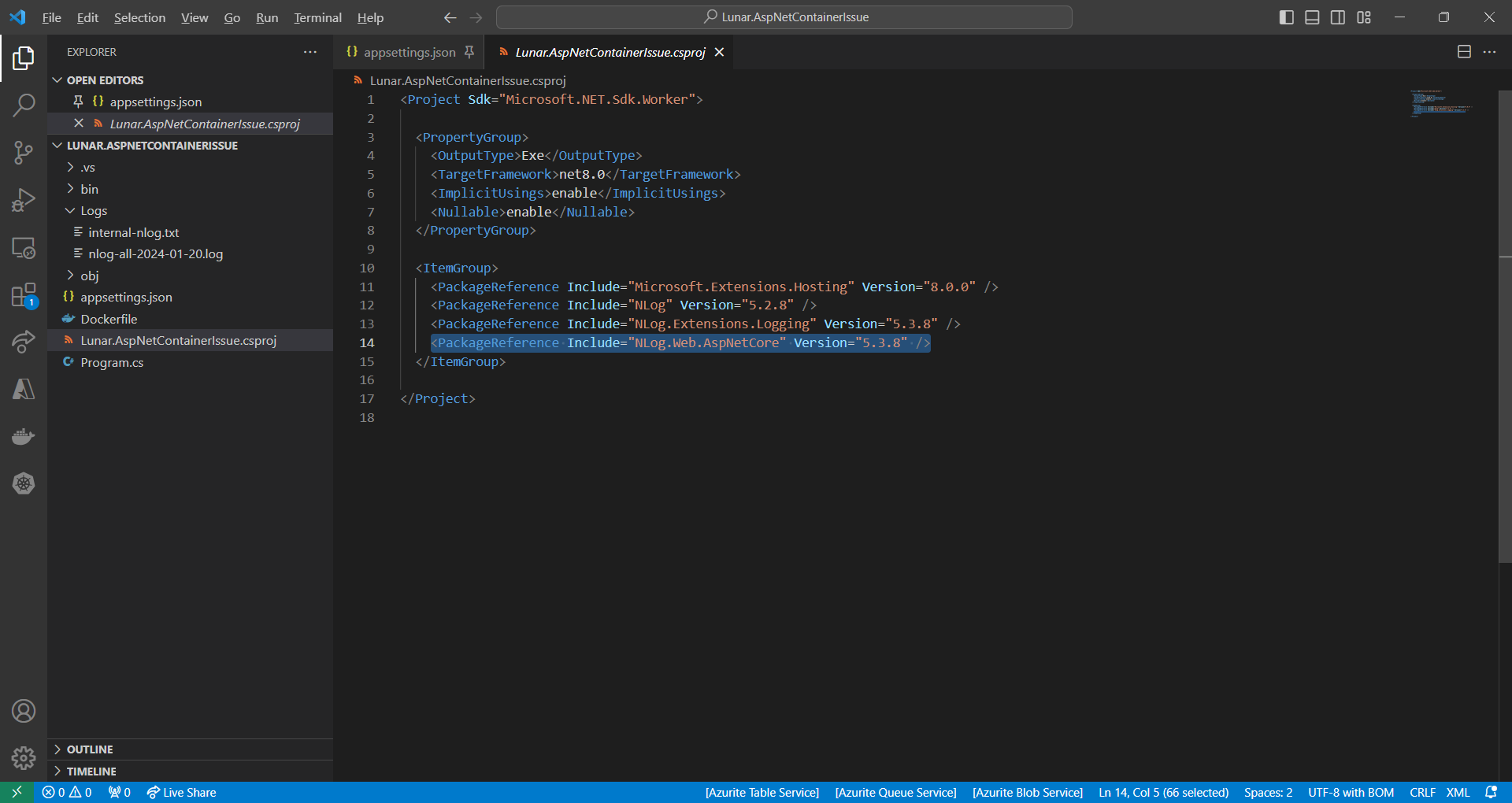
We accidentally include the NLog.Web.AspNetCore NuGet package which supports only ASP .NET Core platform. This library is not used in our worker service at all.

NLog.Web.AspNetCore supports only ASP .NET platform.

So, after we remove the reference, we can now run the Docker image successfully.

WRAP-UP

Thatโ€™s all for how we solve the issue we encounter when developing our .NET worker service.


KOSD, or Kopi-O Siew Dai, is a type of Singapore coffee that I enjoy. It is basically a cup of coffee with a little bit of sugar. This series is meant to blog about technical knowledge that I gained while having a small cup of Kopi-O Siew Dai.

Using Docker and Kubernetes without Docker Desktop on Windows 11

Last week, my friend who is working on a microservice project at work suddenly messaged me saying that he realised Docker Desktop is no longer free.

Docker Desktop is basically an app that can be installed on our Windows machine to build and share containerised apps and microservices. It provides a straightforward GUI to manage our containers and images directly from our local machine.

Docker Desktop also includes a standalone Kubernetes server running locally within our Docker instance. It is thus very convenient for the developers to perform local testing easily using Docker Desktop.

Despite Docker Desktop remaining free for small businesses, personal use, education, and non-commercial open source projects, it now requires a paid subscription for professional use in larger businesses. Consequently, my friend expressed a desire for me to suggest a fast and free alternative for development without relying on Docker Desktop.

Install Docker Engine on WSL

Before we continue, we need to understand that Docker Engine is the fundamental runtime that powers Docker containers, while Docker Desktop is a higher-level application that includes Docker Engine. Hence, Docker Engine can also be used independently without Docker Desktop on local machine.

Fortunately, Docker Engine is licensed under the Apache License, Version 2.0. Thus, we are allowed to use it in our commercial products for free.

In order to install Docker Engine on Windows without using Docker Desktop, we need to utilise the WSL (Windows Subsystem for Linux) to run it.

Step 1: Enable WSL

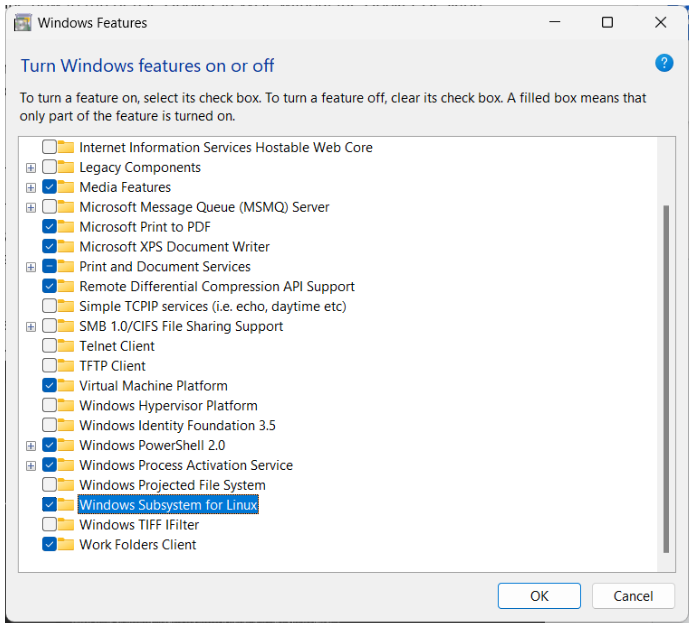
We have to enable WSL from the Windows Features by checking the option โ€œWindows Subsystem for Linuxโ€, as shown in the screenshot below.

After that, we can press โ€œOKโ€ and wait for the operation to be completed. We will then be asked to restart our computer.

If we already have WSL installed earlier, we can update the built-in WSL to the Microsoft latest version of WSL using the โ€œwsl –updateโ€ command in Command Prompt.

Later, if we want to shutdown WSL, we can run the command โ€œwsl –shutdownโ€.

Step 2: Install Linux Distribution

After we restarted our machine, we can use the Microsoft Store app and look for the Linux distribution we want to use, for example Ubuntu 20.04 LTS, as shown below.

We then can launch Ubuntu 20.04 LTS from our Start Menu. To find out the version of Linux you are using, you can run the command โ€œwslfetchโ€, as shown below.

For the first timer, we need to set the Linux username and password.

Step 3: Install Docker

Firstly, we need to update the Ubuntu APT repository using the โ€œsudo apt updateโ€ command.

After we see the message saying that we have successfully updated the apt repository, we can proceed to install Docker. Here, the โ€œ-yโ€ option is used to grant the permission to install required packages automatically.

When Docker is installed, we need to make a new user group with the name โ€œdockerโ€ by utilising the below-mentioned command.

Docker Engine acts as a client-server application with a server that has a long-running daemon process dockerd. dockerd is the command used to start the Docker daemon on Linux systems. The Docker daemon is a background process that manages the Docker environment and is responsible for creating, starting, stopping, and managing Docker containers.

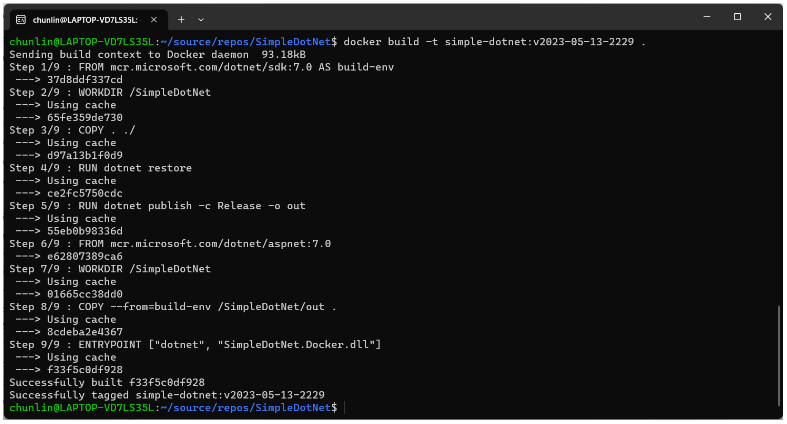
Before we can build images using Docker, we need to use dockerd, as shown in the screenshot below.

Step 4: Using Docker on WSL

Now, we simply need to open another WSL terminal and execute docker commands, such as docker ps, docker build, etc.

With this, we can now push our image to Docker Hub from our local Windows machine.

Configure a local Kubernetes

Now if we try to run the command line tool, kubectl, we will find out that the command is still not yet available.

We can use the following commands to install kubectl.

$ curl -LO https://storage.googleapis.com/kubernetes-release/release/`curl -s https://storage.googleapis.com/kubernetes-release/release/stable.txt`/bin/linux/amd64/kubectl


$ chmod +x ./kubectl


$ sudo mv ./kubectl /usr/local/bin/kubectl


$ kubectl version --client

The following screenshot shows what we can see after running the commands above.

After we have kubectl, we need to make Kubernetes available on our local machine. To do so, we need to install minikube, a local Kubernetes. minikube can setup a local Kubernetes cluster on macOS, Linux, and Windows.

To install the latest minikube stable release on x86-64 Linux using binary download:

$ curl -LO https://storage.googleapis.com/minikube/releases/latest/minikube-linux-amd64

$ sudo install minikube-linux-amd64 /usr/local/bin/minikube

The following is the results of running the installation of minicube. We also run the minicube by executing the command โ€œminikube startโ€.

We can now run some basic kubectl commands, as shown below.

References

Getting Certified as Kubernetes App Developer: My Kaizen Journey

The high concentration of talented individuals in Samsung SDS is remarkable. I have worked alongside amazing colleagues who are not only friendly but also intelligent and dedicated to their work.

In July 2022, I had numerous discussions with my visionary and supportive seniors about the future of cloud computing. They eventually encouraged me to continue my cloud certification journey by taking the Certified Kubernetes Application Developer (CKAD) certification exam.

Before attempting the CKAD exam, I received advice on how demanding and challenging the assessment could be. Self-learning can also be daunting, particularly in a stressful work environment. However, I seized the opportunity to embark on my journey towards getting certified and committed myself to the process of kaizen, continuous improvement. It was a journey that required a lot of effort and dedication, but it was worth it.

I took the CKAD certification exam while I was working in Seoul in March 2023. The lovely weather has a soothing impact on my stress levels.

August 2022: Learning Docker Fundamentals

To embark on a successful Kubernetes learning journey, I acknowledge the significance of first mastering the fundamentals of Docker.

Docker is a tool that helps developers build, package, and run applications in a consistent way across different environments. Docker allows us to package our app and its dependencies into a Docker container, and then run it on any computer that has Docker installed.

Docker serves as the foundation for many container-based technologies, including Kubernetes. Hence, understanding Docker fundamentals provides a solid groundwork for comprehending Kubernetes.

There is a learning path on Pluralsight specially designed for app developers who are new to Docker so that they can learn more about developing apps with Docker.

I borrowed the free Pluralsight account from my friend, Marvin Heng.

The learning path helps me gain essential knowledge and skills that are directly applicable to Kubernetes. For example, it shows me how the best practices of optimising Docker images by carefully placing the Docker instructions and making use of its caching mechanism.

In the learning path, we learnt about Docker Swarm. Docker Swarm is a tool that helps us manage and orchestrate multiple Docker containers across multiple machines or servers, making it easier to deploy and scale our apps.

A simple architecture diagram of a system using Kubernetes. (Source: Pluralsight)

After getting the basic understanding of Docker Swarm, we move on to learning Kubernetes. Kubernetes is similar to Docker Swarm because they are both tools for managing and orchestrating containerised apps. However, Kubernetes has a larger and more mature ecosystem, with more third-party tools and plugins available for tasks like monitoring, logging, and service discovery.

December 2022: Attending LXF Kubernetes Course

Kubernetes is a project that was originally developed by Google, but it is now maintained by the Cloud Native Computing Foundation (CNCF), which is a sub-foundation of the Linux Foundation.

The Linux Foundation provides a neutral and collaborative environment for open-source projects like Kubernetes to thrive, and the CNCF is able to leverage this environment to build a strong community of contributors and users around Kubernetes.

In addition, the Linux Foundation offers a variety of certification exams that allow individuals to demonstrate their knowledge and skills in various areas of open-source technology. CKAD is one of them.

The CKAD exam costs USD 395.00.

The Linux Foundation also offers Kubernetes-related training courses.

The CKAD course is self-paced and can be completed online, making it accessible to learners around the world. It is designed for developers who have some experience with Kubernetes and want to deepen their knowledge and skills in preparation for the CKAD certification exam.

The CKAD course includes a combination of lectures, hands-on exercises, and quizzes to reinforce the concepts covered. It covers a wide range of topics related to Kubernetes, including:

  • Kubernetes architecture;
  • Build and design;
  • Deployment configuration;
  • App exposing;
  • App troubleshooting;
  • Security in Kubernetes;
  • Helm.
Kubectl, the command-line client used to interact with Kubernetes clusters. (Image Credit: The Linux Foundation Training)

January 2023: Going through CKAD Exercises and Killer Shell

Following approximately one month of dedicated effort, I successfully completed the online course and proudly received my course completion certificate on 7th of January 2023. So, throughout the remainder of January, I directed my attention towards exam preparation by diligently working through the various online exercises.

The initial series of exercises that I went through is the CKAD exercise thoughtfully curated by a skilled software developer, dgkanatsios, and made available on GitHub. The exercise covers the following areas:

  • Core concepts;
  • Multi-container pods;
  • Pod design;
  • Configuration;
  • Observability;
  • Services and networking;
  • State persistence;
  • Helm;
  • Custom Resource Definitions.

The exercise comprises numerous questions, therefore, my suggestion would be to devote one week to thoroughly delve into them, by allocating an hour each day to tackle a subset of the questions.

During my 10-day Chinese New Year holiday, I dedicated my time towards preparing for the exam. (Image Credit: Global Times)

Furthermore, upon purchasing the CKAD exam, we are entitled to receive two complementary simulator sessions for the exam on Killer Shell (killer.sh), both containing the same set of questions. Therefore, it is advisable to strategise and plan our approach towards making optimal utilisation of them.

After going through all the questions in the CKAD exercise mentioned above, I proceeded to undertake the initial killer.sh exam. The simulator features an interface that closely resembles the new remote desktop Exam UI, thereby providing me with invaluable insights on how the actual exam will be conducted.

The killer.sh session is allocated a total of 2 hours for the exam, encompassing a set of 22 questions. Similar to the actual exam, the session is to test our hands-on experience and practical knowledge of Kubernetes. Thus, we are expected to demonstrate our proficiency by completing a series of tasks in a given Kubernetes environment.

The simulator questions are comparatively more challenging than the actual exam. In my initial session, I was able to score only 50% out of 100%. Upon analysing and rectifying my errors, I resolved to invest an additional month’s time to study and prepare more comprehensively.

Scenario-based questions like this are expected in the CKAD exam.

February 2023: Working on Cloud Migration Project

Upon my return from the Chinese New Year holiday, to my dismay, I discovered that I had been assigned to a cloud migration project at work.

The project presented me with an exceptional chance to deploy an ASP .NET solution on Kubernetes on Google Cloud Platform, allowing me to put into practice what I have learned and thereby fortify my knowledge of Kubernetes-related topics.

Furthermore, I am lucky to have had the opportunity to engage in a fruitful discussion with my fellow colleagues, through which I was able to learn more from them about Kubernetes by presenting my work.

March 2023: The Exam

In the early of March, I was assigned to visit Samsung SDS in Seoul until the end of the month. Therefore, I decided to seize the opportunity to complete my second kill.sh simulation session. This time, I managed to score more than the passing score, which is 66%.

After that, I dedicated an extra week to reviewing the questions in the CKAD exercises on GitHub before proceeding to take the actual CKAD exam.

The actual CKAD exam consists of 16 questions that need to be completed within 2 hours. Even though the exam is online and open book, we are not allowed to refer any resources other than the Kubernetes documentation and the Helm documentaion during the exam.

In addition, the exam has been updated to use the PSI Bridge where we get access to a remote desktop instead of just a remote terminal. There is an an article about it. This should not be unfamiliar to you if you have gone through the killer.sh exams.

The new exam UI now provides us access to a full remote XFCE desktop, enabling us to run the terminal application and Firefox to open the approved online documentations, unlike the previous exam UI. Thus, having multiple monitors and bookmarking the documentation pages on our personal Internet browser before the exam are no longer helpful.

The PSI Bridgeโ„ข (Image Credit: YouTube)

Before taking the exam, there are a lot more key points mentioned in the Candidate Handbook, the Important Instructions, and the PSI Bridge System Requirements that can help ensure success. Please make sure you have gone through them and get your machine and environment ready for the exam.

Even though I am 30-minute early to the exam, I faced a technical issue with Chrome on my laptop that caused me to be 5 minutes late for the online exam. Fortunately, my exam time was not reduced due to the delay.

The issue was related to the need to end the “remoting_host.exe” application used by Chrome Remote Desktop in order to use a specific browser for the exam. Despite trying to locate it in task manager, I was unable to do so. After searching on Google, I found a solution for Windows users. We need to execute the command “net stop chromoting” to the “remoting_host.exe”.

During my stay in Seoul, my room at Shilla Stay Seocho served as my exam location.

CKAD certification exam is an online proctored exam. This means that it can be taken remotely but monitored by a proctor via webcam and microphone to ensure the integrity of the exam. Hence, to ensure a smooth online proctored exam experience, it is crucial to verify that our webcam is capable of capturing the text on our ID, such as our passport, and that we are using a stable, high-speed Internet connection.

During the exam, the first thing I did is to create a few aliases as listed below.

alias k="kubectl "
alias kn="kubectl config set-context --current --namespace"
export dry="--dry-run=client -o yaml"
export now="--force --grace-period 0"

These aliases helped me to complete the commands quickier. In addition, if it’s possible, I also always use an imperative command to create a YAML file using kubectl.

By working on the solution based on the generated YAML file, I am able to save a significant amount of time as opposed to writing the entire YAML file from scratch.

I completed only 15 questions with 1 not answered. I chose to forgo a 9-mark question that I was not confident in answering correctly, in order to have more time to focus on other questions. In the end, I still managed to score 78% out of 100%.

The passing score for CKAD is 66% out of 100%.

Moving Forward: Beyond the Certification

In conclusion, obtaining certification in one’s chosen field can be a valuable asset for personal and professional development. In my experience, it has helped me feel more confident in my abilities and given me a sense of purpose in my career.

However, it is essential to remember that it is crucial to continue learning and growing, both through practical experience and ongoing education, in order to stay up-to-date with the latest developments in the field. The combination of certification, practical experience, and ongoing learning can help us to achieve our career goals and excel in our role as a software engineer.

Together, we learn better.