Besides the public nuget.org host, which acts as the central repository of over 100,000 unique packages, NuGet also supports private hosts. Private host is useful for example it allows developers working in a team to produce NuGet packages and share them with other teams in the same organisation.
Before we run a new container from the image, we need to create a file named baget.env to store BaGet’s configurations, as shown below.
# The following config is the API Key used to publish packages.
# We should change this to a secret value to secure our own server.
ApiKey=NUGET-SERVER-API-KEY

Storage__Type=FileSystem
Storage__Path=/var/baget/packages
Database__Type=Sqlite
Database__ConnectionString=Data Source=/var/baget/baget.db
Search__Type=Database
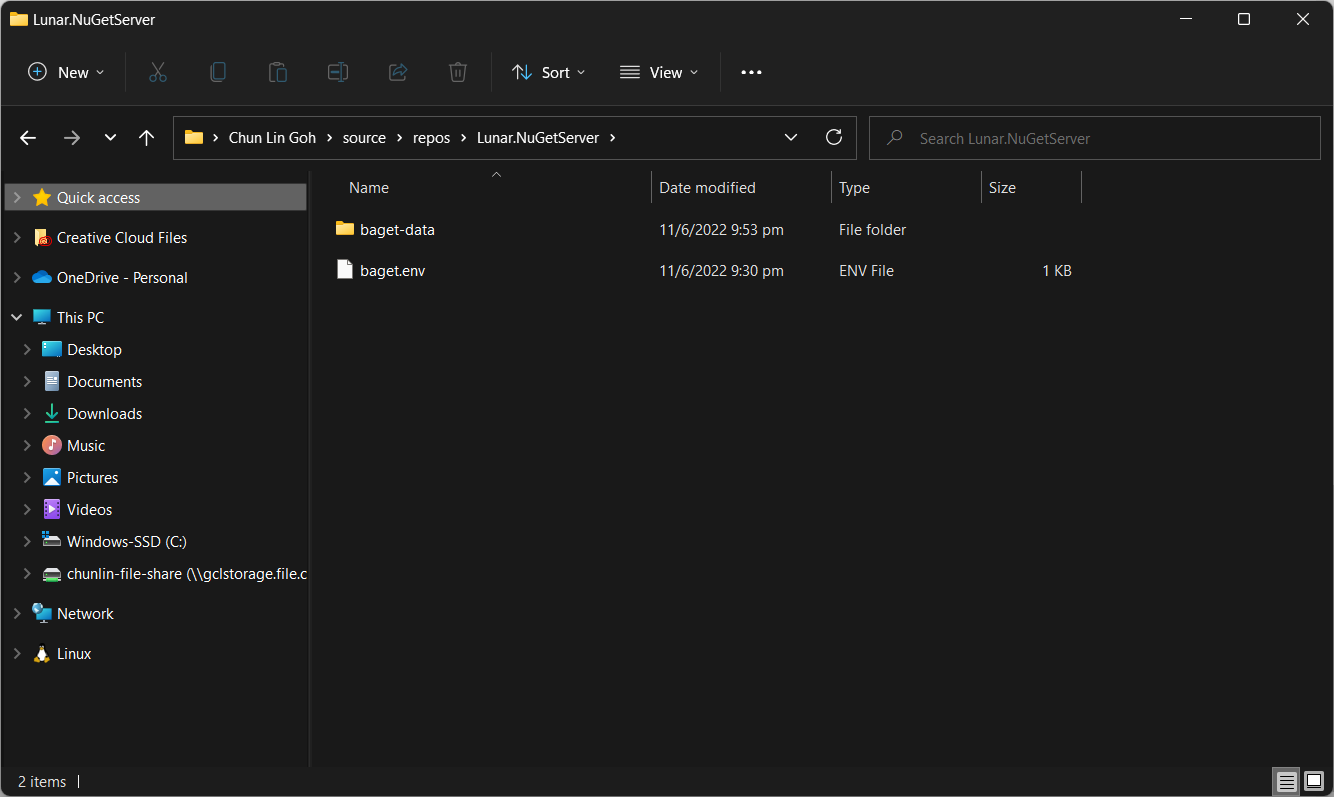
Then we also need to have a new folder named baget-data in the same directory as the baget.env file. This folder will be used by BaGet to persist its state.
The folder structure.
As shown in the screenshot above, we have the configuration file and baget-data at the C:\Users\gclin\source\repos\Lunar.NuGetServer directory. So, let’s execute the docker run command from there.
In the command, we also mount the baget-data folder on our host machine into the container. This is necessary so that data generated by and used by the container, such as package information, can be persisted.
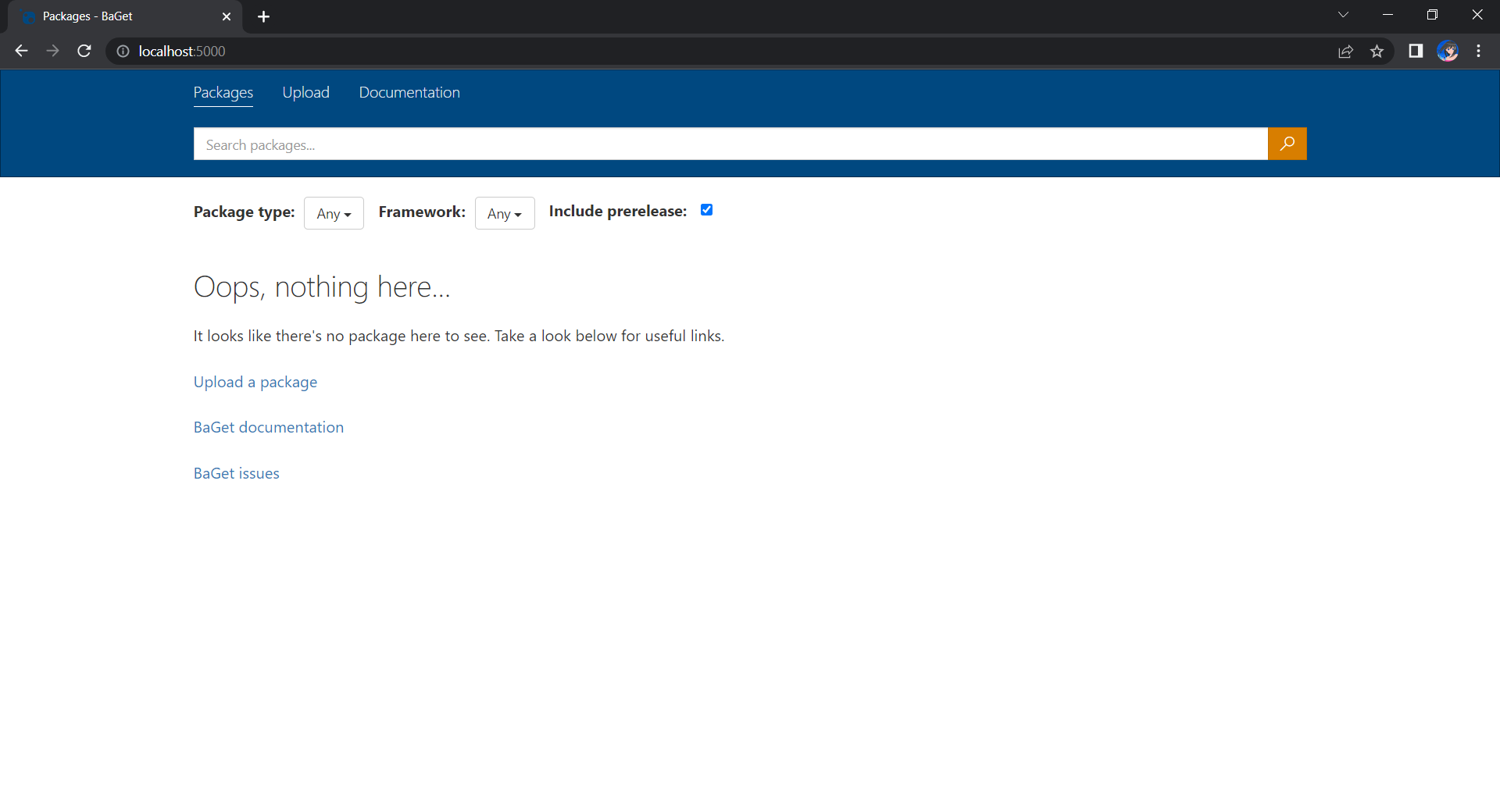
We can browse our own local NuGet server by visiting the URL http://localhost:5000.
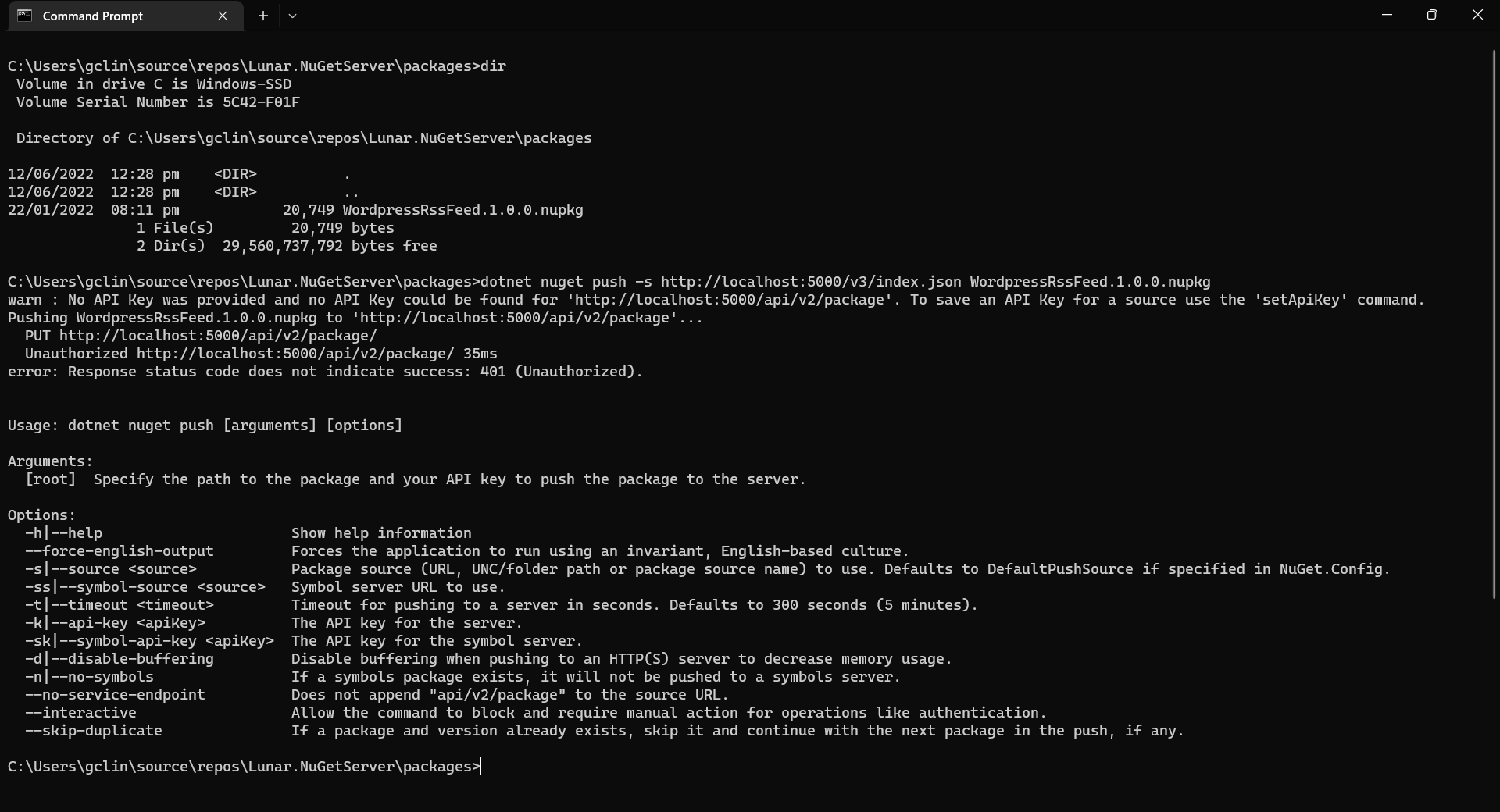
Now, let’s assume that we have our packages to publish in the folder named packages. We can publish it easily with dotnet nuget push command, as shown in the screenshot below.
Oops, we are not authorised to publish the package to own own NuGet server.
We will be rejected to do the publish, as shown in the screenshot above, if we do not provide the NUGET-SERVER-API-KEY that we defined earlier. Hence, the complete command is as follows.
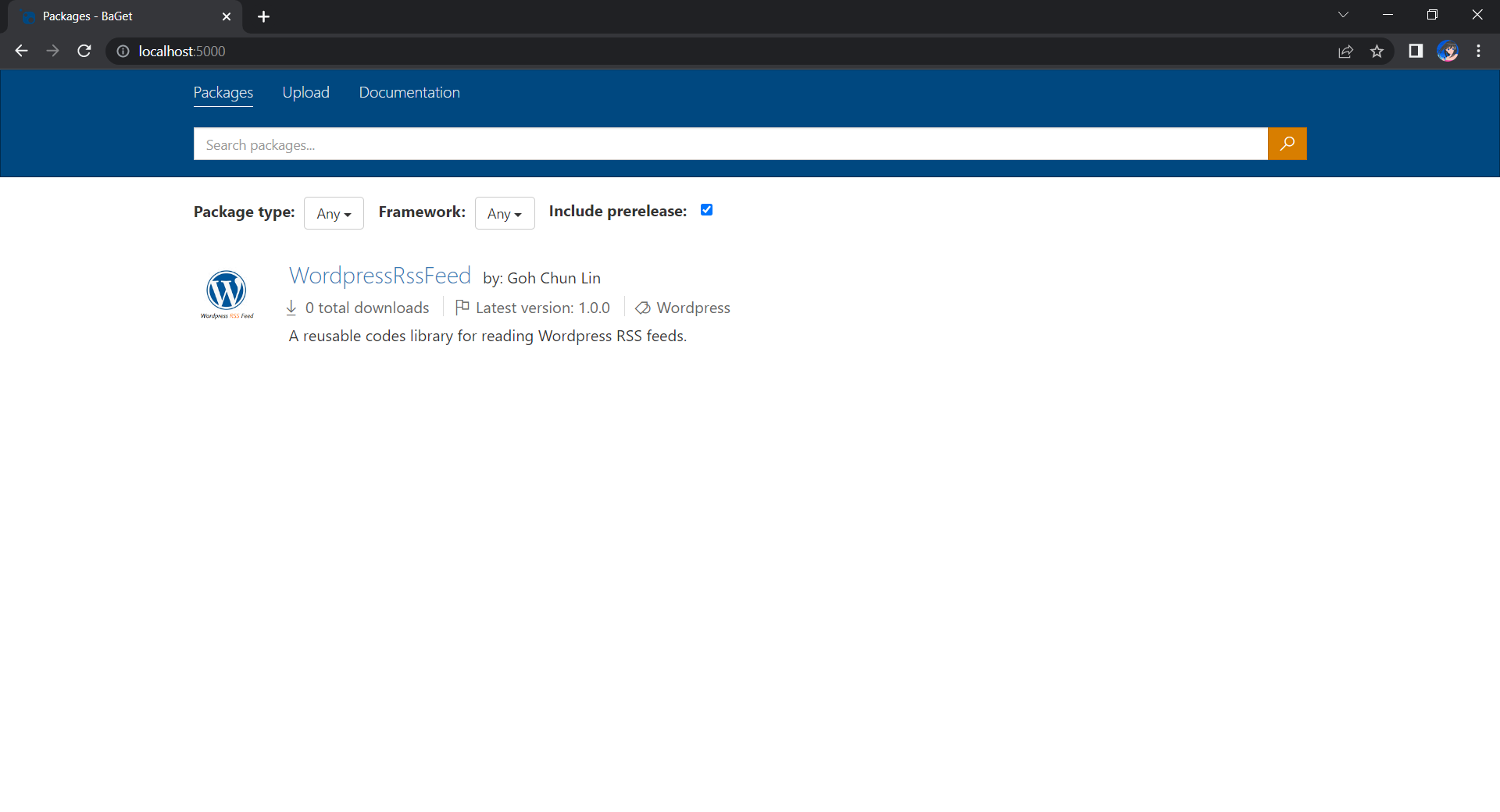
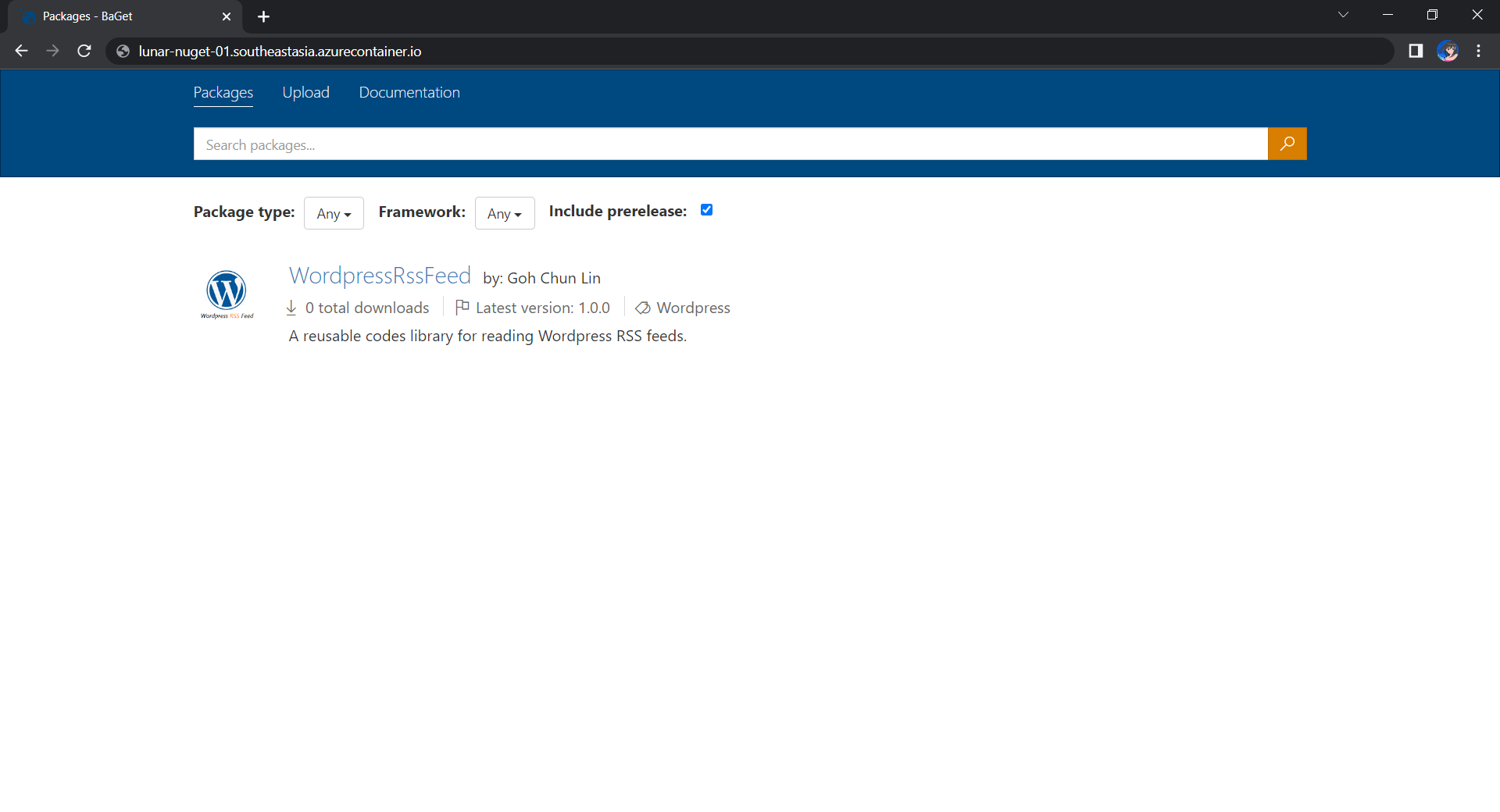
Once we have done that, we should be able to see the first package on our own NuGet server, as shown below.
Yay, we have our first package in our own local NuGet server!
Moving on to the Cloud
Instead of hosting the NuGet server locally, we can also host it on the cloud so that other developers can access too. Here, we will be using Azure Cloud Instance (ACI).
The first thing we need to have is to create a resource group (in this demo, we will be using a new resource group named resource-group-lunar-nuget) which will contain ACI, File Share, etc. for this project.
Secondly, we need to have a way to retrieve and persist state with ACI because by default, ACI is stateless. Hence, when the container is restarted all of its state will be lost and the packages we’ve uploaded to our NuGet server on the container will also be lost. Fortunately, we can make use of the Azure services, such as Azure SQL and Azure Blob Storage to store the metadata and packages.
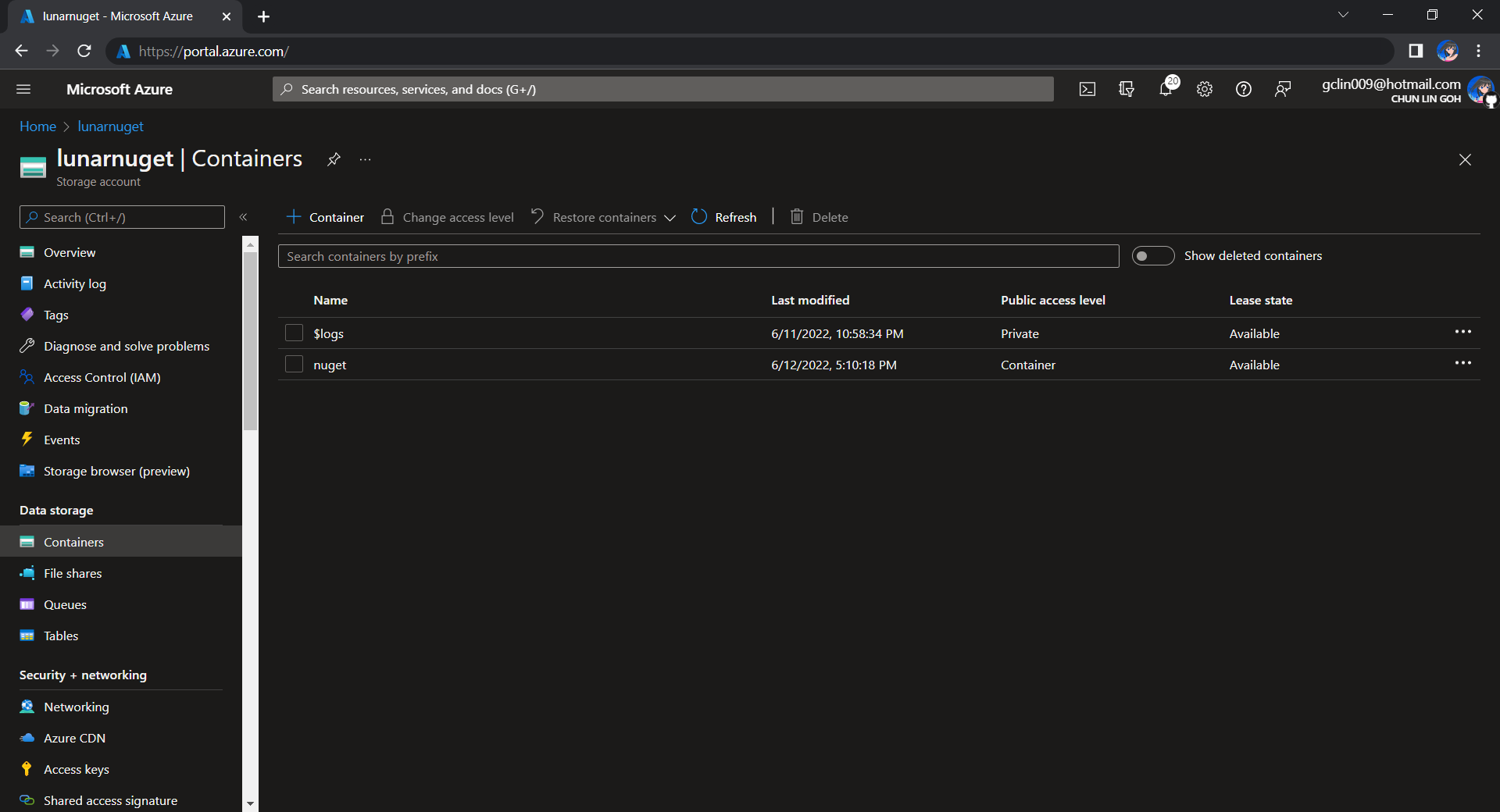
For example, we can create a new Azure SQL database called lunar-nuget-db. Then we create an empty Container named nuget under the Storage Account lunar-nuget.
Created a new Container nuget under lunarnuget Storage Account.
Thirdly, we need to deploy our Docker container above on ACI using docker run. To do so, we first need to log into Azure with the following command.
docker login azure
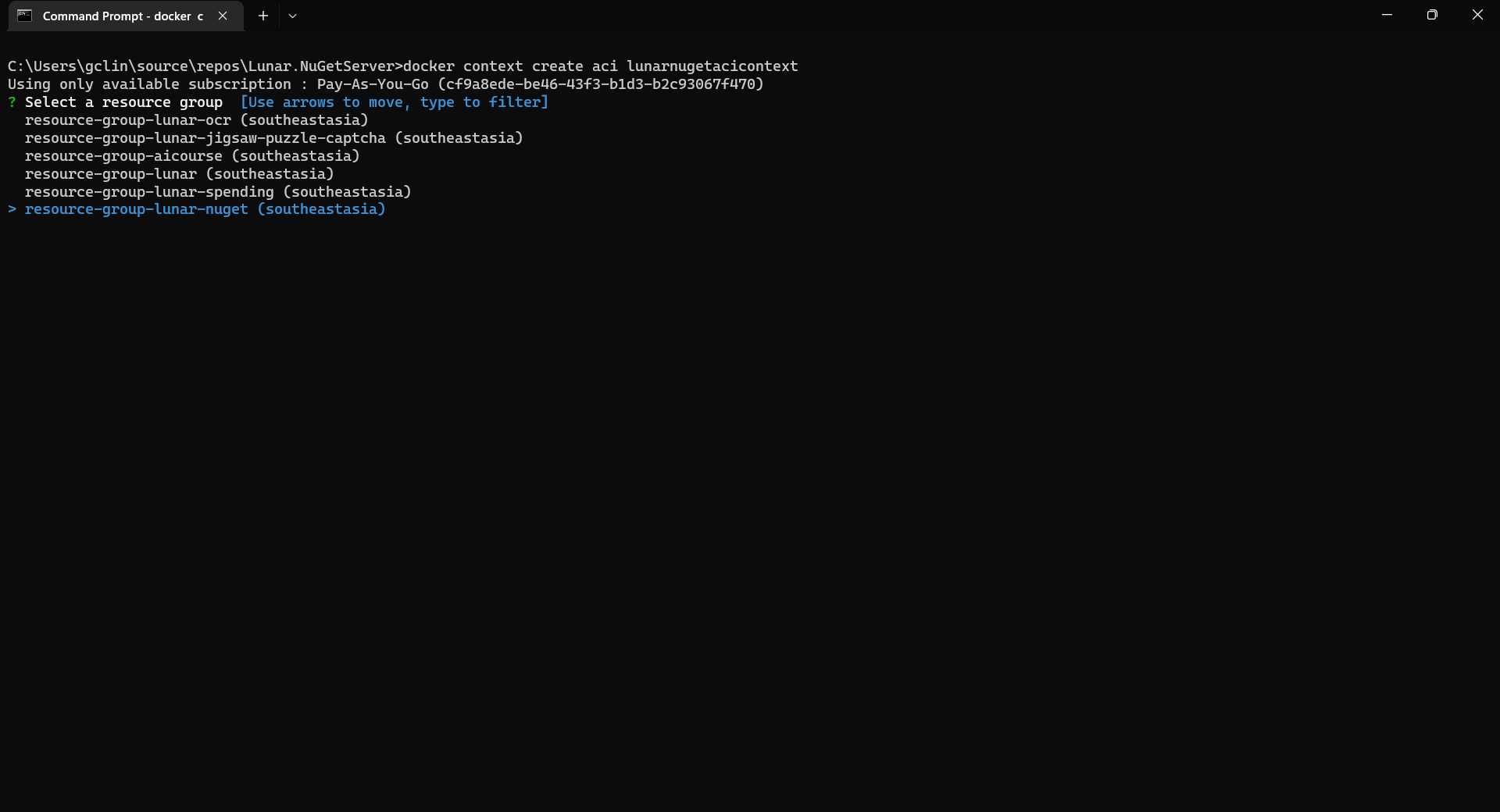
Once we have logged in, we proceed to create a Docker context associated with ACI to deploy containers in ACI of our resource group, resource-group-lunar-nuget.
Creating a new ACI context called lunarnugetacicontext.
After the context is created, we can use the following command to see the current available contexts.
docker context ls
We should be able to see the context we just created in the list.
Next, we need to swich to use the new context with the following command because currently, as shown in the screenshot above, the context being used is default (the one with an asterisk).
docker context use lunarnugetacicontext
Fourthly, we can now proceed to create our ACI which connect to the Azure SQL and Azure Blob Storage above.
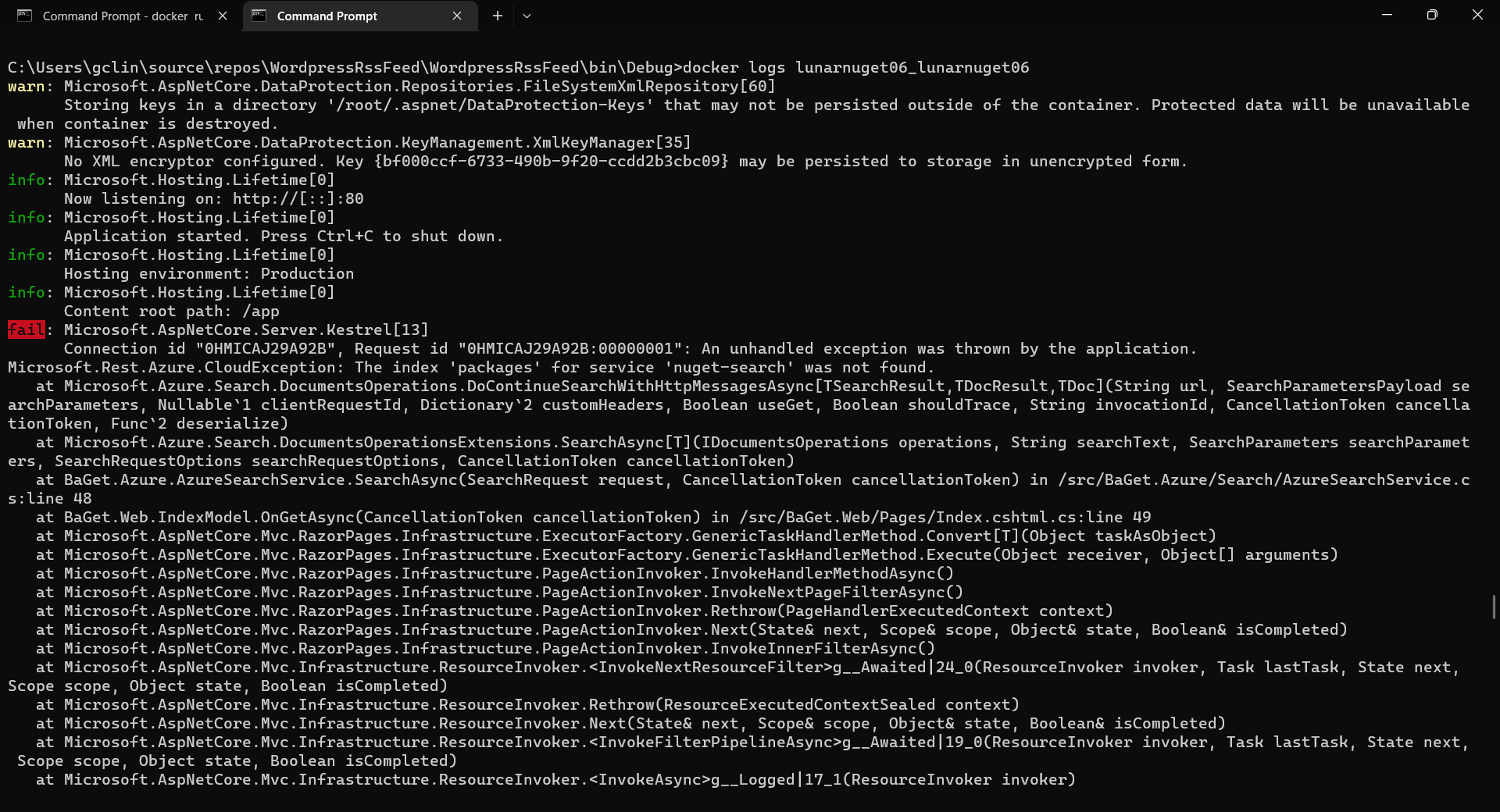
If there is no issue, after 1 to 2 minutes, the ACI named lunarnuget will be created. Otherwise, we can always use docker ps to get the container ID first and then use the following command to find out the issues if any.
docker logs <Container ID here>
Printing the logs from one of our containers with docker logs.
Now, if we visit the given FQDN of the ACI, we shall be able to browse the packages on our NuGet server.
That’s all for a quick setup of our own NuGet server on Microsoft Azure. =)
Today, I’m finally getting recognised by Microsoft as a Microsoft Certified: Azure Artificial Intelligence (AI) Fundamentals.
Nowadays, in many of the industries, we hear words like AI, Machine Learning, and Deep Learning. The so-called AI revolution is here to stay and shows no signs of slowing. Hence, it’s getting more and more important to equip ourselves today for the future of tomorrow with relevant knowledge about AI.
In addition, big players in the AI industry such as Microsoft have made AI learning easier for anyone who has an interest in the AI field. In August 2021, Rene Modery, Microsoft MVP, shared on his LinkedIn profile about how to take a Microsoft Certification exam for free and Azure AI Fundamental certification is one of them. Without the discount, we will need to pay USD 106 just to take the Azure AI Fundamental certification exam in Singapore. Hence, this is a good opportunity for us to take the exam now while the discount is still available.
Why Am I Taking Certification Exam?
One word, Kaizen.
Kaizen is the Japanese term for continuous improvement. I first learnt about this concept from Riza Marhaban, who is also my mentor in my current workplace, in one of the Singapore .NET Community meetups last year. In his talk, Riza talked about how continuous improvement helped a developer to grow and to stay relevant in the ever-changing IT industry.
Yes, professional working experience is great. However, continuous learning and having the ability to demonstrate one’s skills through personal projects and certifications is great as well. Hence, after taking the online Azure AI training course, I decided to take the Microsoft Certificate exam, a way to verify my skills and unlock opportunities.
My Learning Journey
After I received my 2nd dose of the COVID-19 vaccination, I took a one-week leave to rest. During this period of time, every day I spent about 2-3 hours on average to go through the learning materials on Microsoft Learn.
In addition, in order to be eligible for the free exam, I also spent another one day of my leave to attend the Microsoft Azure Virtual Training session on AI Fundamentals.
When I was going through the learning materials, I also took down important notes on Notion, which is a great tool for keeping our notes and documents, for future reference. Taking notes doesn’t only help me to learn better but also provide me an easier exam revision.
Studying for exam is a time of great stress. In fact, I was also busy at work at the same time. Hence, in order to destress, everyday I will find some time to login to Genshin Impact to travel in the virtual world and enjoy the nice view.
Feeling burned out, emotionally drained, or mentally exhausted? Play games with friends to destress! (Image Source: Genshin Impact)
The Exam
The certification exam, i.e. AI-900, has five main sections, i.e.
AI workloads and consideration;
Fundamental principles of ML on Azure;
Computer Vision workloads on Azure;
Natural Language Processing (NLP) workloads on Azure;
Conversational AI workloads on Azure.
In total, there are 40+ questions that we must answer within 45 minutes. This makes the exam a little difficult.
Based on my experience, as long as one has common sense and fully understands the learning materials on Microsoft Learn, it’s quite easy to pass the exam, which is to score at least 700 points only.
I choose to take the certification exam at NTUC Learning Hub located at Bras Basah. (Image Source: Wikimedia Commons)
WANNA BE Certified by Microsoft?
If you are new to Microsoft Certification and you’d like to find out more about their exams, feel free to check out the Microsoft Certifications web page.
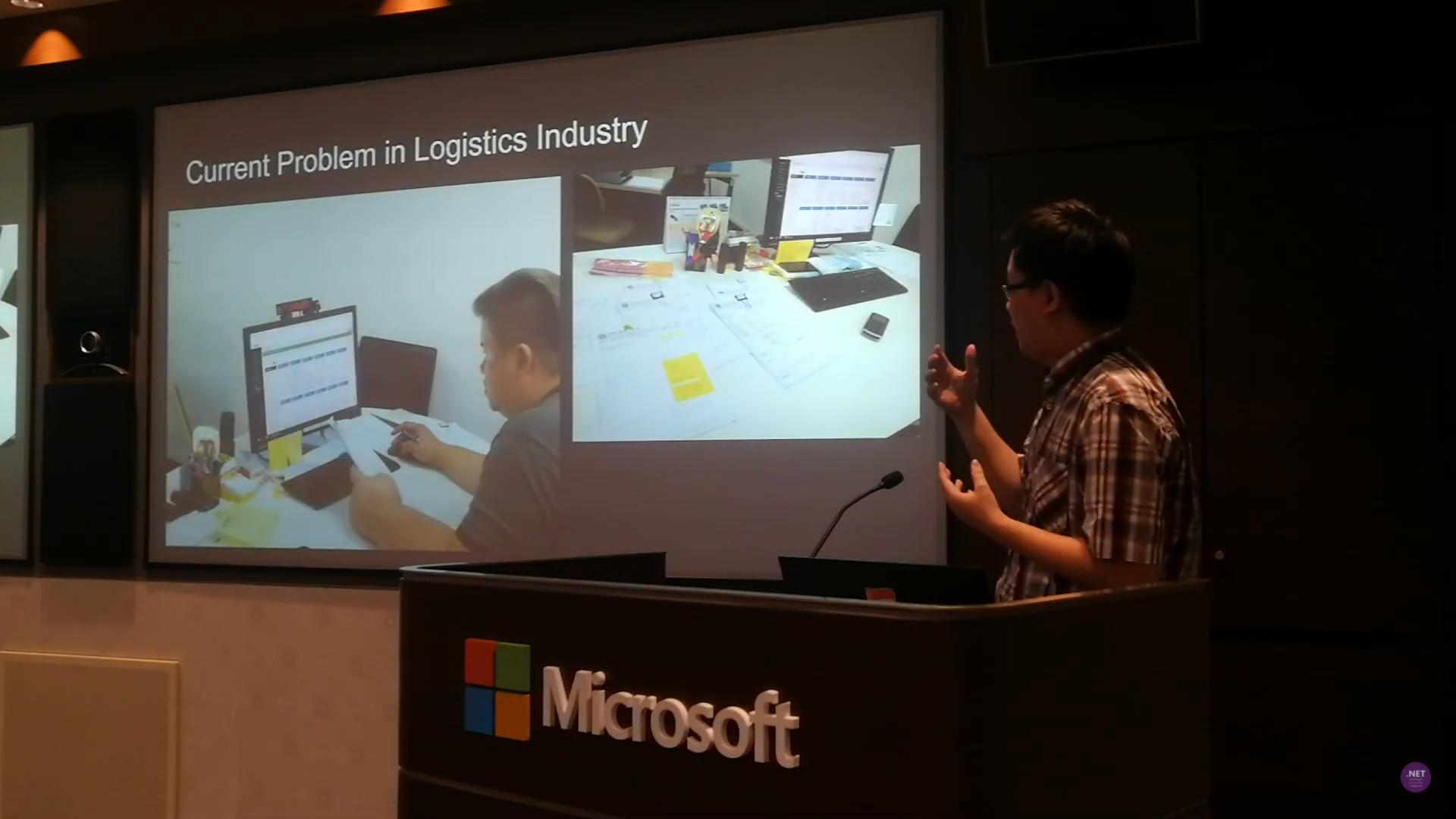
I have been in the logistics and port industry for more than 3 years. I have also been asked by different business owners and managers about implementing OCR in their business solutions for more than 3 years. This is because it’s not only a challenging topic, but also a very crucial feature in their daily jobs.
For example, currently the truck drivers need to manually key in the container numbers into their systems. Sometimes, there will be human errors. Hence, they always have this question about whether there is a feature in their mobile app, for example, that can extract the container number directly from merely a photo of the container.
Tesseract is an open-source OCR engine currently developed and led by Ray Smith from Google. The reason why I choose Tesseract is because there is no Internet connection needed. Hence, OCR can be done quickly without the need to upload images to the cloud to process.
Currently, I have tried out the following two features offered by Tesseract OCR engine.
Reading text from the image with confidence level returned;
Getting the coordinates of the image.
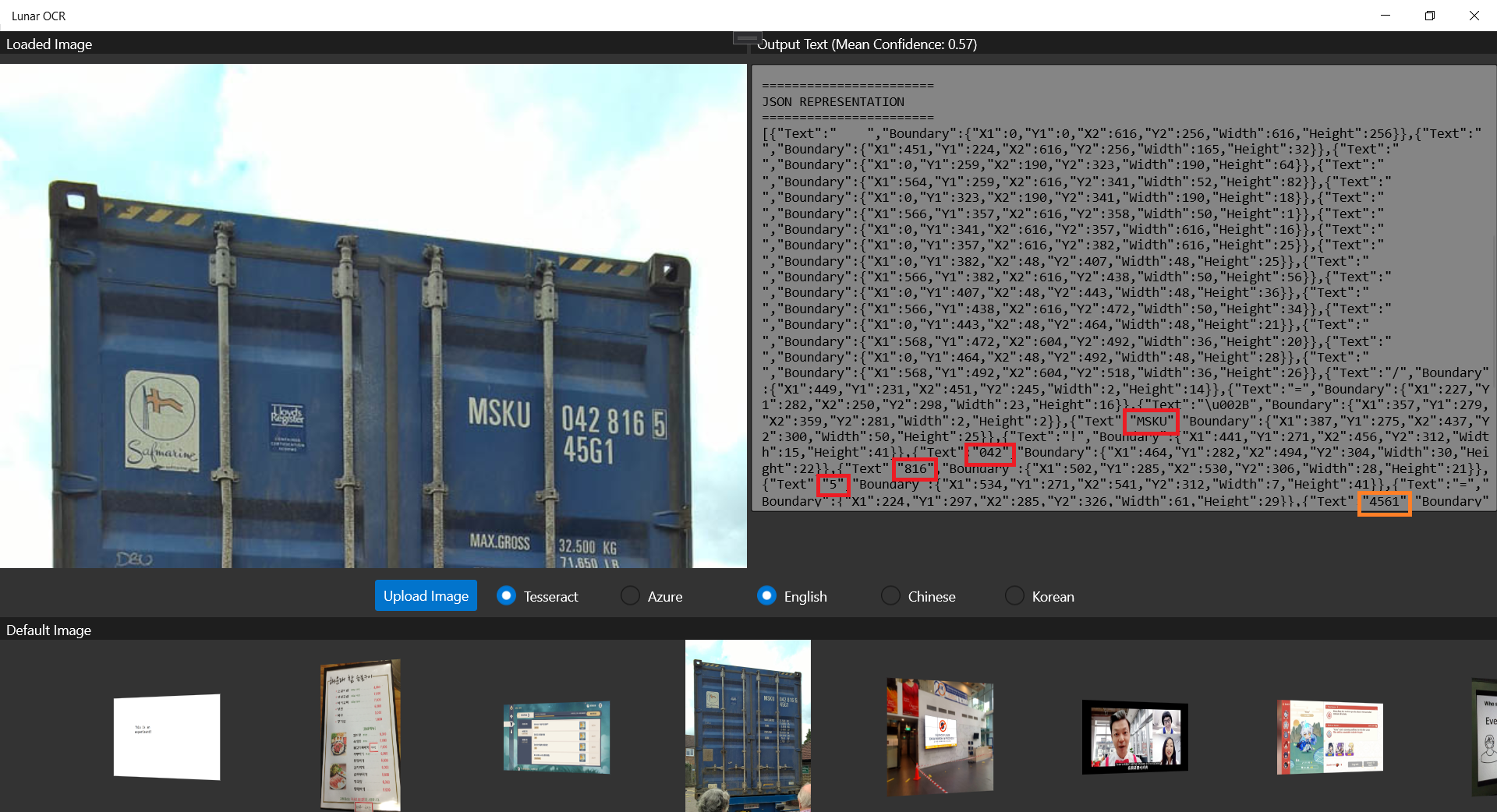
The following screenshot shows that Tesseract is able to retrieve the container number out from a photo of a container.
Only the “45G1” is misread as “4561”m as highlighted by the orange rectangle. The main container number is correctly retrieved from the photo.
Generally, Tesseract is also good at recognizing multiple fonts. However, sometimes we do need to train it based on certain font to improve the accuracy of text recognition. To do so, Bogusław Zaręba has written a very detailed tutorial on how to do it, so I won’t repeat the steps here.
So, let’s see how well Azure OCR engine can recognise the container number shown on the container image above.
Our UWP app can run on the Hololens 2 Emulator.
As shown in the screenshot above, not only the container number, but also the text “45G1” is correctly retrieved by the Computer Vision OCR API. The only downside of the API is that we need to upload the photo to the cloud first and it will then take one to two minutes to process the image.
With Hololens, now I can know what I’m ordering in a Korean restaurant. I want 돼지갈비 (BBQ Pork)~
Conclusion
That’s all for my small little experiment on the two OCR engines, i.e. Tesseract and Azure Computer Vision. Depends on your use cases, you can further update the engine and the UWP app above to make the app works smarter in your business.
Currently I am still having problem of using Tesseract on Hololens 2 Emulator. If you know how to solve this problem, please let me know. Thanks in advance!
This month marks my third year in port and logistics industry.
In April, I attended a talk organised by NUS Business School on the future-ready supply chain. The talk is delivered by Dr Robert Yap, the YCH Group Executive Chairman. During the talk, Dr Yap mentioned that they innovated to survive because innovation was always at the heart of their development and growth. To him and his team, technology is not only an enabler for the growth of their business, but also a competitive advantage of the YCH Group.
In YCH Group, they have a vision of integrating the data flows in the supply chain with their unique analytics capabilities so that they can provide a total end-to-end supply chain enablement and transformation. Hence, today I’d like to share about how, with Microsoft Azure, we can build a data pipeline and modern data warehouse which helps to enable logistics companies to gear towards a future-ready supply chain.
Dr Yap shared about the The 7PL™ Strategy in YCH Group.
Two months ago, I also had the opportunity to join an online workshop to learn from Michelle Xie, Microsoft Azure Technical Trainer, about Azure Data Fundamentals. The workshop consists of four modules. In the workshop, we learnt core data concepts, relational and non-relational data offerings in Azure, modern data warehouses, and Power BI. Hence, I will share with you what I have learned in the workshop in this article as well.
About Data
Data is a collection of facts, figures, descriptions, and objects. Hence, data can be texts written on papers, or it can be in digital form and stored inside the electronic devices, or it could be facts that are in our mind. Data can be classified as follows.
Structured Data: Data stored in predefined schemas. Often structured data is managed using Structured Query Language (SQL). Data needs to be normalised so that no data duplication exists.
Unstructured Data: Data that does not naturally contains field and is stored in its natural format until it’s extracted for analysis, for example image, blob, audio, and video.
Unstructured data like image is frequently used in combination with Machine Learning or Azure Cognitive Services capabilities to extract data.
ETL Data Pipeline
To build an data analytical system, we normally will have the following steps in a data pipeline to perform ETL procedure. ETL stands for Extract, Transform and Load. ETL loads data first into the staging storage server and then into the target storage system, as shown below.
ETL procedure in a data processing pipeline.
Data Ingestion: Data is moved from one or many data sources to a destination where it can be stored and further analysed;
Data Processing: Sometimes the raw data may not in the format suitable for querying. Hence, we need to transform and clean up the data;
Data Storage: Once the raw data has been processed, all the cleaned and transformed data will be stored to different storage systems which serve different purposes;
Data Exploration: A way of analysing performance through graphs and charts with business intelligence tools. This is helpful in making informed business decisions.
A map in the Power BI report showing the location of a prime mover within a time period.
There are two ways of capturing the data in the Data Ingestion stage.
The first method is called the Batch Processing where a set of data is first collected over time and then fed into an analytics system to process them in group. For example, the daily sales data collected is scheduled to be processed every midnight. This is not just because midnight is the end of the day but also because the business normally ends at night and thus midnight is also the time when the servers are most likely to have more computing capacity.
Another method will be Streaming model where data is fed into analytics tools as it arrives and the data is processed in real time. This is suitable for use cases like collecting GPS data sent from the trucks because every piece of new data is generated in continuous manner and needs to be sent in real time.
Modern Data Warehouse
A modern data warehouse allows us to gather all our data at any scale easily, and to get insights through analytics, dashboard, and reports. The following image shows the data warehouse components on Azure.
Azure modern data warehouse architecture. (Image Source: Azure Docs)
For a big data pipeline, the data is ingested into Azure through Azure Data Factory in batches, or streamed near real-time using Apache Kafka, Event Hub, or IoT Hub. This data will then land in Azure Data Lake Storage long term persisted storage.
The Azure Data Lake Storage is an enterprise-wide hyper-scale repository for large volume of raw data. It is a suitable staging storage for our ingested data before the data is converted into a format suitable for data analysis. Thus, it can store any data in its native format, without requiring any prior transformations. Data Lake Storage can be accessed from Hadoop with the WebHDFS-compatible REST APIs.
In the logistics industry, the need to store spatial data is greater than ever.
Let’s say a container trucking company collects data about each container delivery through an IoT device installed on the vehicle. Information such as the location and the speed of the prime mover is constantly sent from the IoT device to Azure Event Hub. We then can use Azure Databricks to correlate of the trip data, and also to enrich the correlated data with neighborhood data stored in the Databricks file system.
Pricing tiers available for Azure Analysis Services.
Relational Database Deployment Options on Azure and HOSTING COST
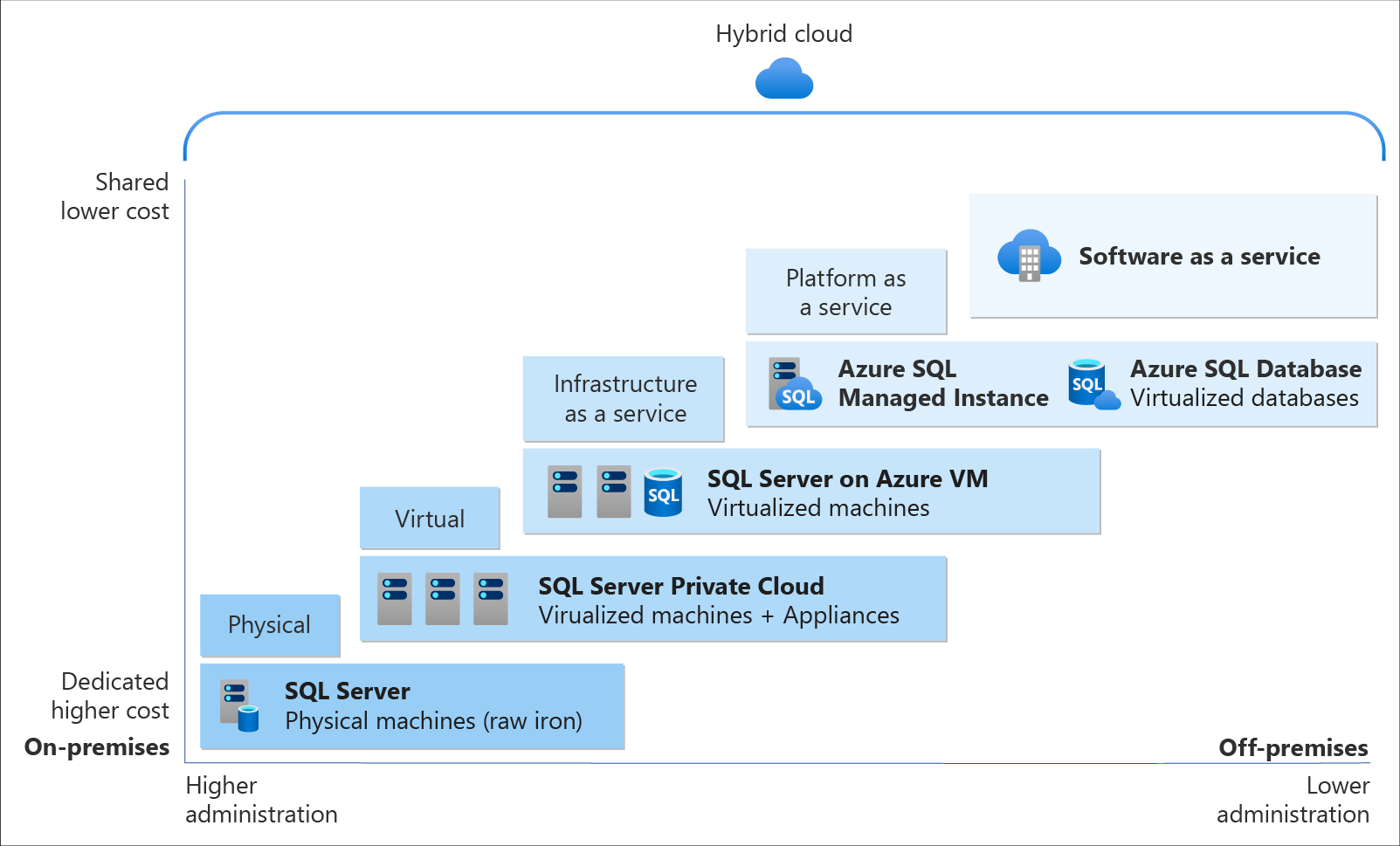
On Azure, there are two database deployment options available, i.e. IaaS and PaaS. IaaS option means that we have to host our SQL server on their virtual machines. For PaaS approach, we are able to either use Azure SQL Database, which is considered as DBaaS, or Azure SQL Managed Instance. Unless there is a need for the team to have OS-level access and control to the SQL servers, PaaS approach is normally the best choice.
Both PaaS and IaaS options include base price that covers underlying infrastructure and licensing. In IaaS, we can reduce the cost by shutting down the resources. However, in PaaS, the resources are always running unless we drop and re-create our resources when they are needed.
The level of administration we have over the infrastructure and by the degree of cost efficiency. (Image Source: Azure Docs)
SQL Managed Instance is the latest deployment option which enables easy migration of most of the on-premises databases to Azure. It’s a fully-fledged SQL instance with nearly complete compatible with on-premise version of SQL server. Also, since SQL Managed Instance is built on the same PaaS service infrastructure, it comes with all PaaS features. Hence, if you would like to migrate from on-premise to Azure without management overhead but at the same time you require instance-scoped features, such as SQL Server Agent, you can try the SQL Managed Instance.
Andreas Wolter, one of the only 7 Microsoft Certified Solutions Masters (MCSM) for the Data Platform worldwide, once came to Singapore .NET Developers Community to talk about the SQL Database Managed Instance. If you’re new to SQL Managed Instance, check out the video below.
Spatial Data Types
Visibility plays a crucial role in the logistics industry because it relates to the ability of supply chain partners to be able to access and share operation information with other parties. Tracking the asset locations with GPS is one of the examples. However, how should we handle the geography data in our database?
In Microsoft SQL Server, native spatial data types are used to represent spatial objects. In addition, it is able to index spatial data, provide cost-based optimizations, and support operations such as the intersection of two spatial objects. This functionality is also available in Azure SQL Database and Azure Managed Instances.
The geometry hierarchy upon which the geometry and geography data types are based. (Image Source: SQL Docs)
Let’s say now we want to find the closest containers to a prime mover as shown in the following map.
The locations of 5 containers (marked as red) and location of the prime mover (marked as blue).
In addition, we have a table of container positions defined with the schema below.
CREATE TABLE ContainerPositions
(
    Id int IDENTITY (1,1),
    ContainerNumber varchar(13) UNIQUE,
    Position GEOGRAPHY
);
Azure Table Storage is one of the Azure services storing non-relational structured data. It provides a key/attribute store with a schema-less design. Since it’s a NoSQL datastore, it is suitable for datasets which do not require complex joins and can be denormalised for fast access.
Globally, supply chain with Industry 4.0 is transformed into a smart and effective procedure to produce new outlines of income. Hence, the key impression motivating Industry 4.0 is to guide companies by transforming current manual processes with digital technologies.
Hard-copy of container proof of delivery (POD), for example, is still necessary in today’s container trucking industry. Hence, storing images and files for document generation and printing later is still a key feature in the digitalised supply chain workflow.
Proof of Delivery is now still mostly recorded on paper and sent via email or instant messaging services like Whatsapp. There is also no acceptable standard for what a proof of delivery form should specify. Each company more or less makes up their own rules.
On Azure, we can make use of Blob Storage to store large, discrete, binary objects that change infrequently, such as the documents like Proof of Delivery mentioned earlier.
Hence, as shown in the screenshot below, we can upload files from a computer to the Azure File Share directly. Then the files will be accessible in another computer which is also connected to the Azure File Share, as shown below.
We can mount Azure File Share on macOS, Windows, and even Linux.
The Data Team
Setting up a new data team, especially in a startup, is a challenging problem. We need to explore roles and responsibilities in the world of data.
There are basically three roles that we need to have in a data team.
Database Administrator: In charge of operations such as managing the databases, creating database backups, restoring backups, monitoring database server performance, and implementing data security and access rights policy.
Tools: SQL Server Management Studio, Azure Portal, Azure Data Studio, etc.
Data Engineer: Works with the data to build up data pipeline and processes as well as apply data cleaning routine and transformations. This role is important to turn the raw data into useful information for the data analysis.
Tools: SQL Server Management Studio, Azure Portal, Azure Synapse Studio.
Data Analysis: Explores and analyses data by creating data visualisation and reporting which transforms data into insights to help in business decision making.
Tools: Excel, Power BI, Power BI Report Builder
In 2016, Gartner, a global research and advisory firm, shared a Venn Diagram on how data science is multi-disciplinary as shown below. Hence, there are some crucial technical skills needed, such as statistics, querying, modelling, R, Python, SQL, and data visualisation. Besides the technical skill, the team also needs to be equipped with business domain knowledge and soft skills.
The data science Venn Diagram. (Image source: Gartner)







 cuteprogramming