In one of our projects, we have a .NET web service. On the client side, we have phone running Android which will consume the web service. Hence, the first option that came to my teammate’s mind is to use kSOAP2, a lightweight SOAP client library for Android.
Problem
When we first tried out our Android app, we realized that it worked fine if the app was calling a web method with no parameter. However, when the app called another web method with one or more parameters, the web service complaint that the value it received was always null.
My colleague discovered this issue around 5:40pm, 20 minutes before I could leave the office. I always hope that I can enjoy a sunset on my way back from office. Hence, I decided to help him settle that little problem within the 20 minutes. Otherwise, I might miss the sunset for the day.
I left the office around 6:10pm so I still had chance to enjoy the sunset.
Anyway, this is actually a good opportunity for me to learn a bit about kSOAP and how Android app communicates with .NET web service. So, it’s fun to get involve in some other projects which you are not working on usually. =)
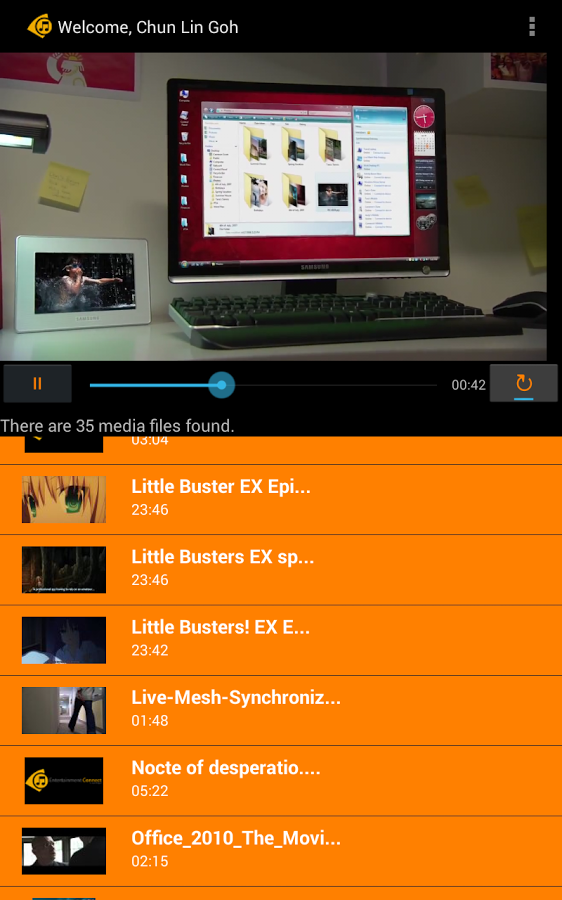
It turns out that both VideoView and ListView are put in linear layout with vertical orientation. So, I just need to assign some nonzero values to the layout weight of them and the video now looks very nice on Android tablet.
Entertainment Connect on Galaxy Tab 4
Log Out and Go Back
Entertainment Connect retrieves media files from the user’s OneDrive. Hence, there is a need to handle user login and logout activities correctly. Android devices all have this Back button. Hence, in the first version of Entertainment Connect, user can log out from the app and then click the Back button to view the media list again. To prevent that, I added following two lines in the logout method.
intent.setFlags(Intent.FLAG_ACTIVITY_CLEAR_TOP);// To clean up all activities
finish();
Calling finish() because the current activity (Player Activity) is done and should be closed after logout. Interestingly, without calling it, the user can still go back to the Player Activity after logging out even though FLAG_ACTIVITY_CLEAR_TOP is used.
Soon after I completed the application for Windows, I found out that more and more of my family and friends were buying Android phones. Thus, I decided to build another version of Entertainment Connect for Android.
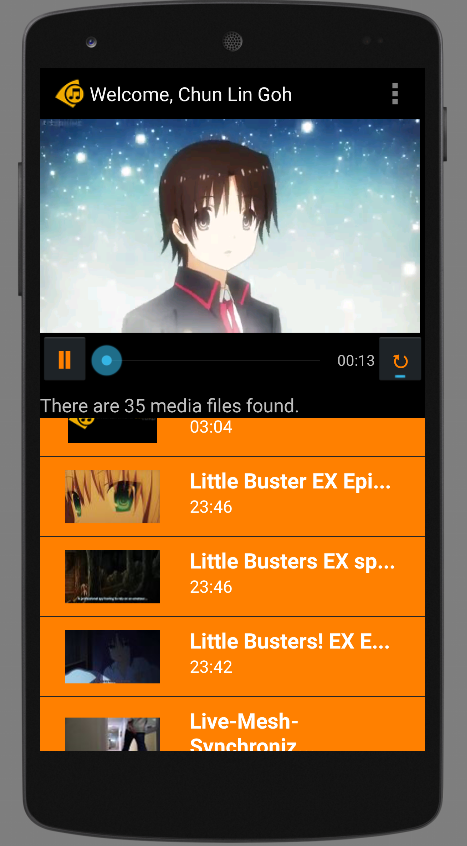
Entertainment Connect is now available on Android devices!
Today, I would like to share what I had learnt in developing my first personal Android app which makes use of Microsoft Live SDK for Android.
New IDE: Android Studio
I have been using Eclipse for Android app development in my work. Coding with Eclipse is not easy. Luckily, Google just released Android Studio, an official IDE built specifically for Android with much powerful GUI designer. In addition, due to the fact that Google encourages developers to migrate to Android Studio, I decided to try it out.
Android Studio with the login page of Entertainment Connect.
Working with Microsoft Live SDK
Yesterday, I just received notifications from Live SDK Github saying that the team was going to support and migrate to Android Studio. Finally. When I started this project, the Live SDK only supports Eclipse ADT.
It is very easy to include Live SDK to the project in Android Studio. Firstly, I need to download the Live SDK. Just download the whole project via ZIP is enough. The project consists of some useful samples which teach us how to properly use the SDK.
Secondly, I need to add new module under Project Structure.
Add new module in Project Structure.
Thirdly, I just choose the “Import Existing Project” option which will import the Eclipse project (Live SDK) as a module.
Import existing Eclipse project as module.
Finally, to make my application being able to use the Live SDK, I need to create introduce a module dependency to my app module, as shown in the screenshot below.
Introduce module dependency between app and src (Live SDK).
With these few lines of code, I can already get a working media player with all the controls, such as play, pause, progress bar, etc.
However, this is not the case in Android app development. I am using VideoView. Hence, I also need to build my own play/pause functions and progress bar.
Also, I realized there was a bug if I switched from playing video file to audio file on VideoView. The image part of the previous video will stay even though the audio starts playing already. Hence, I added the following few lines of code to reset the background image of the VideoView so that the image of previous video will be “erased”.
videoPlayer.setBackgroundColor(Color.TRANSPARENT);
if (availableMedia.get(position).getmMediaFileName().toLowerCase().endsWith(".mp3")) {
    videoPlayer.setBackgroundColor(Color.BLACK);
}
Loading the thumbnail of media from OneDrive is also a headache in Android.
In Windows 8 app, after adding the items returned from Live SDK to a collection, I can easily bind the items to the template easily. After that, the thumbnails will be automatically shown on the screen smoothly.
<!-- Template of the list items to show available music/videos -->
<div id="mediumListIconTextTemplate" data-win-control="WinJS.Binding.Template" style="display: none">
    <div class="mediumListIconTextItem">
        <img onerror="this.src='/images/default-video-preview.png';" class="mediumListIconTextItem-Image" data-win-bind="src : picture" />
        <div class="mediumListIconTextItem-Detail">
            <h4 data-win-bind="innerText: name"></h4>
            <h6 data-win-bind="innerText: duration"></h6>
        </div>
    </div>
</div>
Yes, it is fun. However, it’s slower than Windows 8 app development. It’s just too bad that not a lot of my friends really go Windows Store to download desktop apps. So I have no choice but to build Android version of my app also.
I will try to publish Entertainment Connect to Google Play soon after I have fixed my debit card issue. Currently, I still encounter problems on paying developer registration fee with Google Wallet. Oh well.







 cuteprogramming