From k6 to Simulation: Optimising AWS Burstable Instances

Photo Credit: Nitro Card, Why AWS is best!

In cloud infrastructure, the ultimate challenge is building systems that are not just resilient, but also radically efficient. We cannot afford to provision hardware for peak loads 24/7 because it is simply a waste of money.

In this article, I would like to share how to keep this balance using AWS burstable instances, Grafana observability, and discrete event simulation. Here is the blueprint for moving from seconds to milliseconds without breaking the bank.

The Power (and Risk) of Burstable Instances

To achieve radical efficiency, AWS offers the T-series (like T3 and T4g). These instances allow us to pay for a baseline CPU level while retaining the ability to “burst” during high-traffic periods. This performance is governed by CPU Credits.

Modern T3 instances run on the AWS Nitro System, which offloads I/O tasks. This means nearly 100% of the credits we burn are spent on our actual SQL queries rather than background noise.

By default, Amazon RDS T3 instances are configured for “Unlimited Mode”. This prevents our database from slowing down when credits hit zero, but it comes with a cost: We will be billed for the Surplus Credits.
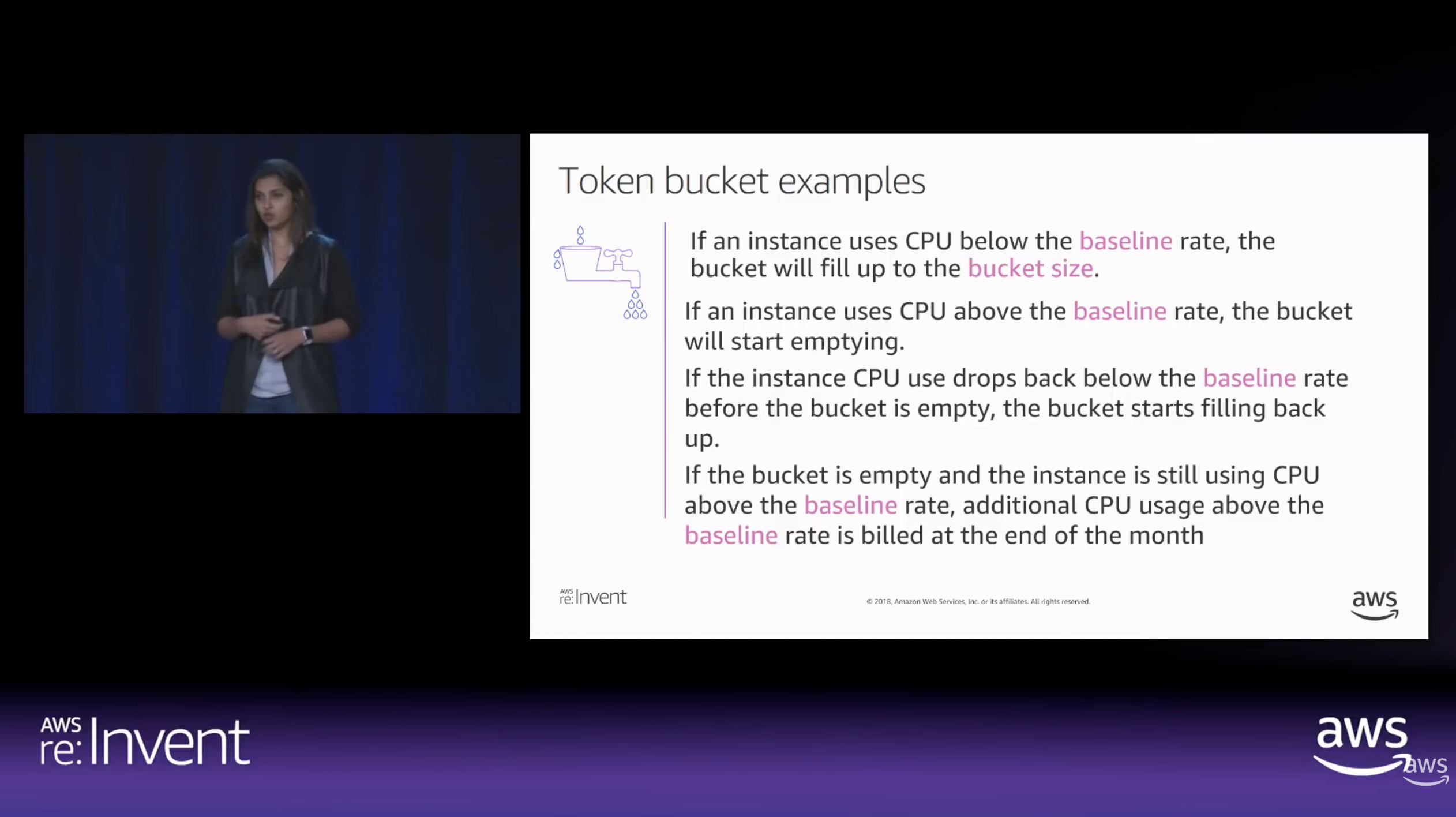
How CPU Credits are earned vs. spent over time. (Source: AWS re:Invent 2018)

The Experiment: Designing the Stress Test

To truly understand how these credits behave under pressure, we built a controlled performance testing environment.
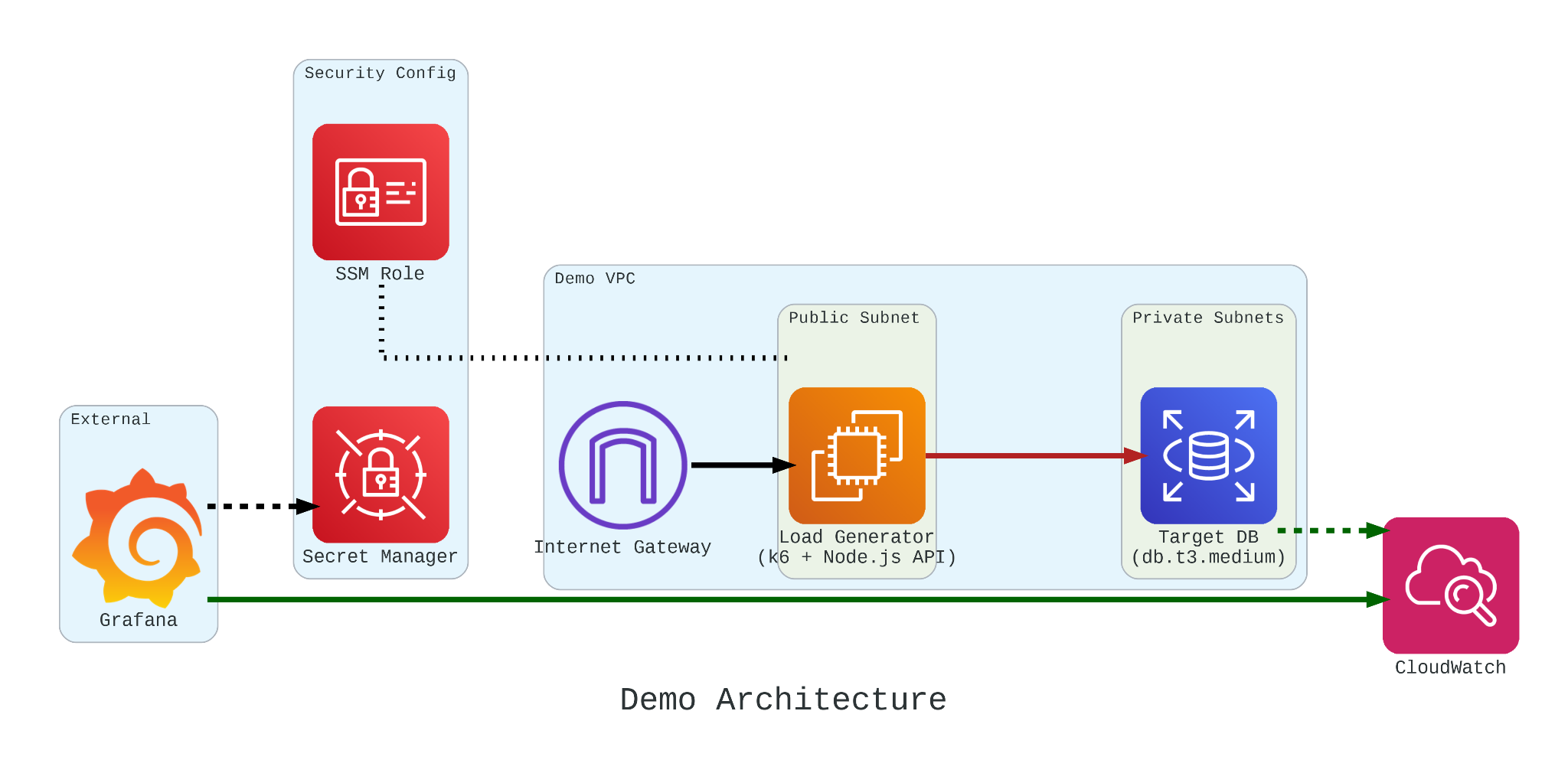
Our setup involved:

  • The Target: An Amazon RDS db.t3.medium instance.
  • The Generator: An EC2 instance running k6. We chose k6 because it allows us to write performance tests in JavaScript that are both developer-friendly and incredibly powerful.
  • The Workload: We simulated 200 concurrent users hitting an API that triggered heavy, CPU-bound SQL queries.

Simulation Fidelity with Micro-service

If we had k6 connect directly to PostgreSQL, it would not look like real production traffic. In order to make our stress test authentic, we introduce a simple NodeJS micro-service to act as the middleman.

This service does two critical things:

  1. Implements a Connection Pool: Using the pg library Pool with a max: 20 setting, it mimics how a real-world app manages database resources;
  2. Triggers the “Heavy Lifting”: The /heavy-query endpoint is designed to be purely CPU-bound. It forces the database to perform 1,000,000 calculations per request using nested generate_series.
const express = require('express');
const { Pool } = require('pg');
const app = express();
const port = 3000;
const pool = new Pool({
user: 'postgres',
host: '${TargetRDS.Endpoint.Address}',
database: 'postgres',
password: '${DBPassword}',
port: 5432,
max: 20,
ssl: { rejectUnauthorized: false }
});

app.get('/heavy-query', async (req, res) => {
try {
const result = await pool.query('SELECT count(*) FROM generate_series(1, 10000) as t1, generate_series(1, 100) as t2');
res.json({ status: 'success', data: result.rows[0] });
} catch (err) {
res.status(500).json({ error: err.message }); }
});

app.listen(port, () => console.log('API listening'));

In our k6 load test, we do not just flip a switch. We design a specific three-stage lifecycle for our RDS instance:

  1. Ramp Up: We started with a gradual ramp-up from 0 to 50 users. This allows the connection pool to warm up and ensures we are not seeing performance spikes just from initial handshakes;
  2. High-load Burn: We push the target to 200 concurrent users. These users will be hitting a /heavy-query endpoint that forces the database to calculate a million rows per second. This stage is designed to drain the CPUCreditBalance and prove that “efficiency” has its limits;
  3. Ramp Down: Finally, we ramp back down to zero. This is the crucial moment in Grafana where we watch to see if the CPU credits begin to accumulate again or if the instance remains in a “debt” state.
import http from 'k6/http';
import { check, sleep } from 'k6';

export const options = {
stages: [
{ duration: '30s', target: 50 }, // Profile 1: Ramp up
{ duration: '5m', target: 200 }, // Profile 1: Burn
{ duration: '1m', target: 0 }, // Profile 1: Ramp down
],
};

export default function () {
const res = http.get('http://localhost:3000/heavy-query');
check(res, { 'status was 200': (r) => r.status == 200 });
sleep(0.1);
}

Monitoring with Grafana

If we are earning CPU credits slower than we are burning them, we are effectively walking toward a performance (or financial) cliff. To be truly resilient, we must monitor our CPUCreditBalance.

We use Grafana to transform raw CloudWatch signals into a peaceful dashboard. While “Unlimited Mode” keeps the latency flat, Grafana reveals the truth: Our credit balance decreases rapidly when CPU utilisation goes up to 100%.
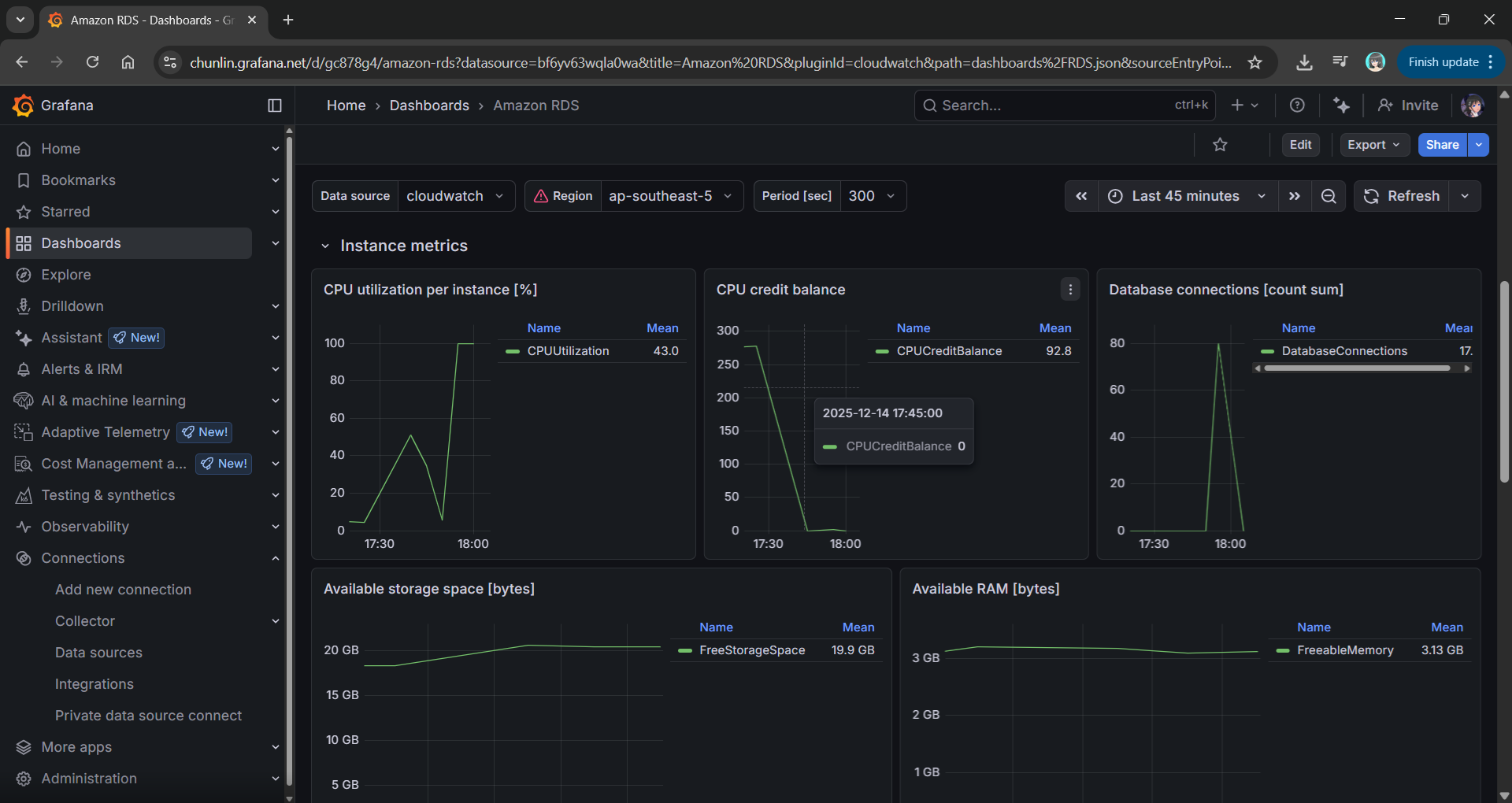
Grafana showing the inverse relationship between high CPU Utilisation and a dropping CPU Credit Balance.

Predicting the Future with Discrete Event Simulation

Physical load testing with k6 is essential, but it takes real-time to run and costs real money for instance uptime.

To solve this, we modelled Amazon RDS T3 instance using discrete event simulation and the Token Bucket Algorithm. Using the SNA library, a lightweight open-source library for C# and .NET, we can now:

  • Simulate a 24-hour traffic spike in just a few seconds;
  • Mathematically prove whether a rds.t3.medium is more cost-effective for a specific workload;
  • Predict exactly when an instance will run out of credits before we ever deploy it.
Simulation results from the SNA.

Final Thoughts

Efficiency is not just about saving money. Instead, it is about understanding the mathematical limits of our architecture. By combining AWS burstable instances with deep observability and predictive discrete event simulation, we can build systems that are both lean and unbreakable.

For those interested in the math behind the simulation, check out the SNA Library on GitHub.

MS SQL on AWS: Amazon RDS

amazon-rds-ms-sql-server

There are some startups and SMEs hosting their databases on AWS. However, most of them choose to use Amazon EC2 because doing so is similar to running a SQL Server on-premise at data centres. So, to them, it’s something that they are familiar with back in the old days. However, doing so actually increases their cost of hosting services on AWS. The companies also need to hire experts to do database administration such as database backup and recovery and OS patching.

Hence, if I’m given the opportunity, I usually recommend the small companies with limited resources to consider Amazon RDS (or Azure SQL) first. Amazon RDS is a fully managed service which provides cost-efficient and resizable capacity while automating time-consuming database administration tasks.

Multi-AZ Deployments for MS SQL Server

Starting from May 2014, Amazon RDS also provides a highly available database solution with the synchronous Multi-AZ replication for MS SQL. Multi-AZ deployments for MS SQL database instances use SQL Server Mirroring.

Currently, Amazon RDS only supports Standard Edition and Enterprise Edition of SQL Server 2008 R2, 2012, 2014, and 2016. Amazon RDS also does not support Multi-AZ with Mirroring for the following regions yet:

  • US West (N. California);
  • Asia Pacific (Singapore);
  • European Union (Frankfurt);
  • AWS GovCloud (US);
  • Asia Pacific (Sdyney): Supported for DB instances in VPCs only;
  • Asia Pacific (Tokyo): Supported for DB instances in VPCs only;
  • South America (São Paulo): Supported for all DB instance classes except m1/m2.

It’s quite unfortunate that Singapore Region is one of them.

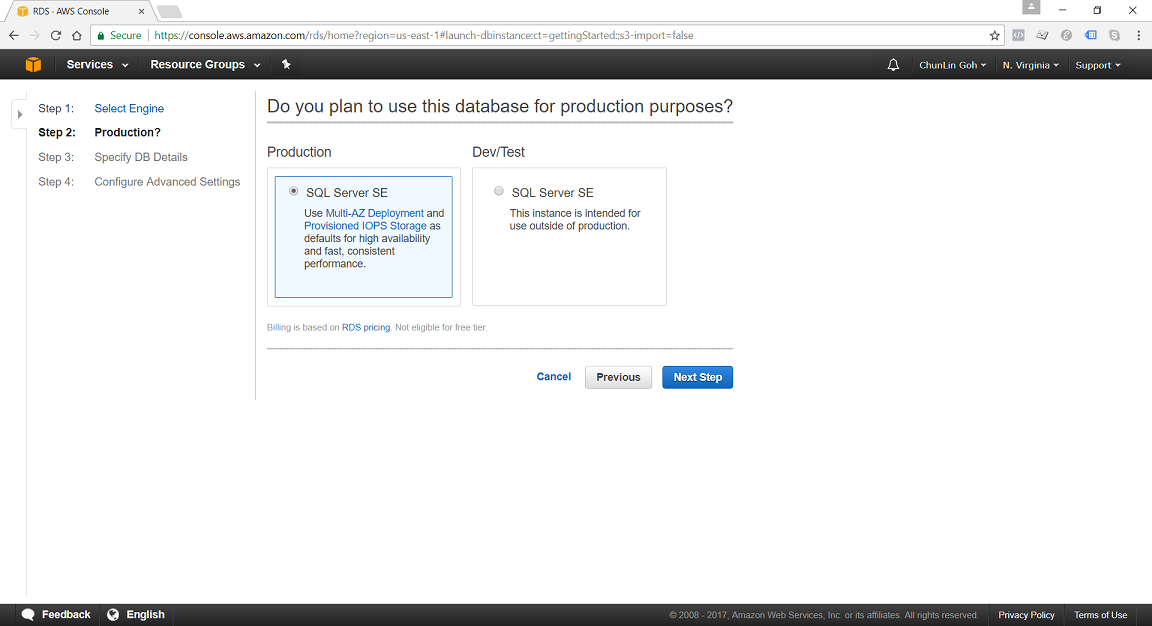
use-multi-az-deployment-for-production-sql-server-se.png
In N. Virginia Region, we’re able to specify to use Multi-AZ Deployment in Production SQL Server SE.

DB Instance Class

We can specify the DB Instance Class that allocates the computational, network, and memory capacity required by planned workload of the database instance.

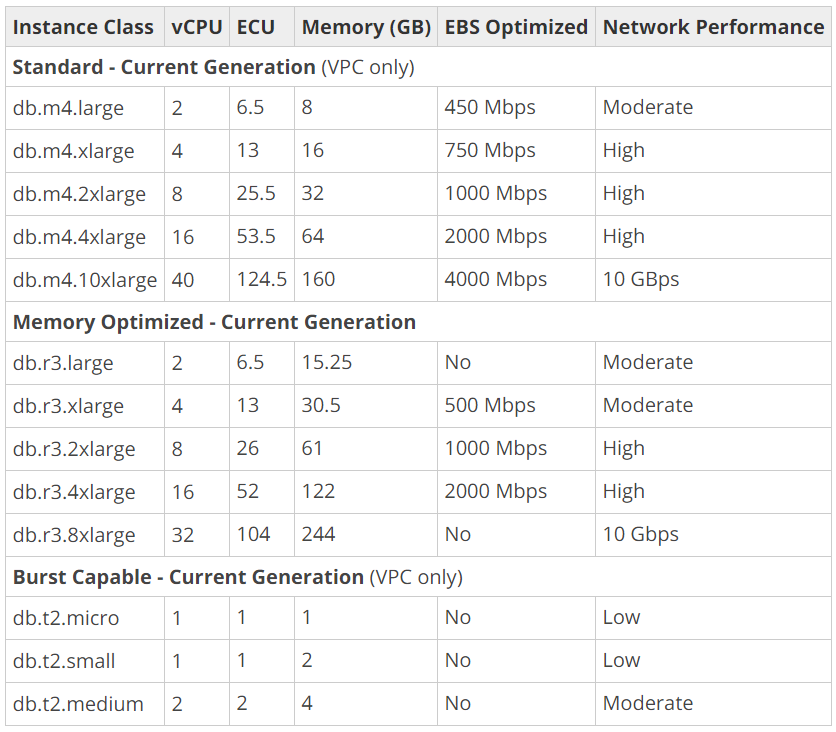
available-instance-class-for-ms-sql.png
DB Instance Classes available in MS SQL 2016 on AWS.

Standard (db.m4) instances offer a balance of compute, memory, and network resources, and are a good choice for many applications.

Memory Optimized (db.r3) instances are designed to deliver fast performance for workloads that process large data sets in memory. The instances are well suited for the applications, such as high performance relational databases, in-memory analytics, and enterprise applications (for example, Microsoft SharePoint).

Burst Capable (db.t2) instances are instances that provide baseline performance level with the ability to burst to full CPU usage.

Storage Types

Most of the Amazon RDS are using Amazon EBS (Elastic Block Store) volumes for database and log storage. There are currently two main Storage Types available when setting up MS SQL database instances, as listed below.

General Purpose (SSD) storage, aka gp2, offers cost-effective storage which is suitable for a broad range of database workloads. Hence, it’s ideal for small to medium-sized databases. It provides baseline of 3 IOPS/GB and ability to burst to 3,000 IOPS for extended periods of time. Its volume can range from 20GB to 4TB for MS SQL database instances. However, provisioning less than 100 GB of General Purpose (SSD) storage for high throughput workloads could result in higher latencies upon exhaustion of the initial General Purpose (SSD) I/O Credit balance.

Provisioned IOPS (SSD) storage, aka io1, is suitable for I/O intensive database workloads which pay attention to storage performance and consistency in random access I/O throughput. It provides flexibility to provision I/O ranging from 1,000 to 30,000 IOPS. MS SQL can have provisioned IOPS volumes between 100GB (Express/Web edition) or 200GB (Standard/Enterprise edition) and 4TB.

amazon-ebs-pricing.png
Amazon Elastic Block Store (EBS) Pricing for Singapore region.

Allocated Storage and I/O Credits

General Purpose (SSD) storage performance is controlled by the volume size. Larger volumes have higher base performance levels and can accumulate I/O Credits faster. The more storage, the greater the base performance is and the faster it replenishes the credit balance.

For General Purpose (SSD) storage, the DB instance has an initial I/O Credits balance of 5.4 million. When the storage requires more than the base performance I/O level, it uses I/O credits in the credit balance to burst to the required performance level, up to a maximum of 3,000 IOPS. If the storage uses all of its I/O credit balance, its maximum performance will remain at the base performance level until I/O demand drops below the base level and unused credits are added to the I/O credit balance at the baseline performance rate of 3 IOPS/GB of volume size. Hence, we can use the formula below to calculate the Burst Duration.

burst-duration-formula.png

burst-duration-tabular.png

Thus, for production application that requires fast and consistent I/O performance, it’s recommended to use Provisioned IOPS (SSD) storage that is optimized for I/O intensive, online transaction processing workloads that have consistent performance requirements. Note that we cannot decrease storage allocated for a DB instance.

For MS SQL Server, Amazon RDS does not currently support increasing storage. Hence, we need to provision storage based on anticipated future storage growth. If we predict it wrongly, then we need to increase the storage of an existing SQL Server DB instance by first exporting the data, creating a new database instance with increased storage, and then importing the data into the new database instance.

Specifying Database Instance Specification

After understanding key concepts above, we can then proceed to setup our database instance.

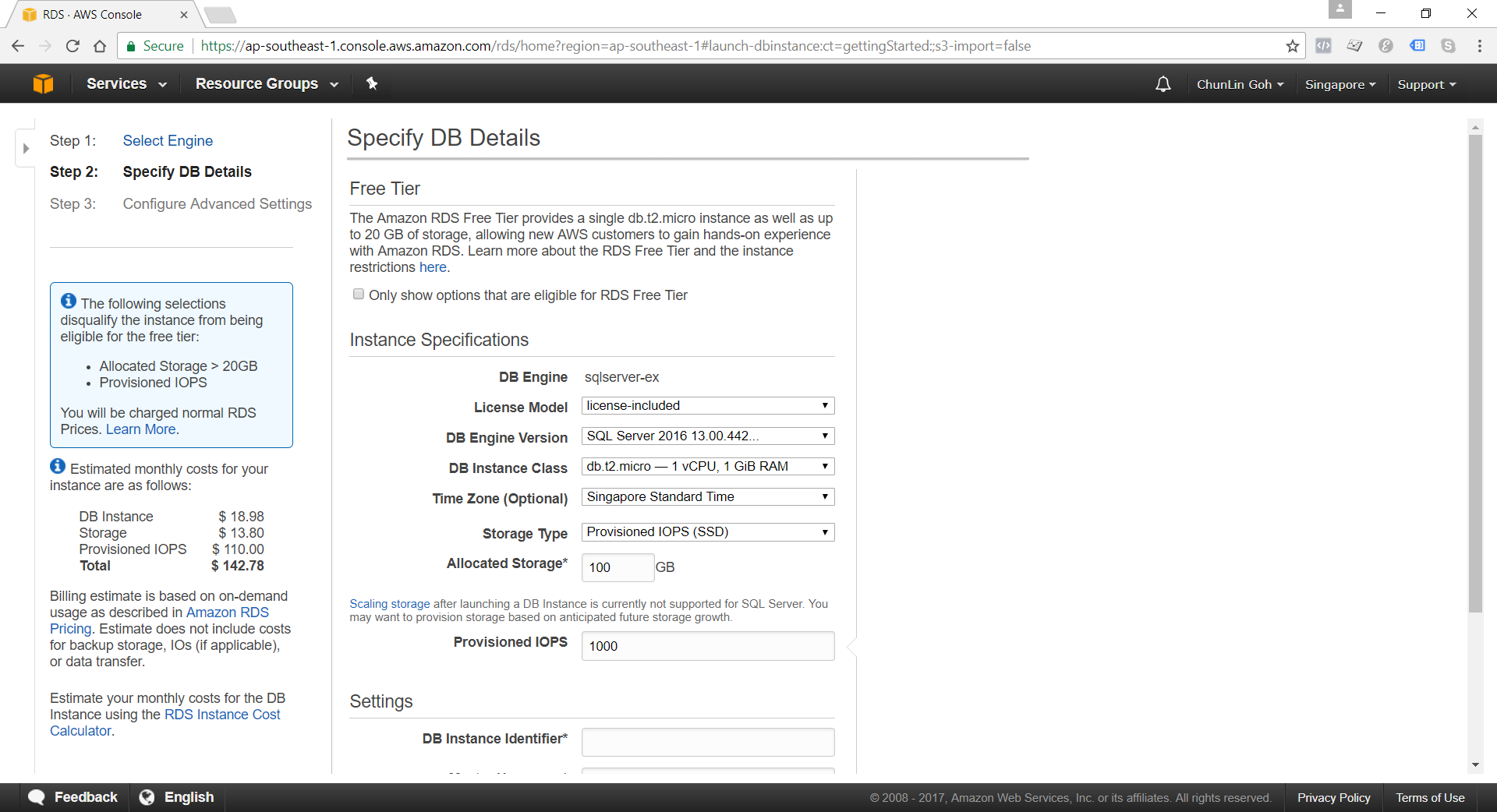
specifying-db-instance-specifications.png
Although there is Free Tier available but allocating storage > 20GB or adding provisioned IOPS will disqualify the databse instance from being eligible for the Free Tier.

Network and Security: VPC (Virtual Private Cloud)

Amazon RDS database instances can be hosted on either EC2-VPC platform or the legacy EC2-Classic platform, the original platform used by Amazon RDS. Amazon VPC launches AWS resources, such as database instances, into a virtual private cloud.

Nowadays, if we are creating a database instance in a region that we have not used before, we normally are already on the EC2-VPC platform.

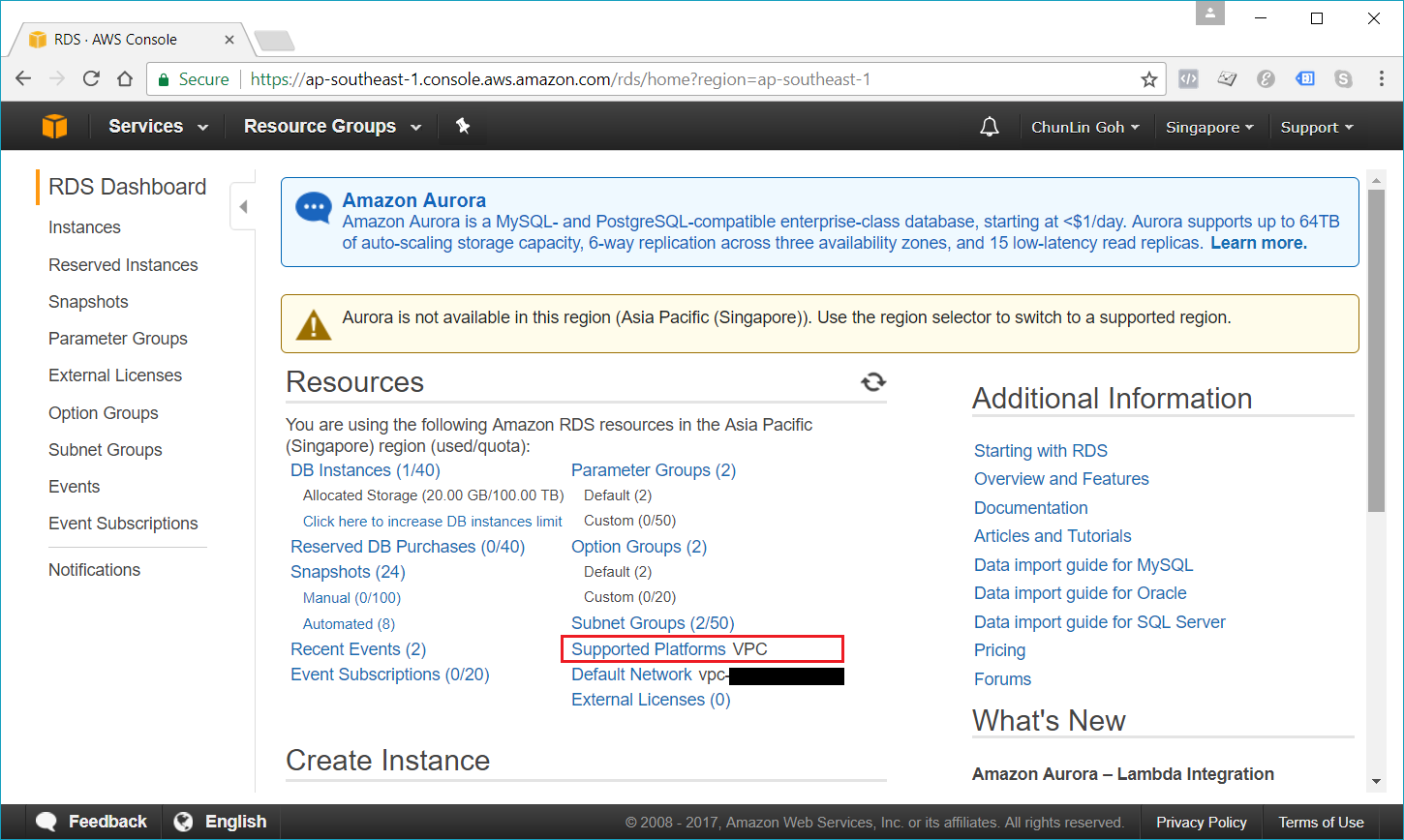
rds-supported-platforms.png
We are already on EC2-VPC platform.

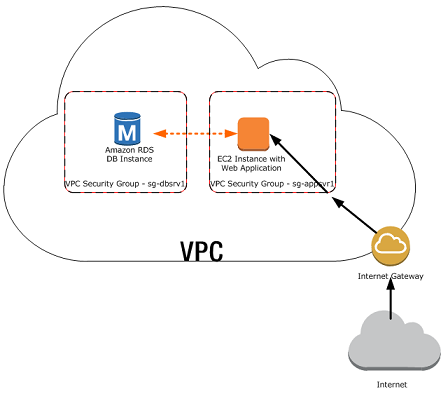
There are many scenarios for accessing a database instance in a VPC. Today, I will only focus on having an EC2 web server to access the database instance in the same VPC.

web-server-and-db-instance-in-the-same-vpc.png
A database instance in a VPC accessed by an EC2 instance in the same VPC (Source: AWS Documentation)

In such scenario, Amazon RDS database instance normally needs to be available to the web server, and not to the public Internet. Hence, we can create a VPC with both public and private subnets. The web server will be hosted in the public subnet so that it is accessible by the public. The database instance is hosted in the private subnet so that it won’t be available to the public Internet, providing greater security.

The Security Group used to restrict access to the database instances can have a custom rule that allows TCP access using the port 1433 and an IP address we will use to access the database instance for development or other purposes. In addition, we also need to set the Public Accessible option to Yes first (It is recommended to set the option to No for production database instance to limit the potential thread with no public routes).

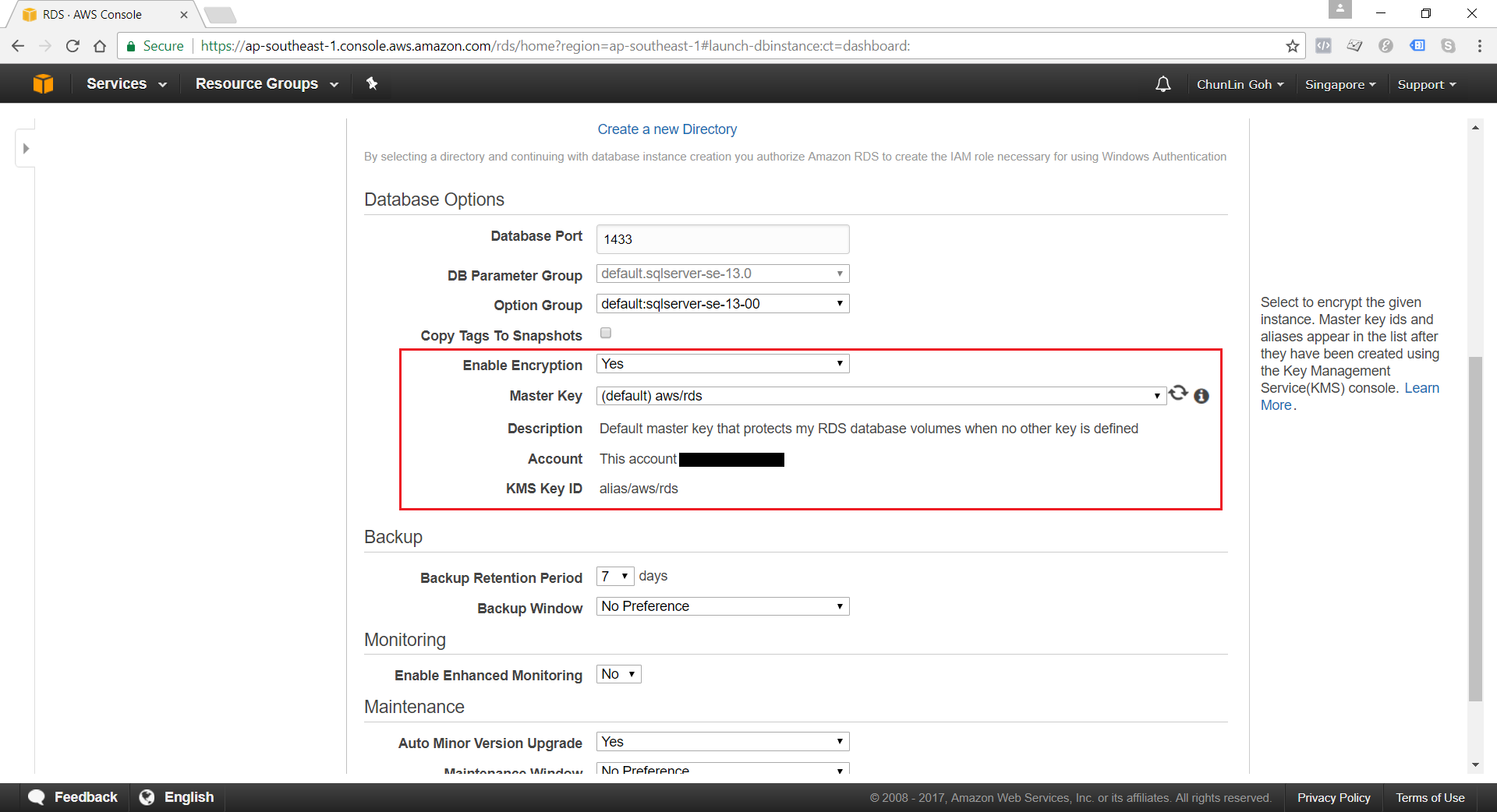
Encryption of Database Instances using Key Management Service (KMS)

Amazon RDS for MS SQL supports the encryption of database instances with encryption keys managed in AWS KMS. Once the data is encrypted, Amazon RDS handles authentication of access and decryption of the data transparently without having the need to change our database client applications.

enable-database-encryption.png
Currently, encryption of database instances (Data-in-Rest Protection) is not available for those which are running SQL Server Express Edition.

Backup and Maintenance

Amazon RDS automatically backup our database instances. It creates a storage volume snapshot of our database instance, backing up the entire database instance and not just individual databases. We can setup and modify our preferred Backup Window from time to time. During the automatic backup window, storage I/O might be suspended briefly while the backup process initializes (typically under a few seconds). For SQL Server, I/O activity is suspended briefly during backup for Multi-AZ deployments.

By default, Amazon RDS has a 30-minute backup window randomly selected from an 8-hour block (Singapore region will be 14:00–22:00 UTC).

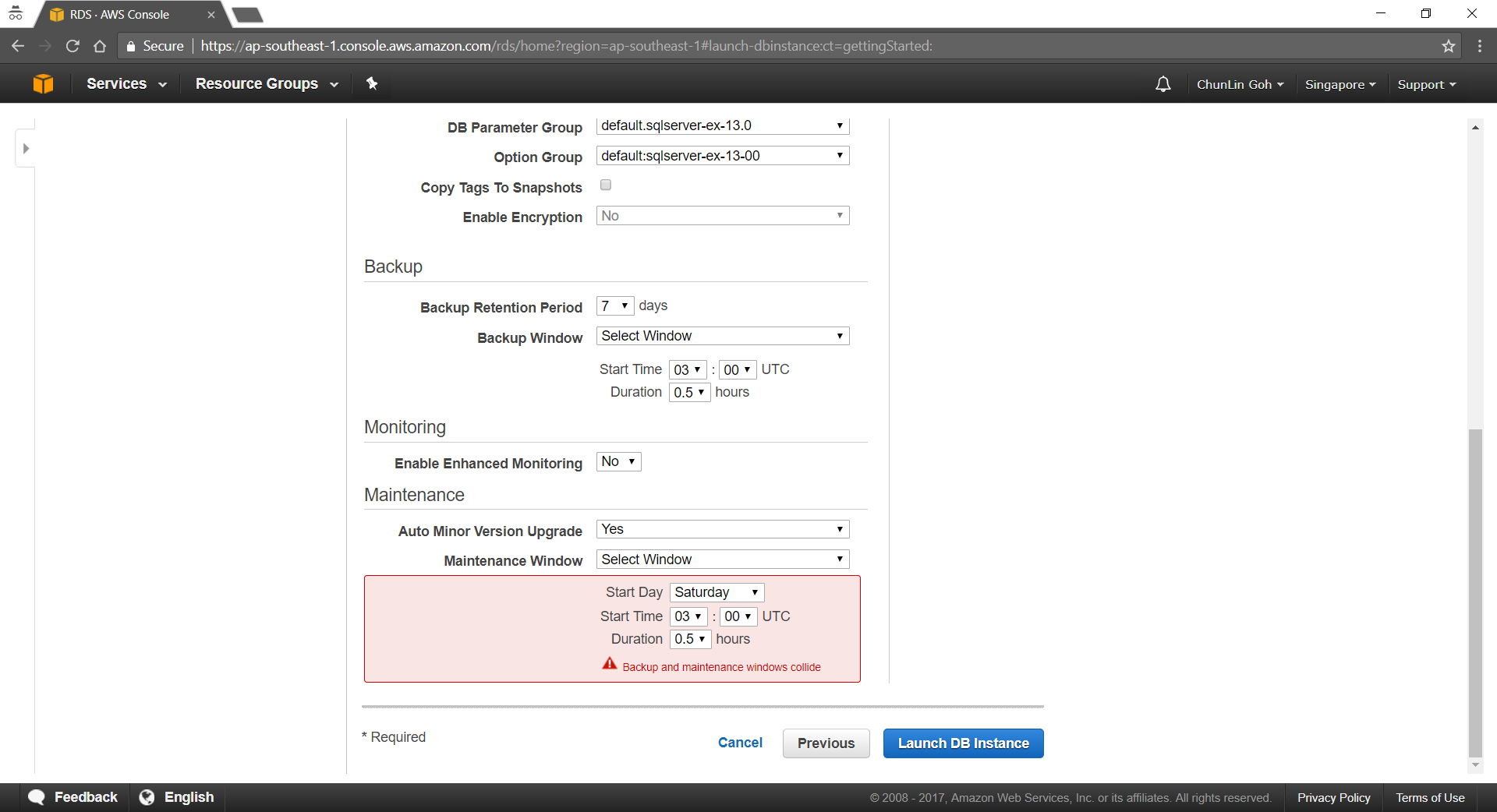
Periodically, Amazon RDS also automatically does maintenance work such as, updating the databse instance’s or database cluster’s OS. We can choose to manually apply maintenance, or wait for the automatic maintenance process initiated during our preferred maintenance window. There is one thing to take note is that the maintenance window determines when pending operations start, but does not limit the total execution time of these operations.

By default, Amazon RDS also has a 30-minute maintenance window randomly selected from an 8-hour block (Singapore region will be 14:00–22:00 UTC).

maintenance-window-collide-with-backup-window.png
We’re not allowed to make the maintenance window and the backup window overlap.

CloudWatch

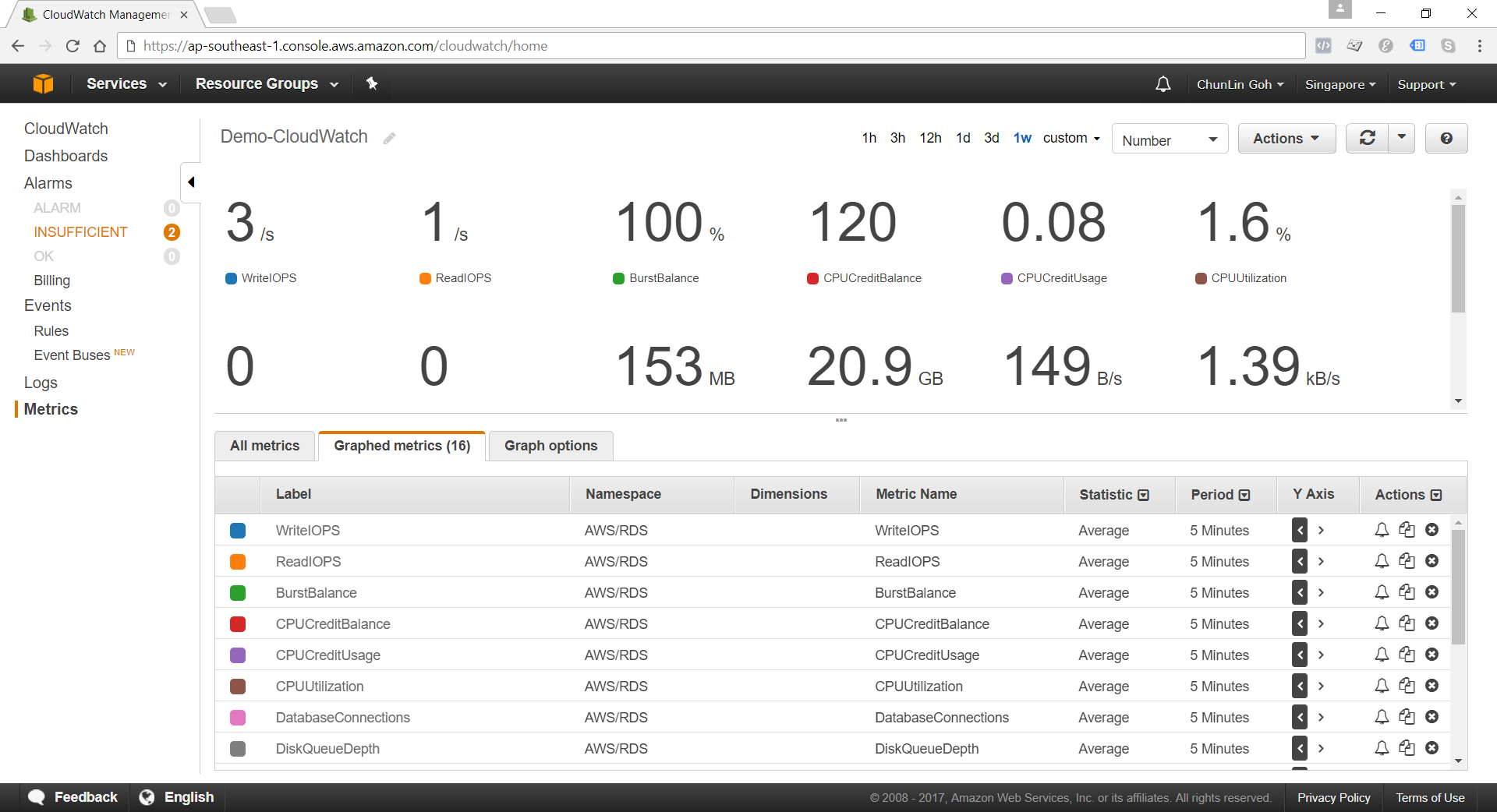
Amazon RDS sends metrics to CloudWatch for each active database instance every minute. Detailed monitoring is enabled by default.

cloudwatch.png
Amazon RDS Metrics

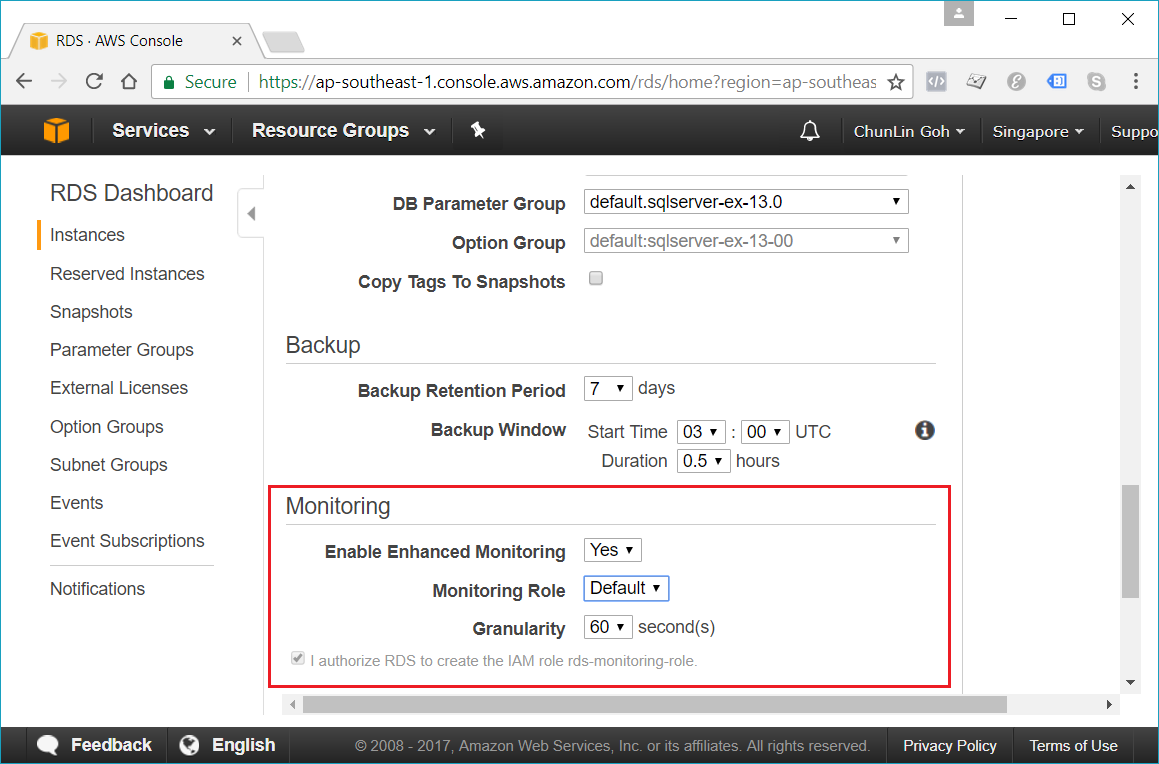
When setting up the database instance, there is an option for us to specify whether to enable Enhanced Monitoring or not. Enhanced Monitoring is not exactly like CloudWatch. CloudWatch gathers metrics about CPU utilization from the hypervisor for a database instance, and Enhanced Monitoring gathers its metrics from an agent on the instance.

enable-enhanced-monitoring.png
Enhanced monitoring requires permission to act on our behalf to send OS metric information to CloudWatch Logs.

Conclusion

It’s true that AWS allows us to deploy our MS SQL Server database on either Amazon RDS and Amazon EC2. However, it’s very crucial to analyze our needs and our application before deciding which one to use. In general, it is still recommended to consider Amazon RDS first so that developers can focus on high-level tasks and business logic implementation.

That’s all for my first trip to Amazon RDS. As a frequent user of Microsoft Azure, I never host MS SQL Server on AWS platform. So, if there is any mistake made in this article, kindly feedback to me. Thanks in advance!

Further Reading

Deploying Microsoft SQL Server on Amazon Web Services