In EF Media Player 3, the implementation of videos viewing history recording and video bookmarking takes me about two days to figure out the way to do it.
Video Bookmarking
In order to have those features, storage is a important issue. The history and bookmark records need to be stored somewhere. There are a few approaches to this problem. One is of course the serialization. I can basically store the history and bookmark by doing serialization. This approach was tried and successfully implemented by our CS2103 team when we’re trying to store the data of our apps. In C#, thanks to the .NET library, I can actually store the data and records in settings as well. All these stored records will be persisted between application execution sessions.
Loading Values from Settings
System.Collections.Hashtable savedViewedVideos = new System.Collections.Hashtable();
// Try to load previously saved viewed videos (if any) to the list.
if (Properties.Settings.Default[“viewedVideosList”] != null){
foreach (String recordEntry in Properties.Settings.Default.viewedVideosList){
string[] entryBreakdown = recordEntry.Split(‘*’);
if (entryBreakdown[1].Equals(VideoRecordType.NEWLY_ADDED.ToString())) savedViewedVideos.Add(entryBreakdown[0], VideoRecordType.PREVIOUSLY_PLAYED.ToString());
else
savedViewedVideos.Add(entryBreakdown[0], entryBreakdown[1]);
}}
I actually use a small trick here by using array list as a name-value collection. Every element in the array list is a string containing an asterisk symbol. Before the asterisk, it is the file path of the video and after it will be the video record type:
Storing Values to Settings
Why don’t I use the name-value collection which is also provided by .NET? The reason is simple. This is because the name-value collection doesn’t have a schema predefined. So, why do we need a schema here? This is because all the values stored in the settings are stored in XML format in the user.config file. Hence, without a schema defined, the values cannot be updated later using Properties.Settings.Default.Save();. Fortunately, the schema of the array list is provided. So, in order to avoid the troubles of defining schema for the name-value collection, I chose array list here.
Currently, there are still a lot of people discussing why they can’t update the values stored in the name-value collection and other similar data types. I am not sure about the causes of their problems but I think not having a schema for the data types they are using may be a reason for some of them.
More about settings: http://msdn.microsoft.com/en-us/library/aa730869(VS.80).aspx
Project Description
The purpose of upgrading EF Media Player 2 to EF Media Player 3 is to, firstly, fix the bugs and problems found in the second version and, secondly, to implement some new features to make the application become more user-friendly. Same as the previous two versions, useful features like playing FLV and other types of audio and video files as well as streaming videos stored in SkyDrive are still available.
In this project, there are additional features implemented, such as full screen mode, history recording and video bookmarking. The challenging part of this project will be the implementation of video bookmarking which caused me to spend about two days to figure out the way to do it (Read more: https://cuteprogramming.wordpress.com/2010/12/02/ef-media-player-3-the-code-the-idea/).
In addition, there is a minor change made to the SkyDrive videos viewing. User is now allowed to play the videos by directly dragging and dropping the, to the File Path area.
EF Media Player 3
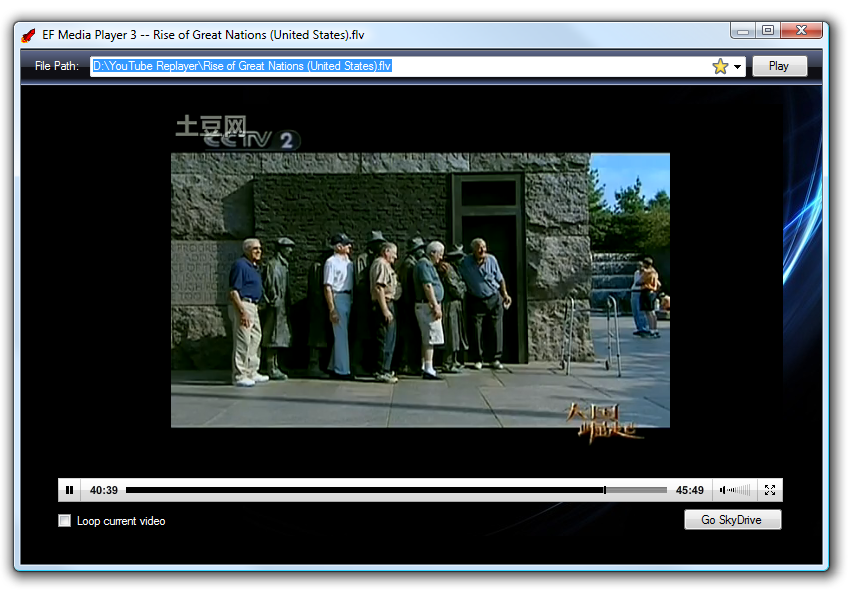
Full Screen Mode
In both the YouTube Re-Player (Desktop) and EF Media Player 2, there is no full screen mode available although there is a “Full Screen” button which basically does not trigger anything. Full Screen mode is previously not necessary because YouTube Re-Player is built for collecting and playing favourite music videos from YouTube site, not watching those videos. In addition, due to the fact that the player was embedded in AxShockwaveFlash object, the “Full Screen” functionality that comes together with the YouTube player cannot be easily triggered.
Full Screen mode become important in EF Media Player because it is an application used to watch videos. Same as YouTube Re-Player (Desktop), the “Full Screen” button in JW Player which is used in EF Media Player does not trigger anything as well. This may be due to the fact that the JW Player is put inside the AxShockwaveFlash object.
Hence, this project is to figure out how to add the Full Screen functionality to the application. In this version, for users using more than one screen, they can also have EF Media Player to be in full screen mode in one of the screens while they are doing their work on other screens. This is something which cannot be done in the YouTube site itself.
History Recording and Video Bookmarking
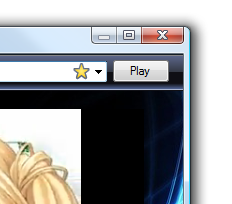
Yellow Star Means Video Is Bookmarked
Another exciting feature implemented in EF Media Player 3 is keeping the videos viewing history. All the video watched previously will be kept and thus the user can play those videos again by choosing them from the drop-down selection box.
For those videos which were watched previously but not watched again in the next run of EF Media Player 3 will be removed away from the history. By doing so, the list will always keep track of the videos that are always watched by the user.
In addition, Video Bookmarking is also an interesting feature available in EF Media Player 3. It enables user to basically bookmark the videos that they like. Those videos which are bookmarked will stay forever in the history list. Hence, the users can watch again next time when they run EF Media Player 3.
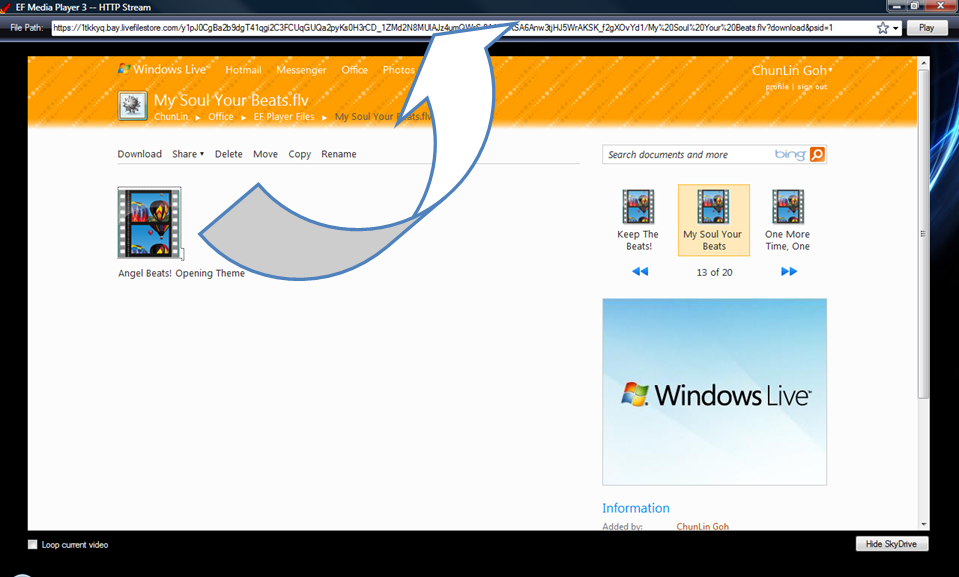
SkyDrive Videos Drag-and-Drop
Users can already watch videos stored in their SkyDrive using EF Media Player 2. In this project, a new functionality is added to the application. It allows users to directly drag and drop the SkyDrive videos into the application and play them. It also allows user to download the videos by directly clicking on them.
SkyDrive Videos Drag-and-Drop
Future Work: What Is the Next Related Video?
YouTube XL is YouTube optimized for the TV. It is made to be simple to use and interact with on big screens. Among all its features, auto playing the next related video is very interesting. However, for some unknown reasons, this feature is not working correctly most of the case. Hence, for the next release of EF Media Player, the focus will be on implementing this functionality which make the application to auto play the next related video. It requires an algorithm which can cleverly analyze limited knowledge and decides the next related video based on those knowledge. After the completion of this feature, EF Media Player can be also be shown on TV as well, just like YouTube XL.
Motivation
EF Player was successfully built in July. It is a media player tool which makes use of the JW Player and the ideas from YouTube Re-Player (Desktop). Because of EF Player, I now can view FLV and MP4 video files easily. Whatever videos that I watched on YouTube and Tudou can be easily converted into FLV files from the browser cache folder. Hence, EF Player provides an alternative to view and store YouTube or Tudou videos locally.
After the creation of EF Player, I started storing many interesting videos that I watched on YouTube and Tudou to my local hard disk. Soon, I found that I did not have too much space to store other stuff in my local machine. This led to the birth of the EF Media Player 2 with a new feature which allows it to connect to SkyDrive.
The following diagram illustrates the idea of having EF Media Player 2 to work together with YouTube from Google and SkyDrive from Microsoft.
EF Media Player 2
Stream Videos From SkyDrive Easily
In order to implement the feature of viewing videos stored on SkyDrive, the EF Media Player 2 requires the Windows Live username and password of the user. After the username and password are varified to be correct, the user can then view the videos stored on the SkyDrive. The videos can be either shared or private. Because of this new feature, the users of the EF Media Player 2 are in fact allowed to share their videos with their friends.
One of the serious problems that YouTube Re-Player series has is that even though the basic info of the YouTube videos, such as their name, description, URL and so on, are stored in the database, their content is not kept locally. Hence, if the videos are removed by the YouTube online, then the videos will no longer be available in YouTube Re-Player as well. EF Media Player solves this problem by transfering the YouTube or Tudou video files to the SkyDrive so that the user can manage the videos without worrying the videos being deleted away on YouTube site.
Actually, there are a few big challenges for implementing this feature. Firstly, the URL of the files in SkyDrive is not fixed. The file URL will be changed every eight hours. So, having a fixed link point to the URL is not a solution at all. Hence, EF Media Player 2, unlike YouTube Re-Player, does not store any URL in local machine. So, the user needs to copy-and-paste the URL of the SkyDrive video file and then pastes it to the File Path textbox in EF Media Player 2 for each time he or she wants to watch the video.
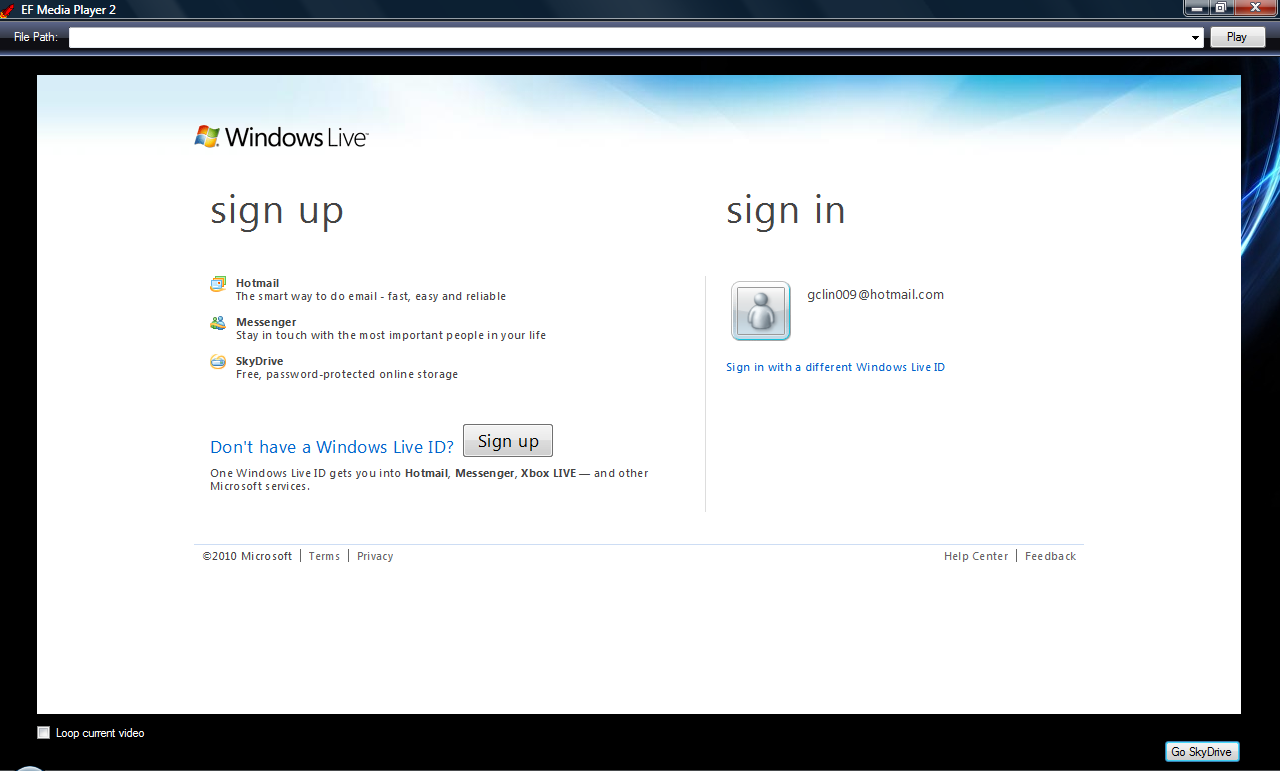
Secondly, it is currently impossible for me to actually pass the username and password to the Windows Live server with the auto-login code. Actually, auto-login has been successfully achieved last month. However, recently Microsoft changed the UI of the login page, so the auto-login function can no longer work. Eventually, the webBrowser control is used to temporarily solve the problem of logging in to Windows Live.
Windows Live Login Page in EF Media Player 2
Playlist Implementation
In EF Media Player 2, the user is able to play not only a single video file each time, but also a playlist which contains more than one video. This is actually the feature offered by the JW Player. Hence, what EF Media Player 2 does is taking in the XML file which contains the list of videos in the playlist and then pass it to the JW Player.
Because of the implementation of playlist, EF Media Player 2 can loop both single video file and playlist. Hence, instead of listening to a song over and over again (like what is done in YouTube Re-Player), now it allows listening to a set of songs and musics over and over again.
Playlist feature also allows me to watch video series and anime series without keep dragging and dropping the files to the player. The playlist feature enables the player to automatically play from the first episode until the last episode of the video series.
Since the playlist files must always stay in the same folder as the JW Player, playing playlist files which are on the SkyDrive is theorectically alright as long as the JW Player file is also on the SkyDrive. However, I have not tried this because the playlist files normally do not occupy too much space on my hard disk. Hence, I am now still keeping the playlist files in local machine.
Future Work
Streaming video from SkyDrive is not that easy actually. Also, Microsoft is still going to improve the Windows Live services in a rapid speed. Hence, I should always keep track of the new updates available, especially the SkyDrive API, in order to make EF Media Player eventually able to work with SkyDrive in a more advanced way.
There is still room for GUI improvement in EF Media Player 2. For example, adding a progress bar to display the progress of the login process. In addition, the username and password validation is actually not yet implemented. Now it always assume the user to give correct username and password for the Windows Live login. Hence, all these will be done in the future version.
In the beginning of last month, I joined a computing camp at Kuala Lumpur. After coming back from there, I was basically busy at maintaining YMCA Volunteer Management System (VMS) together with my teammates. Although I was quite busy, I still contributed time to do GCL Project, my personal projects, as well.
However, due to the fact that the first two activities mentioned above: Computing camp and VMS maintenance were time consuming, there were only two products successfully completed one month after Google Docs Notifier was released. The two products are EF Player and EF Player (Mobile).
The Motivation
In December 2008, I was finding a way to store and play the music in YouTube. Downloading the videos from YouTube seemed like a simple way. However, in January 2009, I found a more simple way to do it, which is using YouTube API. Thus, I built several versions of YouTube Re-Player to do the job.
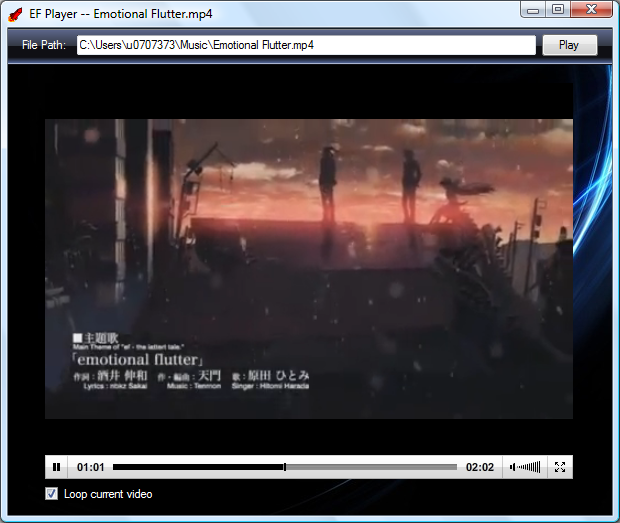
Last month, I couldn’t find the full version of the song Emotional Flutter in YouTube. However, there was one available in Tudou. In this case, YouTube Re-Player couldn’t be used. I remembered that my tutor once told me that browsers, such as Firefox and Chrome, actually downloaded videos to their cache folder when a YouTube video was loaded. So, I tried to look for the cache folder and later found that Chrome actually kept one copy of playing video from Tudou in its cache folder as well.
Since the copy in the cache folder is in .flv format, I had to find another player to play it. Hence, I built a new player: EF Player. I named it EF Player as I started this project because of the song Emotional Flutter.
EF Player
Third Party Plugin: JW Player
After searching on Google for few days, I found a very powerful FLV player known as JW Player (http://www.longtailvideo.com/players/jw-flv-player/). By referencing the code used in YouTube Re-Player (Desktop) that I built last year, I easily built another C# app which worked together with SWF (The JW Player itself is just a swf file).
Supported File Types: FLV, MP4, MP3 + YouTube Online Video
JW Player is so powerful that it can actually play quite a lot of different types of audio and video files. Hence, by doing simple C# coding, I can easily make EF Player supports the following file types: .flv, .mp4 and .mp3. Hence, because of EF Player, I not only don’t have to download FLV player, but also stop using QuickTime Player because most of my audio and video files are in these three formats. Besides playing local files, EF Player can also play online YouTube videos by the help of JW Player. Thus, JW Player plays an important role in EF Player.
Different Approach To The Problem
The reason why I build EF Player and YouTube Re-Player is the same. I want to not only view, but also store my favourite YouTube (or other sites such as Tudou) music videos. In YouTube Re-Player (Desktop), I tries the parallel video downloading approach to solve the problem of viewing YouTube videos offline. However, it is not efficient. The correct way is to store the videos in the local machine, instead of always retrieving videos from YouTube site. Well, since I don’t want to get the video through direct downloading, I have to use the cache to help me achieve the goal of having YouTube videos stored in my computer.
As the browser already caches the YouTube videos that I watched before, now by using EF Player, I can use EF Player to watch the videos again without visiting YouTube site. So, I basically can keep a collection of YouTube videos in local machine so that I can view them anytime, anywhere without the requirement of having internet connection.
EF Player is more powerful than YouTube Re-Player in terms of the number of supported file types and EF Player actually makes replay to be optional, EF Player becomes a threat to another product of GCL Project: YouTube Re-Player. Hence, I currently try not to do anything related to the YouTube API in the EF Player.
However, the replay function in EF Player does not work as good as the one in YouTube Re-Player. EF Player will actually retrieve the video every time it replays it. I have no idea why.
From PC To Mobile
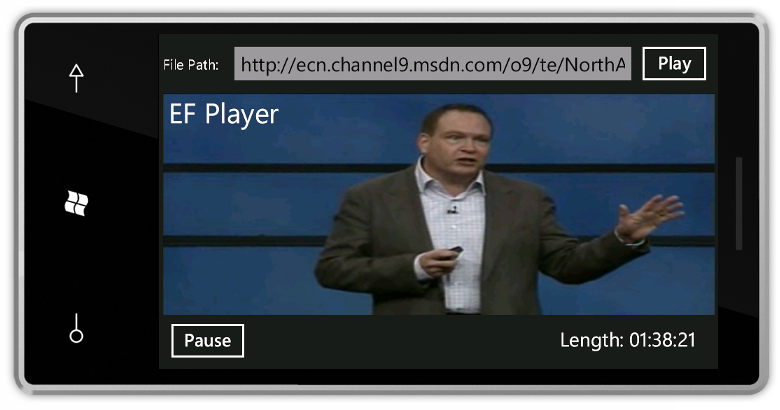
After I finished the EF Player, I tried to build one in Windows Phone 7.
EF Player (Mobile) on Windows Phone 7
It is not a simple task. First of all, Flash is not supported in Windows Phone 7 (poor Flash T.T). Hence, the JW Player cannot be used on Windows Phone 7. Secondly, my computer performance is highly decreased when I deploy my app on the Windows Phone 7 Emulator. So, I usually need to wait after pressing F5 in Visual Studio because the emulator takes time to setup my app. Thirdly, XAML returns. Well, I am still learning XAML, so I am not that pro in XAML yet (although I did a lot of XAML programming in CS3215 project).
Anyway, the EF Player (Mobile) does not support FLV, MP4 and YouTube online videos. It still supports MP3 though. Also, it can now play WMV and WMA files.
Learning While Doing
When I was doing CS3215 project, VS2010 was released few days before the end of the course. So, unfortunately, we didn’t have too much opportunity to use VS2010 in our project. Hence, I decided to learn how to use it in this summer vacation. EF Player and the GCL Homepage (completed in May) are then chosen to be the first three projects done using VS2010. Of course, EF Player is just a starting point. Starting from now, I will try to explore VS2010 more.
This is the first time I try out the third party tool in GCL Project, I think. Fortunately, the API documentation of JW Player is well written. Hence, I can easily learn how to make my C# code work together with their API.
This is also the first time that I build application for Windows Phone 7. As I said earlier, it is not that simple because it is a bit different from building app for PC. There are a lot of stuff working in PC cannot be run on Windows Phone 7. However, it is fun to see your app running on mobile phone, isn’t it? =)
Auto Rotate Feature (Thanks WP7)
Future Work
Summer holiday is going to end soon. However, I still need to plan the future work for EF Player Project.
First, learn how to improve it by adding in more useful features. Here, I try not to give any example of “useful features” that I want to add.
Second, make it to be another open source GCL Project. However, due to the fact that YouTube Re-Player is not yet an open source project and EF Player is more powerful than YouTube Re-Player, I will only publish EF Player after YouTube Re-Player is made open source. In addition, I am using third party app in EF Player, so I am not sure whether I’ll be sued if I publish EF Player.
Third, improve EF Player (Mobile) because there are still some features missing in the app. =)




 cuteprogramming