Building Mobile Version for My ASP Website

I enjoy watching YouTube on my Android because I don’t sit in front of my PC for a long time. I found that the mobile version of YouTube was quite simple, straight-forward and easy. It is very easy to look for videos in Subscriptions, personal Playlists, History and Favourites. I like how YouTube handles playlists which are very long (having more than 12 videos in it). Instead of showing all the videos in a long playlist, the mobile version of YouTube shows only the first few. The user then has to click on the “Show more videos” button at the bottom of the page to view more of the playlist. This is a bit troublesome for the user but that feature helps in showing the playlist videos page faster. This feature is introduced because of the smaller display we have in mobile phones.

Usability
Recently, I am doing the mobile version for an existing ASP website. Learning from YouTube mobile and some other mobile website online tutorials, I introduce a few changes in the mobile version of the ASP website:

  1. Remove large images, especially not-so-useful advertisement pictures shown on the original site and background images. This helps in reducing the bandwidth;
  2. Make the mobile version of the website to be single column. The original site has a multi-column layout. This makes the user needs to scroll a lot (horizontally and vertically) on the phone just to view the entire web page. The what-the-hash moment comes when the page contains too much unnecessary content, and the user has to spend time on scrolling and finding the important info on the page;
  3. Increase the click-able area. It will never be a good idea to ask user to zoom in to the page just to click on the tiny check-box or radio button. So, I have a large table cells there to replace the radio buttons and check-boxes so that user has a wider area to click on. Drop-down list can also be used to replace radio buttons because it is easier to choose item from the drop-down list in the mobile phone;
  4. No Flash and Silverlight. Removing all the animation thingy is a good choice;
  5. Build a fluid layout. Since different types of the mobile phones have different screen size, so it is good to fix the width of the display area;
  6. Have a “Back” button to go to the previous page. The original site has a section where the user has to go through several steps to get to see their results. So, a “Back” button is important in section like this on mobile version.

Besides, the links should be avoided for any important call to action. YouTube mobile still has this problem. Previously, they even placed the “Sign out” link very close to the “Show more videos” button. So, there are many times I accidentally clicked on the “Sign out” link. In the latest version, YouTube mobile has changed the position of the “Sign out” link. However, it is still placed not far from the frequently used buttons and they still do not ask for conformation when user clicks on the “Sign out” link. Haiz…

YouTube Mobile Not-so-good Design
The "Sign out" link in YouTube mobile is still close to the "Show more videos" button. Argg...

Also, I am thinking of having the functionality of allowing the user to view the address on the map on smartphone. This is to help user find out the actual position of the place easily. Allow users to automatically call the number when they click on the number on the web page is also helpful. I think some users will go crazy if they have to first note down the number on paper and then type the number on the phones just to call the person.

Detect the Mobile Device
Since it is an ASP website, I decided to use ASP to do the device detection.

MSDN shows a very easy tutorial to do that: http://msdn.microsoft.com/en-us/library/fhhycabe.aspx. The tutorial shows how to use Request.Browser[“IsMobileDevice”] to check if it is a mobile device that is accessing the page right now. According the a discussion thread on the StackOverflow (http://stackoverflow.com/questions/1829089/how-does-ismobiledevice-work), by calling Request.Browser[“IsMobileDevice”], the runtime uses regular expression from the *.browser files to match against the incoming User-Agent string. However, this does not work at my side.
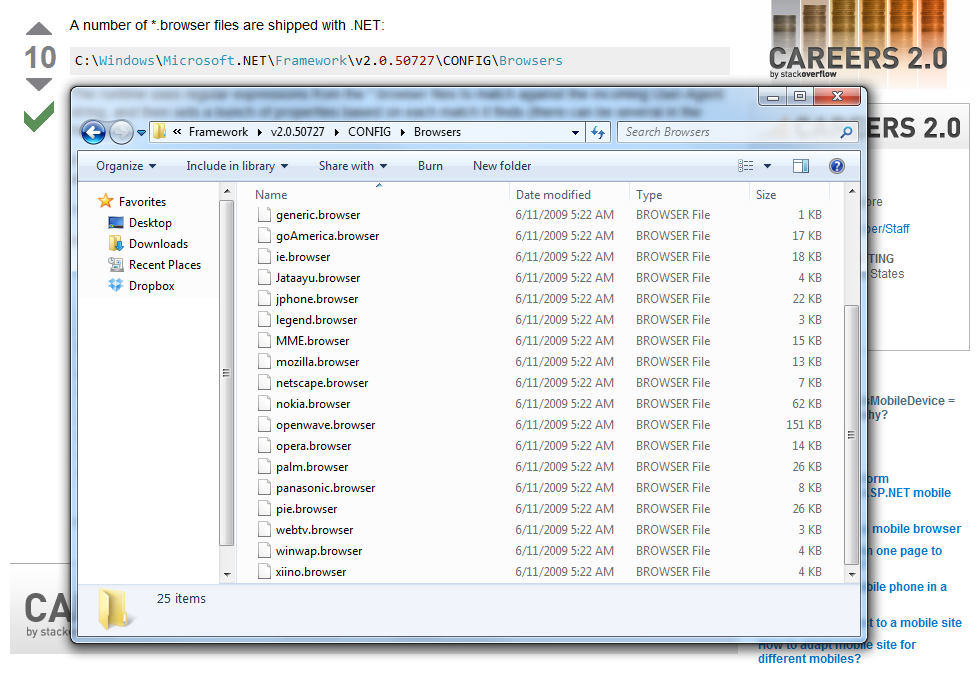
The *.browser files shipped with .NET
I then tried another solution found on another thread ASP.NET Forums (http://forums.asp.net/t/1175390.aspx):

An advanced version of code to check the device being used
The method suggested by anantjains uses several stuff to check: IsMobileDevice, HTTP_X_WAP_PROFILE, HTTP_ACCEPT and HTTP_USER_AGENT. The code actually works when I use User Agent Switcher on Firefox to test it. Yup, so I will use the code for now.

Meanwhile, according to a page in ASP.NET (http://www.asp.net/mobile), there is a third-party project on detecting the mobile devices, including those which are just released recently. The project is an open-source project and it is called 51degree.mobi Foundationhttp://51degrees.codeplex.com/. I have not tried it yet though.

Testing Mobile Website on PC
I usually tested my ASP and C# code on localhost first before deploy it on the server. So, for the mobile ASP website, I need a way to test it on my PC also.

True mobile browsing can be done on Firefox with the help of User Agent Switcher add-on (https://addons.mozilla.org/en-US/firefox/addon/user-agent-switcher/). With just the User Agent and a short description in the User Agent Switcher, a new user agent option can then be added to the list. By switching to the correct mobile user agent, the mobile version of the page can be viewed properly.

User Agent Switcher Add-on for Firefox

There is also an online article about testing mobile website on Firefox using this add-on and Modify Headers add-on: http://mobiforge.com/testing/story/testing-mobile-web-sites-using-firefox.

Entertainment Connect: Dropbox’s Media Player

Background
I use Dropbox because it is very easy to share files with friends and access my files anywhere without the need to carry my external hard drive around. When I was a Computer Science undergraduate in NUS, I teamed with some of my elite friends to develop a online light-sync sync tool for Dropbox (Reference: http://onesync.googlecode.com). Since then, I not only use Dropbox, but also try to build tools which are using it.

Syncing files across two computers is a great feature, but I am also interested in another exciting feature of Dropbox, i.e. storing files on the clouds to enable file access from any computer with the Internet connection. I listen to music a lot. I keep my favourite MP3 songs on Dropbox so that I can listen to them in the office and at home. Thus, I thought it would be great if there is a media player specially designed for users who store their music and videos on Dropbox.

Related Work Done by Other People
SugarSync, a competitor of Dropbox, already has its own music player (Reference: http://www.sugarsync.com/blog/2008/09/08/introducing-sugarsyncs-music-player/). It can be launched from the SugarSync File Manager. Thus, SugarSync users can basically build their own favourite music playlist on SugarSync and then play the songs whenever they are, as long as they have Internet access.

Meanwhile, iTunes in the Cloud and iTunes Match also provides features similar to SugarSync Music Player. iTunes in the Cloud allows users to purchase the songs and listen to them on iOS mobile devices, PC and Mac. With iTunes Match, users are able to match their existing iTunes library with the ones in Apple’s iCloud. I don’t really use it because I cannot make iCloud work in my Windows Vista PC and I don’t use Apple products. Also in order to use iTunes Match, users have to pay a subscription fee of USD24.99 per year. Em… I don’t think there is a need for me to pay just to upload songs in my personal music collection (which are mostly anime songs) and download HQ versions of them.

Last year, Google became one of the online music streaming service providers after the release of Google Music. For Google Music, it supports streaming music to not only PC but also Android devices. Ah-ha, that seems like a good news for me because I have an Android phone! However, the service is currently restricted to only US residents. Haiz… So, I can’t use it also.

So, how about a Dropbox, which is also a file hosting service provider? Unlike iTunes and Google Music, Dropbox is available for free in Windows, Mac, Linux, Android, iPhone and iPad (Reference: http://www.dropbox.com/)! However, it currently does not have an online music player like the one in SugarSync. Thus, as a Dropbox user, I decided to build one.

Introducing Entertainment Connect
Entertainment Connect is the media player that I build for playing MP3 and MP4 files stored on Dropbox.

Entertainment Connect

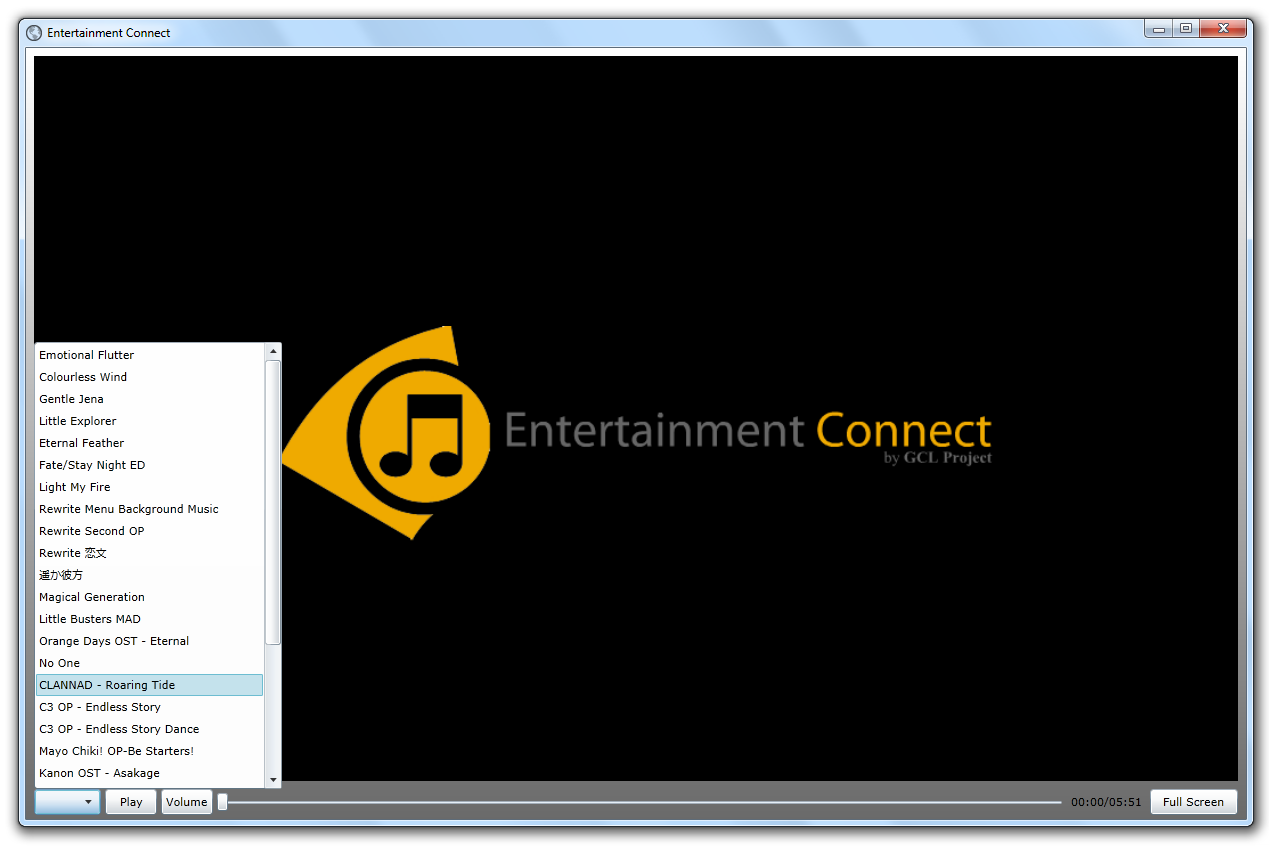
Entertainment Connect is a simple web-based Silverlight app. It has a list of songs and videos for the user to choose. The list is manually generated by the users by providing a XML file in the Dropbox folder. Thus, in order to enjoy their favourite music and videos anywhere, the user just needs to put three things: Entertainment Connect folder, playlist and the songs/videos in the Dropbox Public Folder.

Entertainment Connect App

Also, although web-based Silverlight app cannot run on mobile devices, even on the Windows Phone 7, I can still get the songs downloaded to my Android phone easily since the files are stored in the Dropbox Public Folder.

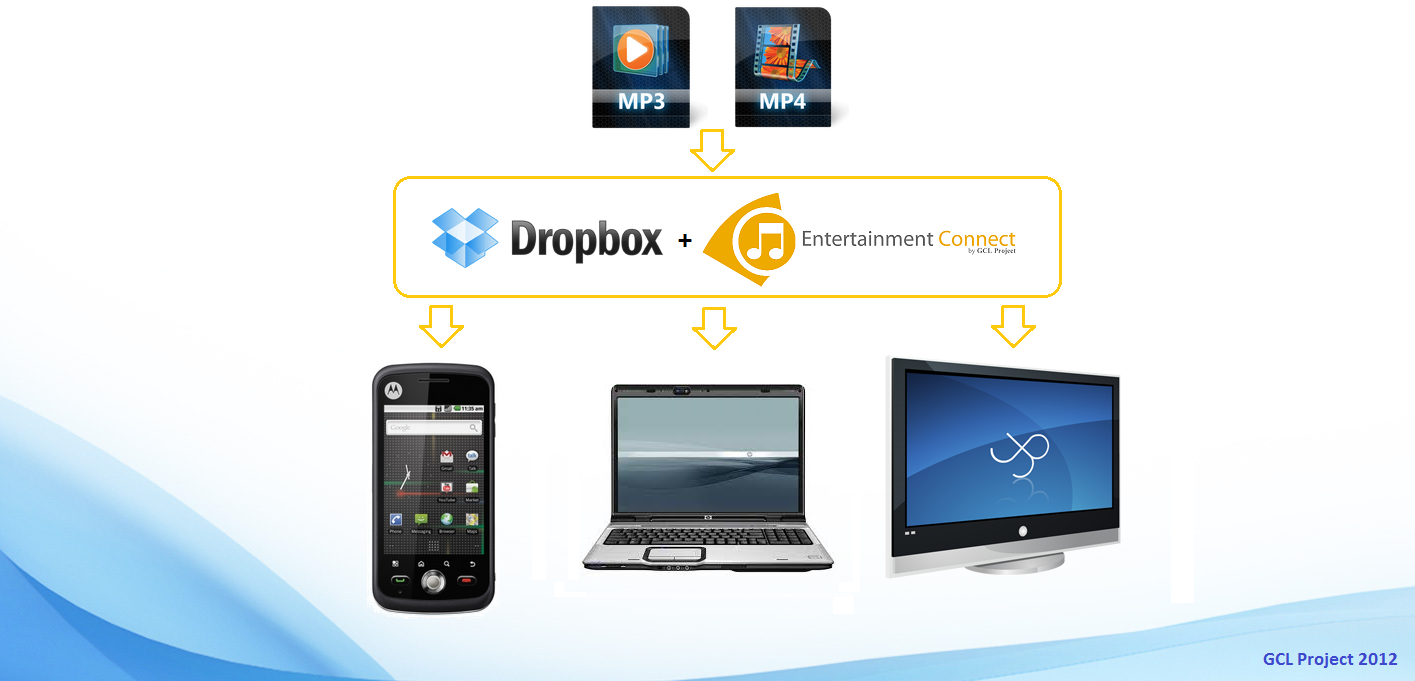
Dropbox and Entertainment Connect
Dropbox and Entertainment Connect bring your favourite songs and videos together with you

Hence, Entertainment Connect provides an alternative for Dropbox users (currently just me) to listen to favourite songs no matter where I am (on train, on bus, in office, at home, blah…). Oh yeah, I can also watch the videos stored in Dropbox on my home TV using Entertainment Connect. =D

Entertainment Connect on TV
Watching StarCraft II video on TV at home using Entertainment Connect

ASP Localization: Having Fun with Different Languages

When working as a software developer in multi-cultural countries, like Malaysia and Singapore, localization of your app is very important sometimes. To reach out more users, it’s better if your app can communicate with the users no matter what language they speak.

Resource Files for ASP.NET
I tried doing localization for OneSync two years ago when I was developing its third version. The localization for C# desktop app is easy and straight-forward. It just needs to have different resource files for different languages and then retrieve the information from the files based on user’s selected language.

So, how about ASP.NET? It is basically the same thing. Resources are available in ASP for web pages contents localization as well (Reference: http://msdn.microsoft.com/en-us/library/ms228208.aspx). In ASP, there are two types of resource files: Global Resource Files and Local Resource Files. According to MSDN (http://msdn.microsoft.com/en-us/library/ms247246.aspx), global resource files are available to any web page in the web site and local resource files are only associated with a single web page. Does that mean we should store the resources that will be used in more than one web page under the Global Resource Files? I guess so. However, I once tried putting all my localized texts under the Local Resource Files folder. It did not actually stopping me from retrieving the localized texts in the local resource files from more than just one web page. I’m still not sure why it’s so.

Where to Store Language Setting?
One place to store the user language setting for your ASP website can be cookies. This is because information about user language selection should be saved permanently. Actually it’s not really permanent storage because the Expires field of a cookie must be set. If it’s not set, then the cookie will be treated as a session, meaning the cookie expires when the session ends. Thus, no expiry date means the cookies won’t be stored in the user’s hard disk at all (Reference: http://msdn.microsoft.com/en-us/library/ms178194.aspx).

To create a new cookie, I currently use the following codes.

Response.Cookies[“language”].Value = “Bahasa Melayu”;
Response.Cookies[“language”].Expires = DateTime.Now.AddDays(365);

Here, I make the cookies expiration to be one year later of its creation.

To read the user language setting from the cookie, I just need to use the following code: Request.Cookies[“language”].Value and then I can happily get the user language selection.

Yup, that’s all with my first attempt in ASP localization.

OneSync: The Fourth Version

OneSync is a synchronization tool to maximizes lightweight synchronization experience and provides both offline synchronization through thumb drive and online synchronization through Dropbox, a file hosting service (Resource: Wikipedia). It was the first app developed by the CodeDroids team from National University of Singapore. It was started as an open source project under GNU General Public License (GPL) version 3 in 2010 and hosted at Google Project Hosting (http://onesync.googlecode.com).

In 2012, this project became one of my personal hobby projects, the GCL Project. Thus, I only blog about OneSync now.

Why OneSync?
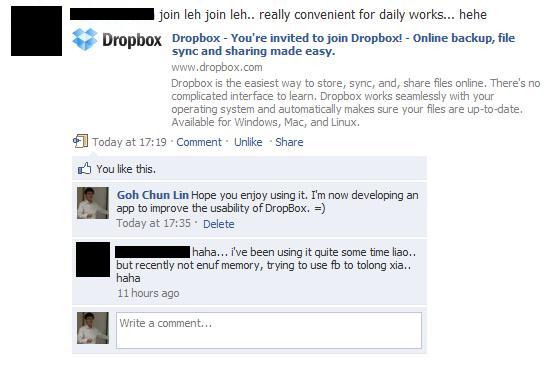
One day, when I was browsing through Facebook, I noticed a link posted by my friend.

OneSync Motivation
One of the Reasons Why OneSync Project Was Started

For those who are familiar with Dropbox should know that whenever someone signs up with Dropbox through a link we sent them, Dropbox will credit both us and the new user 250 MB of free storage. This is also famously known as the Referrals feature. Thus, my friend posted the Dropbox link on his Facebook wall to easily get people signing up as Dropbox new user. The reason was, as he said, he required more space on Dropbox.

At that time, my CodeDroids friends and I were still in the stage of doing some research on Dropbox to see if we could come up with an app which improved Dropbox usability. Then when I read my friend’s Facebook post, I was like, “Aha!” Why didn’t we build a software to help solving my friend’s problem? He was using Dropbox just to sync files between two of his computers. So, was there really a need to backup synced files on Dropbox until they occupied so much space on Dropbox?

In the following day, I talked about the idea of Light-weight Sync during CodeDroids meeting. Light-weight sync is basically just a way to removed files from intermediate storage, for example Dropbox, once they are synced in two computers. By doing so, we would make sure the usage of Dropbox to be low.

Yup, that basically marked the beginning of OneSync development days.

Improvement in OneSync 4

OneSync 4 Logo

The improvement work on OneSync will never stop, hopefully.

In OneSync 4, the focus is on fixing two serious bugs found in the previous version (Issue 156 and Issue 154). They caused problems in Sync Preview by displaying wrong preview results and files couldn’t be deleted. In fact, one of the bugs was reported by a staff from Microsoft when OneSync was submitted to Microsoft for review. However, since she couldn’t give us a detailed description of the bug at that time, we didn’t continue on finding out the problem.

Besides bug fixing, a improvement done on OneSync is the GUI improvement. Finally, I found the way to implement drag-and-drop ListView item in WPF (My blog post about this: Drag-and-drop Reordering in WPF ListView). I basically just followed the instructions shown on Drag and Drop Items in a WPF ListView – CodeProject® written by Josh Smith.

Drag-and-drop Feature in OneSync 4

These are basically what I did in OneSync 4.

The Path to Better App
As promised, I will continue working on OneSync. Since one of my CodeDroids teammates once said, “We cannot ignore the requests from our users. If there are bugs, we should fix them and keep making our app better.”

Finally, I’d like to thank those who have showed interest and downloaded OneSync. Thanks for your support since two years ago because your support is my motivation to continue working on OneSync as well. =)

OneSync 4 Download Page: http://onesync.googlecode.com