Export Scheduled Report in an Excel Spreadsheet as an Email Attachment

People love reports. I do not know why but most of the time, the systems that I am working on always have this report module. The requirements of the report are usually given by the administrative staff. So normally the admin will always give me a sample of existing report as a reference during the development of the report module.

Previously, the admin was happy with just one report module giving them the ability to view reports by using their login id and password. After that, they wanted the function to export the report to Excel so that they could immediately work on the data analysis. Soon, they realized that logging in to the system just to view the report was a bit stupid. Thus, they required an email to be sent to them in midnight with the report in Excel format attached in the email.

Admin Loves Reading Reports (Photo Credit: Kono Aozora ni Yakusoku o)
Admin loves reading reports. Image Credits: Kono Aozora ni Yakusoku o

Although there is this cool stuff called Excel Interactive View which can generate Excel table and charts of  an HTML table on the fly, I don’t really like it. The generated Excel table looks very complicated with colourful bar appearing at the background of the cells containing numbers.

Also, as shown in the following screenshot, the Excel Interactive View does not do a good job because contact number and tutorial class number are wrongly taken as numerical data used to generate the charts. Hence, Excel Interactive View is great and convenient but it does not work in all kinds of reports.

The look-and-feel of Excel Interactive View can be simpler.
The four charts shown at the right are meaningless already.

In ASP.NET, I can have my own “Export to Excel” button by adding in the following codes in the Page_Load method of a web page.

Response.ContentType = "application/vnd.ms-excel";
Response.AddHeader("Content-Disposition", "attachment; filename=\"Sales_Report.xls\"");
string excelBody = "";

excelBody +=
 "<head>" +
 "<meta http-equiv=Content-Type content=\"text/html; charset=utf-8\">" +
 "<style>" +
 "<!--table" +
 "br {mso-data-placement:same-cell;}" +
 "tr {vertical-align:top;}" +
 "-->" +
 "</style>" +
 "</head>";
excelBody += "<body>" + <The HTML table goes here...> + "</body>";
excelBody += "</html>";
Response.Write(excelBody);

Then, I just need to redirect the user to this page when the “Export to Excel” button is pressed. This is the code used when admin staff was satisfied with just the functionality to export their reports to Excel.

Soon after that, I found another great library to help generating Excel spreadsheet in C#. It is called excellibrary, which is able to be downloaded on Google Code. Thanks to the library, I am able to do a system which will automatically send out an email attached with Excel report.

To do that, firstly, I need to generate the report in Excel format with the help of excellibrary.

Workbook workbook = new Workbook();
Worksheet wsReport = new Worksheet("Sales Report");
int startingRow = 0;
wsReport.Cells[startingRow, 0] = new Cell("Column 1 Row 1");
wsReport.Cells[startingRow, 1] = new Cell("Column 2 Row 2");
...
for (int i = startingRow + 1; i < 200; i++)
{
    wsReport.Cells[i, 0] = new Cell(" "); // Some dummy empty cells
}
workbook.Worksheets.Add(wsReport);
workbook.Save("C:\\ExcelOutputs\\Sales_Report.xls");

The reason for adding some dummy empty cells in the end is because Excel will complain that it found unreadable content in Sales_Report.xls when the number of cells containing real data is too small. This is a reported issue in the excellibrary project and one workaround suggested by the users is to increase the file size by adding more rows and columns with a space.

Secondly, I send out the email by using the following code.

string sSmtpServer = "smtp.gmail.com";
MailMessage myMessage = new MailMessage();
myMessage.Body = "The report in Excel format is attached in this email.";
myMessage.Subject = "Sales Report in Excel!";
myMessage.To = "...";
// Add the file attachment to this e-mail message.
myMessage.Attachments.Add(new MailAttachment("C:\\ExcelOutputs\\Sales_Report.xls"));
myMessage.Fields["http://schemas.microsoft.com/cdo/configuration/smtpauthenticate"] = 1;
myMessage.Fields["http://schemas.microsoft.com/cdo/configuration/sendusing"] = 2;
myMessage.Fields["http://schemas.microsoft.com/cdo/configuration/sendusername"] = "...";
myMessage.Fields["http://schemas.microsoft.com/cdo/configuration/sendpassword"] = "...";
myMessage.Fields["http://schemas.microsoft.com/cdo/configuration/smtpserverport"] = "465";
myMessage.Fields["http://schemas.microsoft.com/cdo/configuration/smtpusessl"] = "true";
myMessage.From = "...";
myMessage.BodyFormat = MailFormat.Html;
SmtpMail.SmtpServer = sSmtpServer;
SmtpMail.Send(myMessage);

Finally, I just need to create a scheduled task to run this little program daily.

Yup, this is how my automatic report exporting and emailing system is done in C#.

Chinese New Year Special: LAMP and CodeIgniter

10 February is the Chinese New Year. I went back to my home in Malaysia  As a multiracial country, Malaysia celebrates this festival with great fanfare as well. So, in the past few days, I got to play and eat a lot without worrying about my work too much. Also, I had more time to work on some personal projects. =D

Chinese New Year dinner!

Since it’s a new year, I decided to work on a totally new project with PHP, a language that I have not been using for about one year. With a few years of experience on using PHP and Drupal, I would like to try a new PHP web application framework which is known as CodeIgniter. I first heard it from my friend last year but I only got the time to play with it now.

Install LAMP

After Windows 8 on my laptop was expired, I changed to use Fedora a few weeks ago. Hence, I am a beginner in the world of Linux. Before working on the PHP project, I have to install the LAMP programs, like Apache, MySQL and PHP on my laptop again.

There are some helpful tutorials online to install three of them. Here is just a list of websites that I referred to during the installation process.

Hello-world Project: Hack Life

CodeIgniter is using MVC design pattern, something I never heard of before when I was developing web app using Drupal. Drupal does not comply with the MVC design. I just googled and found that Drupal is actually using something called PAC (Presentation-Abstraction-Control) design pattern.

There are very simple and detailed getting-started tutorials available on CodeIgniter website. After going through the tutorials, I can already build a simple web app. The app is called Hack Life which will show a quote randomly retrieved from the database.

Randomly Retrieved Quote on Hack Life
Randomly Retrieved Quote on Hack Life Homepage

So, in this Chinese New Year, I not only got to eat nice food, watch great fireworks, but also learn some new stuff. =D

Validation of Viewstate MAC Failed

This is a story of me and my friend fixing a problem occurred in one of my ASP.NET web applications. It happened last year. One day, when he browsed my new web app, he realized that there was a very strange server error. It said “validation of viewstate MAC failed”, as shown in the following screenshot.

Server Error: Validation of Viewstate MAC Failed

When he showed me this error, I was like what the hash is going on. I spotted the words “Web Farm” and “cluster”. However, I’m not using any web farm and cluster. Also, what is “viewstate MAC”?

Viewstate and MAC

What is Viewstate?

According to MSDN, Viewstate is a mean to store information directly in the web page so that the page and control will not be lost with each round trip. This is because a Web application is states and thus a new instance of the Web page class will be created each time the page is requested from the server. So, Viewstate can be used to store values that have to be retained during postback, for example the value entered by the user into a textbox on the web page.

By default, Viewstate data is stored in a hidden field on the web page. However, it is very easy for a malicious user to get access to the contents of a hidden field and modify it. Thus, there is a need to secure our Viewstate data. The way it’s done is through creating a hash value of the Viewstate data with MAC (Machine Authentication Code) key and using the hash to check whether the data has been corrupted or not.

Solution

Okai, now I sort of knowing what Viewstate is and why MAC is mentioned in the error message.

The next step will be finding the solution to this problem. You should be able to find a list of articles and forum threads discussing about this problem on Google.

The first article I found is a blog post “Validation of viewstate MAC failed error” on MSDN. One of the workarounds suggested is setting enableEventValidation to false and viewStateEncryptionMode to Never. This method is basically just throwing away the viewstate validation and opening a hole in the security of the web app. If I use this method in my work, I guess I will be beaten by my manager.

Example of Getting Beaten (?). Image Credits: Rewrite

The second workaround mentioned in the article can only work if the problem happens because the postback occurs before the EventValidation field has been rendered. This is no longer an issue in the modern ASP web app. The third and fourth workarounds are also just re-ordering the position of the hidden field storing Viewstate data to the beginning of the form to prevent postback happens before the hidden field is rendered. So, they do not really help.

For my case, the problem is most probably caused by the browser caching. My friend’s browser was using the cached version of the web pages. However, expecting the users to clear their cache and cookies is totally not acceptable. So, the solution I chose is adding a machine key to web.config. There are also online tutorials on how to do that, for example an article written by Adam in 2009, “How To Fix the: “Validation of viewstate MAC failed” Error (ASP.NET MVC)“. The online tool that I use to generate a random machine key is http://aspnetresources.com/tools/machineKey (EDIT on 11 Dec 2014: This link is reported to be dead by one of our readers, Naveen, in the comment section below. You can now try https://www.insitesystems.com/services/tools/machine-key-generator.html).

<configuration>
    ...
    <system.web>
        ...
        <machineKey validationKey="..." decryptionKey="..." validation="SHA1" decryption="AES" />
...

Yup, so that is basically how I solved it until someone hacks my server and gets to know the value of my machine key. =P

p/s: My friend was staying at Hong Kong and thus I named this problem the “Hong Kong Friend’s Problem”.

Using Session in ASP.NET

Recently I encounter some problems while using Session in my ASP.NET web application project. Although most of the problems have been solved, there are still rooms of improvement to gain more stability because it should be stable enough to use for real-world high-load business transactions.

Before working on the future improvement, I would like to write down stuff that I learnt from the project as well as interesting and useful articles that I found so that I can share them with my friends.

By the way, the project is basically about building an online shop that sells anime products, for example anime key chains. Also, there would be white-label service available. This means that we use the same website for other local anime shops to re-brand the website so that it appears as if they made it. Thus, the way I differentiate between the sources of transaction is using Session variables.

Phone_Strap
From my anime product collection: A phone strap featuring Saya Tokido from Little Busters! EX.

Why Session State?

HTTP is a stateless protocol, as we all know. Thus, we can’t store client information on a page. Nowadays, there is a newly available option that allows us to work against stateless nature of HTTP. It is the HTML5 Web Storage. However, personally I don’t like to spend time on figuring how to make my web application to be backwards compatible.

One of the main reasons why I choose to use Session State is because it is extremely easy to implement and any type of object can be stored in the Session. For example, I can just throw the entire online shopping cart into one Session variable easily with just one line of code.

Session["dsCart"] = new ShoppingCart(); // Store the shopping cart into Session

In addition, Session State is secure and the actual state is hidden from the client because it is stored on the server side.

Problem with Safari + Iframe

The way I do white-label website is that I provide the URL of the web application homepage to the anime shops. What they need to do is just embedding it in an iframe.

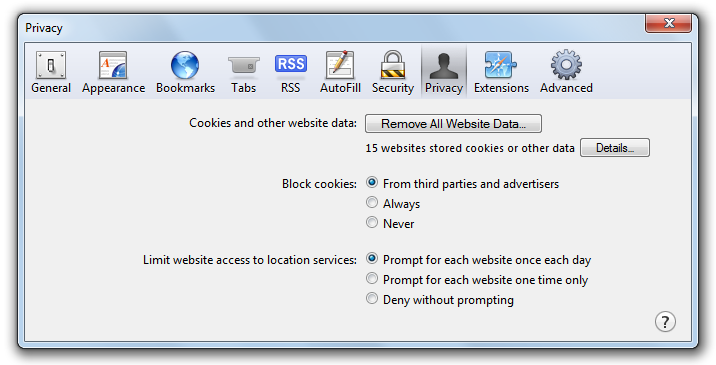
Everything worked fine until we realized that it did not work in Safari. The reason is because Safari has enforced its cookie policy with 5.1.4. By default, Safari blocks cookies from third parties and advertisers. But wait… Why should I care about the cookie policy when I am just using Session State?

Safari - Privacy Settings
By default, Safari blocks all cookies coming from third parties.

The reason is very simple. The Session State relies on the cookies. Of course, there are cookieless sessions available and cookieless sessions are there because users may have disabled the cookies on their browsers. However, cookieless session has a security problem because it makes the session ID easier to be retrieved.

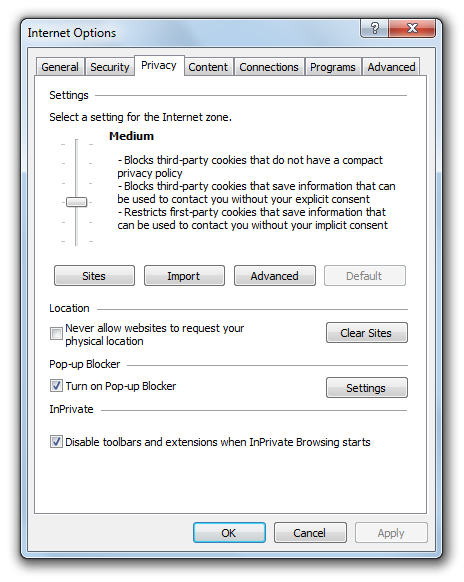
In fact, IE9 has the same problem as well. The Privacy Settings in IE9 is by default set to “Medium” where all third-party cookies are blocked. However, due to the fact that only those which do not have a compact privacy policy will be blocked, I can easily solve it by having IIS to send a compact policy in HTTP header.

IE9 Privacy Settings
IE9 Privacy Setting is set to Medium, by default.

For Safari, having a compact policy does not help at all. Safari can no longer be tricked with that since the release of version 5.1.4. Fortunately (or maybe unfortunately), there are some (ugly) ways to solve the problem. For example, the one I found on StackOverflow is using JavaScript to open a new window to set a cookie for the domain (used in iframe). I do not like this solution very much. However, so far, I have not found any better way yet. So, no choice, I have to continue using it.

Session Timeout Issue

Another problem that I encountered in this project is the session timeout. If our customer does not refresh or make a server request by clicking on a button, for example, within a certain period of time (usually it is 20 minutes), then the sessions will end. Hence, we will loss all the information stored in the Session variables, including the shopping cart. Even worse, part of the system will just not work because Session variables are now all storing null value.

Hence, in the CodeBehind of all the web pages, I have this method, ShowSessionTimeoutMessage(), which takes in the Session State object as parameter and returns a JavaScript code which will be taken care by ScriptManager.RegisterClientScriptBlock. What it does is basically just prevent user from using the system once the Session has ended. This is to avoid the null reference errors in the application when the Session variables are all null. Also, it will show a message telling the user to start his/her online purchase from the first page again.

public static string ShowSessionTimeoutMessage(System.Web.SessionState.HttpSessionState session)
{
    string msgSession = "Your Session Has Timed Out";

    // Time to block GUI, 10 seconds before session ends
    int int_MilliSecondsTimeReminder = (session.Timeout * 60000) - 10000;

    return @"
        var myTimeReminder; 
        clearTimeout(myTimeReminder);
        var sessionTimeReminder = " + int_MilliSecondsTimeReminder.ToString() + @";
        function doReminder(){ $.blockUI({ message: '" + msgSession + @"' , 
        css: {border: 'none', padding: '15px', backgroundColor: '#000', '-webkit-border-radius': '10px', 
        '-moz-border-radius': '10px', opacity: .5, color: '#fff', 'text-align': 'left', cursor: 'default', 
        top: ($(window).height() - 600) /2 + 'px', left: ($(window).width() - 600) /2 + 'px', width: '600px' }
        }); }
        myTimeReminder=setTimeout('doReminder()', sessionTimeReminder);";
}

Here, I am using the jQuery BlockUI  plugin from M. Alsup to prevent user from interacting with the web application after Session ends.

Future Work

Personally, I do not like how I solve the Safari cookie policy problem. Thus, I will be finding better ways to solve it in the future. Also, if possible, I will try to make my entire ASP.NET web application to not use Session variables at all. Then I will not have all the problems mentioned above. Ah-ha!