In one of our projects, we have a .NET web service. On the client side, we have phone running Android which will consume the web service. Hence, the first option that came to my teammate’s mind is to use kSOAP2, a lightweight SOAP client library for Android.
Problem
When we first tried out our Android app, we realized that it worked fine if the app was calling a web method with no parameter. However, when the app called another web method with one or more parameters, the web service complaint that the value it received was always null.
My colleague discovered this issue around 5:40pm, 20 minutes before I could leave the office. I always hope that I can enjoy a sunset on my way back from office. Hence, I decided to help him settle that little problem within the 20 minutes. Otherwise, I might miss the sunset for the day.
I left the office around 6:10pm so I still had chance to enjoy the sunset.
Anyway, this is actually a good opportunity for me to learn a bit about kSOAP and how Android app communicates with .NET web service. So, it’s fun to get involve in some other projects which you are not working on usually. =)
As a software engineer, it’s always fun when trying out to build some new technology and new tool. It all started with a question from my colleagues, “Is it possible to build an app for Samsung Gear?” The answer is yes, but how? I had never built an app for Android Wear and I didn’t even own any smart watch. Hence I decided to give it a try.
First View
I built the app using Android Studio.
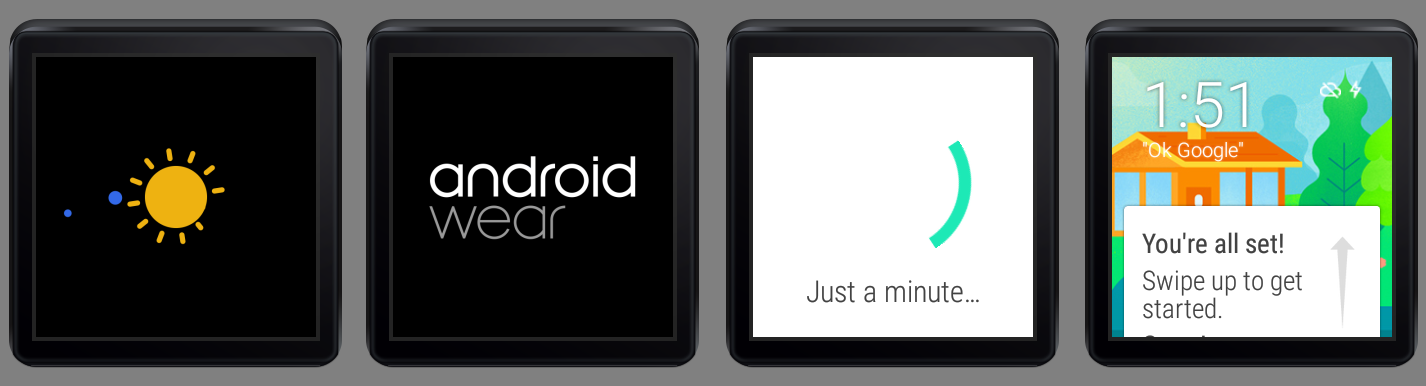
I like the launching animation on the Android Wear emulator. Below are some amazing screenshots taken.
Android Wear Emulator launched!
In fact, I could not get the emulator in the first place. When I tried to launch the Android Wear Square emulator, it threw the following error messages on Android Studio.
emulator: ERROR: x86 emulation currently requires hardware acceleration!
Please ensure Intel HAXM is properly installed and usable.
CPU acceleration status: HAX kernel module is not installed!
Hence, what needed to be done was just installing the Intel x86 Emulator Accelerator (HAXM) installer under the Extras folder in Android SDK Manager.
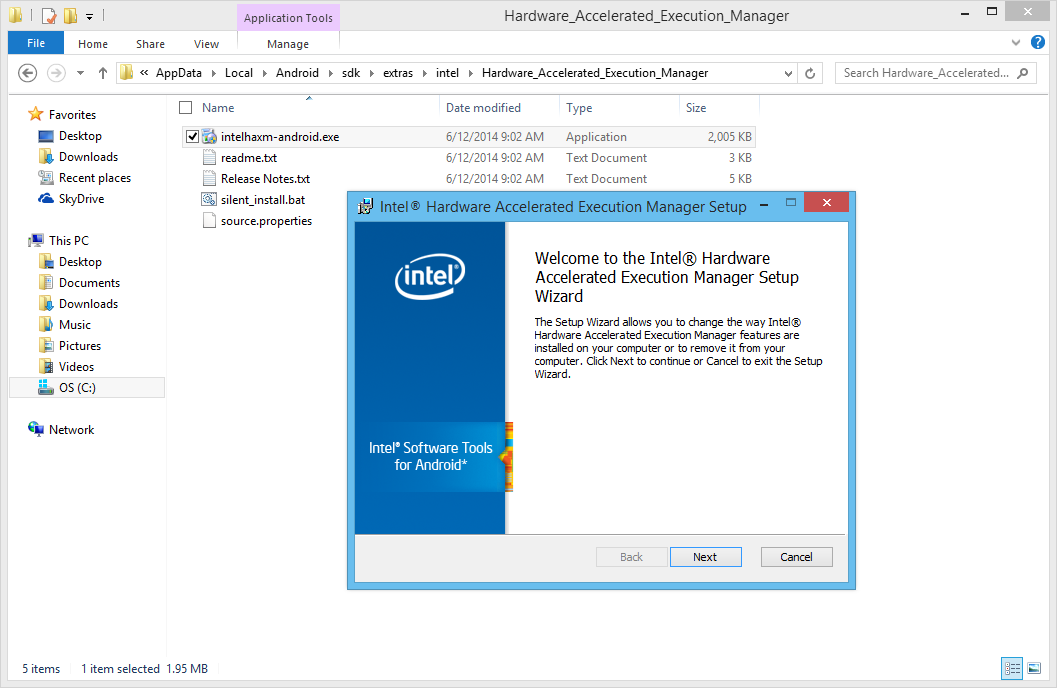
After the installation is done, there is also a need to run the installer located in the Hardware_Accelerated_Execution_Manager folder. Once it is installed on the computer, the Android Wear emulator should be able to be launched!
The Intel Hardware Accelerated Execution Manager Setup
First Draft
Currently, I haven’t finished my first app for Android Wear, Gym Challenge. However, there are already some screenshots available for it which demonstrates the look-and-feel of the application on the Android Wear Square emulator.
Gym Challenge homepage
One of the features in Gym Challenge is to keep track of the user’s time spent on gym.
Meanwhile, I still have no idea on how to try out the functionality to get the heart rate of the user without connecting the emulator to the real smart watch. So, things like SensorManager mSensorManager = ((SensorManager)getSystemService(SENSOR_SERVICE)); is never tested on my app. =P
Anyway, this is just a beginning of my Android Wear app development journey. Feel free to comment or correct me if you spot anything wrong in this post. Thanks! =)
When I first worked as web developer after graduation, I used to think what I knew about web development was already enough. However, as I learned more from friends and colleagues, I realized how difficult the field is, even though in Easibook.com we were just dealing with ASP .NET for web development.
New Ideas
Singapore .NET Developers Community meetup (Photo Credit: .NET Developers Singapore)
I participated in the Singapore .NET Developers Community meetup with my colleagues on 28 January. The theme is about web development. We had the chance to learn about ASP .NET MVC 5, Dependency Injection and how ASP .NET MVC 5 works with Angular JS.
What interested me is the ASP .NET MVC 5 talk given by Nguyen Quy Hy. In work, I was always using ASP .NET Web Forms. When I first started the ASP .NET MVC project in Visual Studio, I was already shocked by new terminologies like Razor, Identity, Scaffold, and all sort of folders, such as Models, Views, Controllers, App_Start, etc. Those are basically not found in my existing Web Forms project.
Working in a startup, there is always more to do and even more to learn, no matter the size of business. In many ways, my job changes frequently. I have to always take time to learn and challenge myself to play with new technology. Hence, learning ASP .NET MVC becomes my new challenge in this year.
I thus decided to write this post to share about what I’ve learned in my ASP .NET MVC 4/5 projects in February.
Bootstrap
Let’s start with simple stuff first. The GUI.
It’s nowadays quite common that people want a website which is responsive and mobile friendly. Luckily, there are frameworks to help. A even better news is that Visual Studio web application template by default is using Bootstrap, a framework providing design and theming features.
Previously we were using VS 2008. There was no such thing as bootstrap in our Web Forms application. Hence, I only started playing with Bootstrap when I did my first ASP .NET MVC 4 project in VS 2012.
ASP .NET web server controls can no longer be seen in ASP .NET MVC project. I was once asked about how GridView and paging were going to be handled in ASP .NET MVC without the use of the web server controls. I found some online discussions and articles which gave good answer to the question.
12-Column Grid System is another thing I learnt when playing with Bootstrap. The grid system allows us to easily create complex grid layouts for different devices.
Grid System of Bootstrap 3
With the help of Bootstrap, even before I do anything, my web application is already responsive and mobile friendly. It’s true that technology is just a tool but with the right tools, we are able to work more efficiently and productively. =)
Native Support of Clean URL: Good News for SEO
My colleague, who was doing SEO, always received requests to do URL Rewrite in our existing Web Forms applications. Whenever there is a new page created, he has to add a new rule to web.config, sometimes just to get rid of the .aspx thingy.
If there are one thousand pages, then there will be same amount of rules. So in the end, we even need to create separate config file just to keep the rules for URL rewrite.
In ASP .NET MVC 5, with the help of ASP .NET Routing, URLs no need to be mapped to specific web pages. Hence, in MVC web application, we can always see clean URLs which is friendly to not only the web crawler but also sometimes to the users. This is one of the features that I love in ASP .NET MVC.
Identity and Social Network Login
Whenever I visit an online store, I always find it more customer-friendly to accept Facebook or Google login.
Fortunately, ASP .NET Identity is powerful enough to not just accept application-wise user name and password, but also allows the connections from social websites like Facebook, Twitter, and Google+.
I only need to create a Facebook app and then key in the https URL of my website. After that, I put both the application ID and secret key to Startup.Auth.cs. Tada, users can now login to my website with their Facebook credentials.
Just in case if you also encounter exception saying “Object reference not set to an instance of an object” on the line with AuthenticationManager.GetExternalLoginInfoAsync(), as shown in the following screenshot, please update Microsoft.Owin.Security.Facebook Nuget package.
I like how easy it is to have all my tables created auto-magically by just defining model using classes. Then after that, I can create new views and controller by adding Scaffold.
Easily create MVC controller and views with Scafolding
Headache with Migrations
In order to have database scheme updated when the model is changed, I have enabled migration by running the Enable-Migrations command.
Ran Enable-Migrations command in the Package Manager Console
After that, whenever I changed my model classes, I will run Update-Database to have database schema updated as well. However, soon I encountered a problem.
When I was working on an ASP .NET MVC 4 project with VS2012, the Id in the Users table is integer. So, in VS2013, I assumed it to be the same when I created the model classes and updated the database. Unfortunately, nope. The default web application of VS2013 uses GUID for user ID. There is an online tutorial on how to change the primary key of Users back to integer, if you are interested.
Due to the fact that my project is a totally new project, so what I am going to do is just to change my model classes to use GUID as the type of storing user ID in other tables. However, when I ran the Update-Database command, the console prompted me an error message, saying “Operand type clash: int is incompatible with uniqueidentifier”. To quickly get rid of this problem, I deleted my tables (Don’t do this at home. =P) from the database. Then when I ran Update-Database command again, it complaint the table was missing. Finally, I had no choice but deleting the relevant records in __MigrationHistory table before making Update-Database to work again. =P
Yay, successfully updated database schema after deleting migration history.
Yay with Entity Framework
Before using Entity Framework, I played with stored procedure for few years. My colleagues have always been complaining that sometimes the logic was being hidden in stored procedures and thus made the debugging difficult. Also, having logic in stored procedures means that our business logic is actually split up into both C# and SQL. So, sometimes the developers need to spend a few hours debugging the C# code before realizing the store procedure was actually the culprit.
With Entity Framework, I am now able to modify the table structure and logic all in C# code which helps developers to easily find out where goes wrong.
Still, sometimes it is good to group related functions into one well-defined stored procedure so that the system only needs to call to the database once to get all the work done. However, after reading a 400-line store procedure once, I decided that doing this may not be the best option because no one in my team was interested to debug SQL code.
Review a long stored procedure?
There are more related topics online regarding Entity Framework vs. Stored Procedures, as listed below. If you are interested, feel free to check them out.
Using MySQL Instead of Default SQL Server: I Was Having a Hard Time
By default, the data provider of ASP .NET Identity with Entity Framework is set to be MS SQL in VS 2013. However, MS SQL Server is not free. So, I decided to use MySQL instead. Hence, I need to find ways to configure Entity Framework on my project to work with MySQL.
However, if I am not wrong, part of these can be done easily by just including the related MySQL nuget packages. I chose four of them to be installed in my project: MySQL.Data, MySQL.Data.Entity, MySQL,Data.Entities, and MySQL.Web.
Install related NuGet packages to make Entity Framework Code First works with MySQL.
After changing web.config, I followed the tutorial to introduce two new classes in the project. One is MySqlHistoryContext.cs which will sync the model changes with the database schema using MySQL standard and not MS SQL.
According to an online post, I added extra one line to the OnModelCreating method MySQLHistoryContext.cs. It’s to fix the exception of the famous Error 0040: The Type nvarchar(max) is not qualified with a namespace or alias. Only primitive types can be used without qualification.
However, the Error 0040 didn’t disappear because of this line. I will share later the other steps I took to fix this problem.
The famous Error 0040 encountered when doing migrations for MySQL.
Another new class is called MySqlConfiguration which is used to make sure the Entity Framework will use MySqlHistoryContext, instead of the default one.
Besides, I also made changes to Configuration.cs. Remember the Error 0040? A discussion thread on Github actually suggested to add the following line to fix it.
SetSqlGenerator("MySql.Data.MySqlClient", new MySql.Data.Entity.MySqlMigrationSqlGenerator());
The sentence basically says that due to the fact that the migration earlier done in SQL Server and thus some data types are not compatible with MySQL, we need to delete the Migrations folder. So, after I excluded the 201502231459263_InitialCreate.cs file (which was created when I am still using MS SQL for my project) in Migrations folder from the project, the Error 0040 was gone when I did Update-Database. Yay!
So yup, sometimes it’s very, very useful to know more than one language. And yup, I spent half of my holiday to figure out how to make Entity Framework to work with MySQL. =)
Oh well, half day gone just to make MySQL work in my little project.
By the way, the Chinese web page mentioned above was already not available. What I shared with you is actually a link to its Google cached copy. I am not sure if the cache is still around when you visit it.
Self Learning ASP .NET MVC on MVA during Chinese New Year
The talks given during the community meetup are good. However, in order to learn more, I also need to get advice from my colleagues who have more experience with ASP .NET MVC.
Yup, people from Malaysia are watching the live too!
The End of the Beginning
I am now still a beginner in ASP .NET MVC. I always find that there are many new things to learn in just web development. Actually, it’s very challenging. For example, to get Entity Framework Code First to work with MySQL already takes me half day to figure it out.
Anyway, this is just a post sharing how I get started on ASP .NET MVC. In the future, I will do my best to share with you all more about what I learn in this cool technology. =)
It turns out that both VideoView and ListView are put in linear layout with vertical orientation. So, I just need to assign some nonzero values to the layout weight of them and the video now looks very nice on Android tablet.
Entertainment Connect on Galaxy Tab 4
Log Out and Go Back
Entertainment Connect retrieves media files from the user’s OneDrive. Hence, there is a need to handle user login and logout activities correctly. Android devices all have this Back button. Hence, in the first version of Entertainment Connect, user can log out from the app and then click the Back button to view the media list again. To prevent that, I added following two lines in the logout method.
intent.setFlags(Intent.FLAG_ACTIVITY_CLEAR_TOP);// To clean up all activities
finish();
Calling finish() because the current activity (Player Activity) is done and should be closed after logout. Interestingly, without calling it, the user can still go back to the Player Activity after logging out even though FLAG_ACTIVITY_CLEAR_TOP is used.







 cuteprogramming