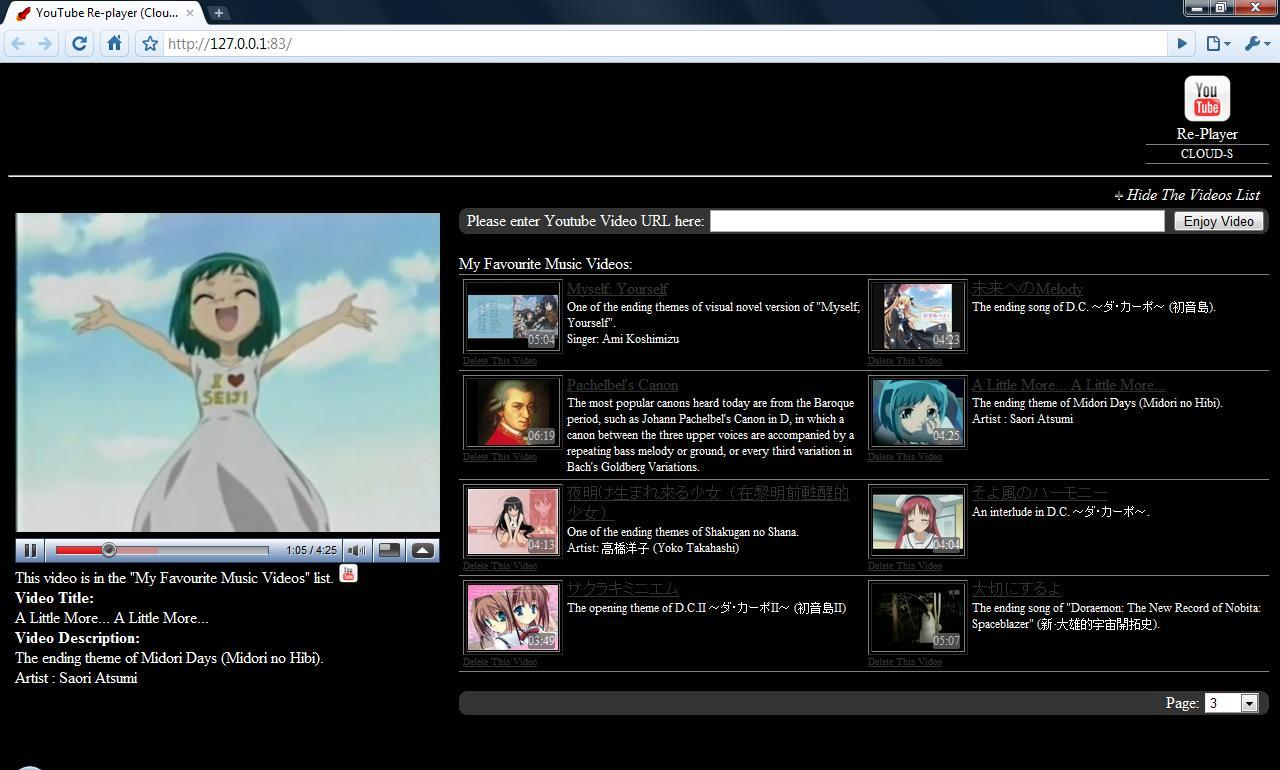
YouTube Re-Player Anywhere, Google Docs Notifier and My Personal Homepage

Last month, I was basically fixing YMCA Volunteer Management System. Meanwhile, I was also doing my personal projects. Unlike previous vacations, I tried to finish three small applications within two weeks. Now, let me introduce them one by one.

YouTube Re-Player Anywhere (finished in 3 days)

Introduction

I started my YouTube Re-Player project since 2009. After the first version of YouTube Re-Player was successfully done in January 2009, many other versions of it had been developed. I tried to build it in several language, such as PHP, JavaScript, C#. Last December, I also deployed one of them on Windows Azure and won a prize from Microsoft.

The version which is on Windows Azure is called YouTube Re-Player at Cloud. It does not need a database because it only stores the video temporarily somewhere. After my Windows Azure account was terminated, I decided to build a similar version of it by using Java.

YouTube Re-Player Anywhere

What is so special about YouTube Re-Player Anywhere? Basically, it is an improved version of YouTube Re-Player at Cloud. It solves some problems that I can’t do it in YouTube Re-Player at Cloud easily. In addition, it requires no installation. Unlike YouTube Re-Player (Desktop) which requires user to install .NET 3.5 Framework. In YouTube Re-Player Anywhere, user can just go to the URL and use the application.

I use Java Servlet in YouTube Re-Player Anywhere to store all the video links in session. Hence, as long as the session is not deleted, the videos will be available in the application.
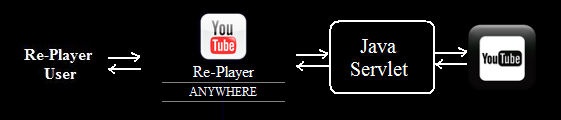
YouTube Re-Player Anywhere Structure

In addition, since YouTube Re-Player (Desktop) was done using WPF, it cannot be run on non-Windows OS. Hence, YouTube Re-Player Anywhere is designed for those who are not using Windows. Also, as it is a web-based application, it can run on phone as long as the phone can access to the Internet. This is where the word “Anywhere” comes from.

Due to the fact that I can’t find a place to host it, currently it is not available to public yet.

What do I learn from doing this project?

The main purpose of doing several GCL Projects is to learn what I can’t learn in school and CVWO. In fact, I use the knowledge and skill that I learn from doing GCL Projects in my school projects and CVWO project. For example, I used the WPF skill that I learnt from doing YouTube Re-Player (Desktop) in my CS3215 project, OneSync. Hence, our team was one of the few teams that built a nice looking application in CS3215.

This time, I learnt quite a lot from doing YouTube Re-Player Anywhere also. First of all, I learnt how to build a Java Servlet application. Before that, I had no idea what Java Servlet is. Actually, it is just like a normal Java class that I wrote in CS1102S class, except the fact that I need to import some libraries and so on. Secondly, I also learnt how to parse XML in Java. Since the feeds retrieved from the YouTube server is in XML, so I have to parse it in order to get the required information such as video title, video description and video length.

I used only three days to learn Java Servlet and finish building this application. This enables me to continue doing my second GCL Project in this summer: Google Docs Notifier.

Google Docs Notifier (finished in 5 days)

Background

When I was writing the proposal for my CS3215 project, my friend, James, asked me whether I had a way to notify the users when their documents in Google Docs were updated. The reason he asked me the question is because in my original CS3215 proposal, Google Docs was chosen to be the online intermediate storage, instead of Dropbox. Hence, I read the Google Documents List Data API and started developing it.

In April, I finished the version 0.9 of Google Docs Notifier and presented it in my team’s lightning talk in CS3215. However, since I was developing OneSync with my friends at the same time, I did not spend too much time on it. Thus, I decided to complete it and added a few more features to it after I finished my exams.

The most interesting part is that I finished it when I was visiting Penang. =D

Motivation

Although Google Docs is popular now, there are still a lot of improvements needed for Google Docs. One of them is notifying the user when his file is edited and updated by his fiends. Currently, users will not know whether their files are updated until they log in to the Google Docs webpage to check or they check their email inbox.

To solve this problem, Google Docs Notifier is chosen as the project of GCL Project 2010. The goal of this project is to build a small application which notifies the user when his files are updated and shows all the recently updated files.

Introduction

Last month, the Google Docs Notifier 1.0 was successfully done. Now, the user can easily know the date and time that the document is modified. In addition, user can view the document by just double clicking on the document name in the program itself.

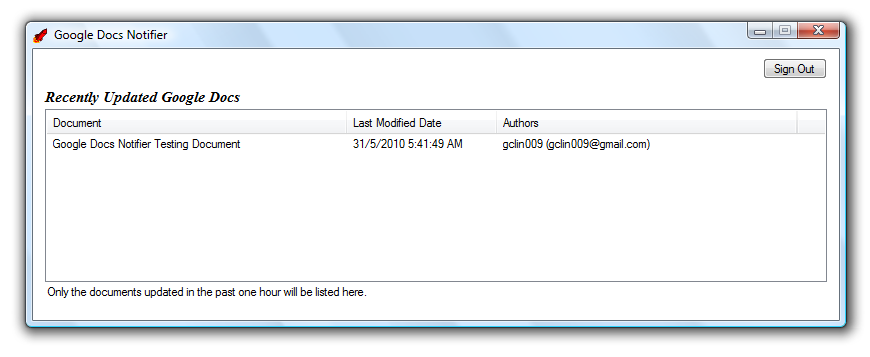
Google Docs Notifier Login Page
Listing All Recently Updated Documents in Google Docs

This is the first GCL Project which is available to the public and open source. You can view the project homepage at here: http://googledocsnotifier.googlecode.com/.

What do I learn from doing this project?

In January, Google announced that the user can now upload any file to Google Docs. However, it does not provide the API of doing that (the fact is that this feature is only available to Google Apps Premier domains). This is the main reason why our CS3215 team chose Dropbox as the online intermediate storage provider.

However, I learnt more about Google Documents List Data API, for example the XML format of the feeds, the information available from the API, how to use the information and so on.

My Personal Homepage (finished in 4 days)

Motivation

Every time I am asked for my personal website, I always give them my Facebook Account URL. It is not really a good idea because Facebook is just a social networking site. Hence, I decide to build a personal web page that introduces me.

Introduction
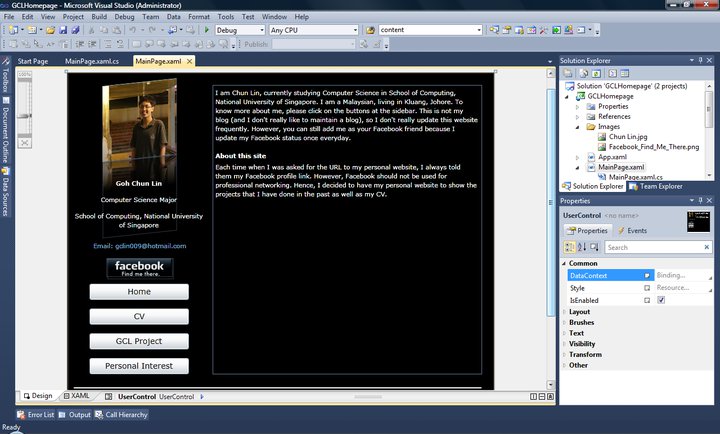
Building Silverlight Web Pages in Visual Studio 2010

I built it using Silverlight. Yup, I know that there are a lot of people who don’t like Silverlight. However, I still think a Silverlight site is cool, especially it provides an easy way to do simple animation, for example, storyboard.

The site has four sections. You can view my CV, GCL projects done before and so on.

Future Work

Since there are a lot of computer users not installing Silverlight in their computer, I decide to have a normal HTML page for my website also.

Also, I am still finding a place to host this personal homepage.

What do I learn from doing this project?

Silverlight. Yes, the only thing I learnt is Silverlight. Since I am not allowed to take CS3216, so the only way that I can learn Silverlight is self-learning. In addition, I received a Silverlight reference book from Microsoft as a gift in January. Hence, I think I should spend time on learning Silverlight well. =)

YouTube Re-Player (Desktop)

The Motivation
“How to repeat the YouTube music video without pressing the Replay button every time when it ends?” Two years ago, there were many people asking this question in some IT forums. The answer was usually “Just download it and play it using FLV player”. That time, downloading seemed like the only way to play YouTube music videos in loop. Then there were some people asking “Is it legal to download YouTube videos?”.

After attending a Google workshop last year, I easily solved this problem. In January 2009, I successfully built YouTube Re-Player (Localhost) 1.0, my first application that used YouTube API. It not only could automatically loop the YouTube music videos, but also allowed the user to keep one’s own favourite videos in the database so that one was able to view it again later.

When I was doing the YouTube Re-Player project, there were many people around the world doing the similar things. Nowadays, you can easily find applications like Muziic, YouTube Repeat and some browser add-ons which do exactly the same thing: Auto replay YouTube videos and/or store them in database. I am quite happy that I am not alone. There are many people trying to do this as well.

From Web Application to Desktop Application
In this winter vacation, I tried to challenge myself again. I not only deployed my YouTube Re-Player on Windows Azure, but also developed a desktop version of it, known as YouTube Re-Player (Desktop).

YouTube Re-Player (Desktop)

Parallel Video Downloading
YouTube Re-Player (Desktop) is a desktop application.

Parallel Video Downloading

Before playing the YouTube video, the player first needs to download the video from YouTube site. Depends on the speed of the Internet connection, it will sometimes take quite a long time to finish downloading the video. Hence, in the YouTube Re-Player (Desktop), there are five Flash Object Holders which are responsible for downloading and showing the YouTube videos running in the background. Each of them will download different YouTube videos. So, the user can first view the video which has been downloaded while he is waiting for other videos to be downloaded.

Quick Launch Bar
Quick Launch Bar

Thus, when all videos are completely downloaded, user can watch them without downloading them again until the sixth video is requested from the YouTube site. This will save a lot of time on just waiting the video to be downloaded.

Aero Glass Background
For those who are using Windows Vista, they should be quite familiar with the term “Aero Glass”. Since YouTube Re-Player (Desktop) is a WPF application, the Aero Glass effect can be easily done using C#. This feature is only available in Windows Vista and above. For those users who are using Windows XP, they will see a background similar to the one in YouTube Re-Player (Localhost).

Conclusion
After YouTube Re-Player is successfully built in last semester, I received many useful and interesting feedback from my friends. I will try my best to implement those useful features in the future versions of YouTube Re-Player.

Since the YouTube Re-Player (Localhost) was coded in PHP and JavaScript, developing YouTube Re-Player (Desktop) in C# is a bit painful. There are things that can be easily done in PHP and JS previously cannot be easily coded in C#, for example the database connection. However, that problem can be easily solved after googling. Secondly, embedding YouTube video in WPF application is not that easy.

The next step of this project will be finding a better way to manage the videos stored in the database. Also, searching feature will also be added to the next version. Besides, after I found a way to deploy the PHP, PhpMyAdmin and MySQL on Windows Azure Development Fabric, I think that I should try to deploy the YouTube Re-Player (Localhost) 2.1 on cloud as well.

Hello Cloud Computing: Windows Azure and YouTube Re-Player at Cloud

After my YouTube Re-Player (Localhost) 2.0 was built in May 2009, my friends told me that they would like to play with it also. Hence, I hoped that I could find a place to host my app.

Last Wednesday, I was given a free Windows azure access token during the Windows Azure workshop organised by Microsoft. Hence, the first thing I did was trying to build my YouTube Re-Player on Windows Azure.

The Wow-wow Workshop
The Windows Azure workshop was held on last Wednesday at SMU. There were only about 30 students from NUS, NTU and SMU in the workshop. Thus, eventually, almost everyone of us was able to get a free access token.

During the workshop, we were taught how to build a hello world web application and later upload it to Windows Azure. Before getting started, I had to install quite many stuff on my computer, for example Visual Web Developer 2008 Express, Windows Azure Tools, SQL Server 2008, ASP.NET, CGI and so on. Luckily with the Microsoft provided the Microsoft Web Platform Installer, the installation was quite straight-forward.

Windows Azure Platform

YouTube Re-Player at Cloud
Because of the Windows Azure, I could finally find a place to host my YouTube Re-Player; however my free account on Windows Azure will be deleted after 31 December 2009 (This is because Windows Azure Platform will go into production on 1 January 2010).

Actually, I currently have two versions of YouTube Re-Player which are used to run on Windows Azure. The first version is called YouTube Re-Player at Cloud. It is now available online (Click here to access). The second version is called YouTube Re-Player (Cloud-S) which I will introduce it later.

Before I introduce YouTube Re-Player at Cloud, it is better if you know its senpai, i.e. YouTube Re-Player (Localhost) 1.0 and 2.0 (Click here to read more about these two applications).

YouTube Re-Player at Cloud doesn’t use any database. However, it still provides the main feature of the YouTube Re-Player series products: Playing a YouTube video unlimited times without pressing the Replay button. Although it has no database to keep the data, it still stores the history record of the viewed YouTube videos. Thus, every time the user plays a new YouTube music video, the name of the video will be added to the “Viewed Videos List” so that he is able to play the video again later.

YouTube Replayer at Cloud

YouTube Re-Player (Cloud-S)
Recently, Microsoft announced that PHP developers were able to build their PHP and MySQL applications on Windows Azure Platform also (More about this: Click here). So, after the YouTube Re-Player at Cloud was done on last Friday, I decided to move YouTube Re-Player (Localhost) 2.1 to cloud as well.

However, developing PHP and MySQL on Windows Azure Platform is painful. To build a simple PHP web application on Azure, I have to do is just adding some codes to the configuration files of Web and Web Role. Meanwhile, I also need to copy and paste the whole php folder (the one containing php.ini) into the solution. Then how about MySQL? This is the headache part. According to the Microsoft, there is a MySQL PHP Solution Accelerator to help solving this problem. However, I can’t even run it successfully. So, I am not able to run the MySQL as a Worker Role in cloud. What I can do is just migrating all my data from Sybase to MySQL and let the whole application running on the Windows Azure Simulation Environment. That’s why I call this application YouTube Re-Player (Cloud-S), where the “S” stands for “Simulation”.

YouTube Re-Player Cloud-S

All the new features in the YouTube Re-Player (Localhost) 2.1, such as showing video length of each video, are available in the YouTube Re-Player (Cloud-S) as well. The only difference between two of them is the database. Localhost version is using Sybase while Cloud-S version is using MySQL. In addition, there is also a problem when I run it on the simulation environment. Since all the content of my application is preloaded, sometimes it will suddenly stop in the middle way and then I have to refresh the whole page.

Only Available Until 31 December 2009
Well, my YouTube Re-Player at Cloud will only be available to public until 31 December 2009. So, please visit http://imbachunlin.cloudapp.net/ now to try it. =)

YouTube Re-Player (Localhost)

Motivation
There are a lot of music videos available on YouTube, the largest worldwide video-sharing community. However, YouTube does not allow user to play a YouTube video over and over again without pressing the Replay button. Hence, it is quite troublesome for user to just loop a YouTube music video. In addition, for those who do not have a YouTube account, they also cannot keep their favourite YouTube videos in their computer, unless they bookmark the URL to the videos.

Hence, since November 2008, I had tried to find out the ways to solve these problems. In January 2009, I built the YouTube Re-Player (Localhost) 1.0, which not only allowed the user to replay the YouTube videos without clicking on the Replay button, but also stored the URL of the YouTube videos in the user’s computer.

The GUI of YouTube Re-Player (Localhost) 1.0
YouTube Re-Player (Localhost) 1.0

In May 2009, the YouTube Re-Player (Localhost) 2.0 was successfully completed. The main improvement was allowing user to have a faster way to edit and load the music videos with the help from AJAX. The Presentation Mode was added as a new feature in the version also.

The GUI of YouTube Re-Player (Localhost) 2.0
YouTube Re-Player (Localhost) 2.0

About YouTube Re-Player (Localhost)
YouTube Re-Player (Localhost) is an application running on the localhost. This explains the word “Localhost” in its name. Both the first and second versions use PHP and JavaScript.

YouTube Re-Player (Localhost) allow the users to give a new name and description for the YouTube videos they added to it.

Paging
Paging

The JavaScript is used to do the paging. In every page, the list only displays eight video links. If there are more than eight videos in the database, then the rest of the links will go to the next page. The JavaScript is used here so that the page will not be refreshed when the user goes to another page. In the second version, there are two options, i.e. “Prev” and “Next”, added to the page options list. So, even if there are many videos, the user won’t find it difficult to navigate.

With JavaScript, the background of YouTube Re-Player will display different colour based on the time of day. The background will change based on the time of day.

YouTube Re-Player 2.0 (Localhost) Background Color
Background Color

In the second version, the AJAX technology is used to load the video and its information. Hence, the user can easily change the video to view or update its information without refreshing the whole page. Because of the AJAX, the user is able to have a faster way to edit the video information and load his favourtie music videos.

Edit Video Info with AJAX Help

Another new feature added to the YouTube Re-player is the “Presentation Mode” which allows user to hide the videos list and to show only the video player. This is useful because sometimes there is a need to play a YouTube video over and over during the presentation. It will be a bit strange if the videos list is shown during the presentation. Hence, the second version provides the user an option to hide the videos list.

Presentation Mode
Presentation Mode

The Database Management System used in both versions is Sybase, not MySQL. Thus, before using the YouTube Re-Player, the user has to install the Sybase in his computer.

Feedback from Friends
1. The user should be able to enter subtitle to the videos.
2. It shouldn’t use the Sybase as its DBMS.
3. It should have a full screen mode.