Re-Player Wave: Lesson Learnt from YouTube RealTime

Motivation
I have been doing the YouTube related projects since late 2008. As a YouTube user (and fan), I find that watching videos together with friends or family is a very unique experience also because normally we only watch YouTube on our own laptop or computer.

In the early 2010, when I was doing the first assignment for CS4341 Multimedia Technologies in NUS, I found an interesting feature provided by YouTube. It was called YouTube RealTime. In YouTube itself, it allowed user-to-user interaction, an element which is getting more and more important due to the rise of social networking sites.

In YouTube RealTime, people are able to see what their friends are doing on YouTube, for example the videos they are watching, their comments for the videos and so on. They can also receive real-time notifications when their friends add a new comment to the video. So, it is something like Facebook where the users can see their friends’ status as well as receive real-time notification when their friends like or comment on their posts.

YouTube RealTime Toolbar Showing Friend Activities

However, just about one month after the school assignment was done, YouTube RealTime was discontinued by Google in March (Reference: http://www.google.com/support/forum/p/youtube/thread?tid=114593f2f666e137&hl=en). About the same time, I attended a Google Wave workshop for CS3216 students. So, I was thinking whether I could do something similar to YouTube RealTime which would allow me to share and watch videos together with friends staying in different places. On 6 February, a new project Re-Player Wave began.

Google Wave
Google Wave is a software application originally developed by Google and later continued by Apache as its Incubator program on 6 December. Google Wave is mainly for real-time communication and collaboration. It was a cool toy for the web developers as well because they could write a gadget for Google Wave. Building a Wave gadget is not that difficult because it requires simple JavaScript, HTML and XML knowledge only.

Luckily, Google Wave does not meet the same fate as YouTube RealTime which is discontinued by Google. Hence, I was still working on the project of building Re-Player Wave, which is also a Wave gadget, in the past few days.

Real-time Videos Sharing and Communication
Google Wave provides a very interesting feature which is online real-time collaborative editing. The main reason why I choose Google Wave as the platform is also because of this feature. Re-Player Wave allows user to share videos with a selected group of his friends on Wave. For each time he adds a new video to Re-Player Wave, the group of friends will be updated at the same time as well.

In order to prove that Re-Player Wave is able to do that, I borrow my sister’s Wave account to do the experiment. If I add a video on my computer, then my sister’s Wave thread will be updated with the new video which is added by me. Similarly, if I add a video on her computer, then I can see the update in my computer as well. The new video will only be added to the list but will not replace the current viewing video.

Re-Player Wave: Sharing Playlist with Friends

YouTube RealTime also provided the feature for real-time communication. Thanks to the same feature offered by Google Wave, real-time communication will thus be possible in Re-Player Wave as well. Besides, there is no need to find a place to host my YouTube Re-Player because all the key information can be stored easily in the state of each Wave thread. After trying to find a place to host my YouTube Re-Player, I finally find a solution to this problem by just transforming YouTube Re-Player to be a Wave gadget.

JSON-C
I learnt about the JSON in my previous GCL Project. In this project, I came to know about the JSON-C. According to the YouTube API Developer Guide, the developers are encouraged to use the JSON-C, instead of JSON, for their applications because the JSON feed will be eventually be replaced by the new functionality provided by JSON-C.

According to the guide (http://code.google.com/apis/youtube/2.0/developers_guide_jsonc.html#Comparing_JSON_and_JSONC), JSON-C feeds are something like the simplified version of JSON because all those XML namespaces and schema related information will not be kept in JSON-C. So, JSON-C is easier to be parsed and used. I am currently finding ways to improve Google Docs Notifier from my another GCL Project. Google Docs Notifier retrieves all the information stored in the JSON format, not in the JSON-C format. So, it is sometimes very hard for me to find out where I should get a certain information out from the JSON.

YouTube Social
YouTube Social

Another Alternative: YouTube Social
Actually besides YouTube RealTime, there is another application called YouTube Social which does almost the same thing as YouTube RealTime and Re-Player Wave. One interesting feature of YouTube Social is the remote control. Unlike Re-Player Wave which the user cannot control what his or her friends are watching, YouTube Social gives the owner a remote control so that he can control the YouTube player of his or her friends as well. If you find this feature useful, you can try it out at http://www.youtubesocial.com.

Re-Player Wave
Re-Player Wave

What’s In It For The Users?
To summarize, Re-Player Wave is a new way for YouTube users to interact with their friends in real time. With Re-Player Wave, you can:

  1. Share videos with friends;
  2. Invite your friends to watch the video you are watching;
  3. Chat with friends about the videos in real time.

Now the Wave has come back from the dead, so please join the Wave community again. If you want to try out the gadget, you can download it at: http://www.comp.nus.edu.sg/~gohchunl/Re-PlayerWave.xml (available until 31 December 2011).

A Dynamic Web Page: Linking Up Website and Google Docs

One day, my friend told me that many websites were outdated or not maintained because it was sometimes troublesome to update the HTML files stored in the servers frequently. So, he was finding a solution where the text of the website was not in the HTML files, instead the text would be stored at a place where people could easily access and edit. I agreed with him. For example, in a university course homepage, there was a web page listing the recent news happening in the course. It turned out that even the prof found it troublesome because the News section of the website was never updated after the second week of the semester.

Dynamic Pages with Google Docs API
Hence, my friend and I were trying to find ways to solve the problem. Finally, we had this idea of turning the web pages into dynamic web pages by using the help of the Google Spreadsheets API. By using this methods, in the future, whenever we need to update those dynamic web pages, we can just update the spreadsheet in Google Docs. After that, the JavaScript code in those dynamic web pages will automatically retrieve the latest changes made in the Spreadsheet and then updates the corresponding parts in those web pages. In order to let the JavaScript get the updates of the Spreadsheet, the Spreadsheet is published as RSS feeds.

JSON + XML = Connection Between GDocs Spreadsheet and Web Pages

EF Media Player 3: The Code; The Idea

In EF Media Player 3, the implementation of videos viewing history recording and video bookmarking takes me about two days to figure out the way to do it.

Video Bookmarking in EF Media Player 3
Video Bookmarking

In order to have those features, storage is a important issue. The history and bookmark records need to be stored somewhere. There are a few approaches to this problem. One is of course the serialization. I can basically store the history and bookmark by doing serialization. This approach was tried and successfully implemented by our CS2103 team when we’re trying to store the data of our apps. In C#, thanks to the .NET library, I can actually store the data and records in settings as well. All these stored records will be persisted between application execution sessions.

Loading Values from Settings
System.Collections.Hashtable savedViewedVideos = new System.Collections.Hashtable();
// Try to load previously saved viewed videos (if any) to the list.
if (Properties.Settings.Default[“viewedVideosList”] != null){
foreach (String recordEntry in Properties.Settings.Default.viewedVideosList){
string[] entryBreakdown = recordEntry.Split(‘*’);
if (entryBreakdown[1].Equals(VideoRecordType.NEWLY_ADDED.ToString())) savedViewedVideos.Add(entryBreakdown[0], VideoRecordType.PREVIOUSLY_PLAYED.ToString());
else
savedViewedVideos.Add(entryBreakdown[0], entryBreakdown[1]);
}}

I actually use a small trick here by using array list as a name-value collection. Every element in the array list is a string containing an asterisk symbol. Before the asterisk, it is the file path of the video and after it will be the video record type:

private enum VideoRecordType{
NEWLY_ADDED,
FAVOURITED,
PREVIOUSLY_PLAYED
}

Storing Values to Settings
Why don’t I use the name-value collection which is also provided by .NET? The reason is simple. This is because the name-value collection doesn’t have a schema predefined. So, why do we need a schema here? This is because all the values stored in the settings are stored in XML format in the user.config file. Hence, without a schema defined, the values cannot be updated later using Properties.Settings.Default.Save();. Fortunately, the schema of the array list is provided. So, in order to avoid the troubles of defining schema for the name-value collection, I chose array list here.

Currently, there are still a lot of people discussing why they can’t update the values stored in the name-value collection and other similar data types. I am not sure about the causes of their problems but I think not having a schema for the data types they are using may be a reason for some of them.

More about settings: http://msdn.microsoft.com/en-us/library/aa730869(VS.80).aspx

YouTube Re-Player Anywhere, Google Docs Notifier and My Personal Homepage

Last month, I was basically fixing YMCA Volunteer Management System. Meanwhile, I was also doing my personal projects. Unlike previous vacations, I tried to finish three small applications within two weeks. Now, let me introduce them one by one.

YouTube Re-Player Anywhere (finished in 3 days)

Introduction

I started my YouTube Re-Player project since 2009. After the first version of YouTube Re-Player was successfully done in January 2009, many other versions of it had been developed. I tried to build it in several language, such as PHP, JavaScript, C#. Last December, I also deployed one of them on Windows Azure and won a prize from Microsoft.

The version which is on Windows Azure is called YouTube Re-Player at Cloud. It does not need a database because it only stores the video temporarily somewhere. After my Windows Azure account was terminated, I decided to build a similar version of it by using Java.

YouTube Re-Player Anywhere

What is so special about YouTube Re-Player Anywhere? Basically, it is an improved version of YouTube Re-Player at Cloud. It solves some problems that I can’t do it in YouTube Re-Player at Cloud easily. In addition, it requires no installation. Unlike YouTube Re-Player (Desktop) which requires user to install .NET 3.5 Framework. In YouTube Re-Player Anywhere, user can just go to the URL and use the application.

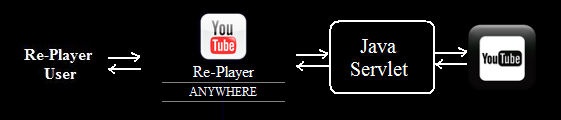
I use Java Servlet in YouTube Re-Player Anywhere to store all the video links in session. Hence, as long as the session is not deleted, the videos will be available in the application.

YouTube Re-Player Anywhere Structure

In addition, since YouTube Re-Player (Desktop) was done using WPF, it cannot be run on non-Windows OS. Hence, YouTube Re-Player Anywhere is designed for those who are not using Windows. Also, as it is a web-based application, it can run on phone as long as the phone can access to the Internet. This is where the word “Anywhere” comes from.

Due to the fact that I can’t find a place to host it, currently it is not available to public yet.

What do I learn from doing this project?

The main purpose of doing several GCL Projects is to learn what I can’t learn in school and CVWO. In fact, I use the knowledge and skill that I learn from doing GCL Projects in my school projects and CVWO project. For example, I used the WPF skill that I learnt from doing YouTube Re-Player (Desktop) in my CS3215 project, OneSync. Hence, our team was one of the few teams that built a nice looking application in CS3215.

This time, I learnt quite a lot from doing YouTube Re-Player Anywhere also. First of all, I learnt how to build a Java Servlet application. Before that, I had no idea what Java Servlet is. Actually, it is just like a normal Java class that I wrote in CS1102S class, except the fact that I need to import some libraries and so on. Secondly, I also learnt how to parse XML in Java. Since the feeds retrieved from the YouTube server is in XML, so I have to parse it in order to get the required information such as video title, video description and video length.

I used only three days to learn Java Servlet and finish building this application. This enables me to continue doing my second GCL Project in this summer: Google Docs Notifier.

Google Docs Notifier (finished in 5 days)

Background

When I was writing the proposal for my CS3215 project, my friend, James, asked me whether I had a way to notify the users when their documents in Google Docs were updated. The reason he asked me the question is because in my original CS3215 proposal, Google Docs was chosen to be the online intermediate storage, instead of Dropbox. Hence, I read the Google Documents List Data API and started developing it.

In April, I finished the version 0.9 of Google Docs Notifier and presented it in my team’s lightning talk in CS3215. However, since I was developing OneSync with my friends at the same time, I did not spend too much time on it. Thus, I decided to complete it and added a few more features to it after I finished my exams.

The most interesting part is that I finished it when I was visiting Penang. =D

Motivation

Although Google Docs is popular now, there are still a lot of improvements needed for Google Docs. One of them is notifying the user when his file is edited and updated by his fiends. Currently, users will not know whether their files are updated until they log in to the Google Docs webpage to check or they check their email inbox.

To solve this problem, Google Docs Notifier is chosen as the project of GCL Project 2010. The goal of this project is to build a small application which notifies the user when his files are updated and shows all the recently updated files.

Introduction

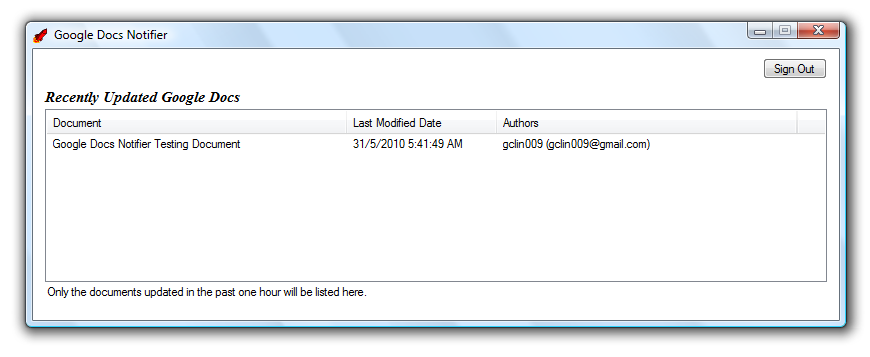
Last month, the Google Docs Notifier 1.0 was successfully done. Now, the user can easily know the date and time that the document is modified. In addition, user can view the document by just double clicking on the document name in the program itself.

Google Docs Notifier Login Page
Listing All Recently Updated Documents in Google Docs

This is the first GCL Project which is available to the public and open source. You can view the project homepage at here: http://googledocsnotifier.googlecode.com/.

What do I learn from doing this project?

In January, Google announced that the user can now upload any file to Google Docs. However, it does not provide the API of doing that (the fact is that this feature is only available to Google Apps Premier domains). This is the main reason why our CS3215 team chose Dropbox as the online intermediate storage provider.

However, I learnt more about Google Documents List Data API, for example the XML format of the feeds, the information available from the API, how to use the information and so on.

My Personal Homepage (finished in 4 days)

Motivation

Every time I am asked for my personal website, I always give them my Facebook Account URL. It is not really a good idea because Facebook is just a social networking site. Hence, I decide to build a personal web page that introduces me.

Introduction

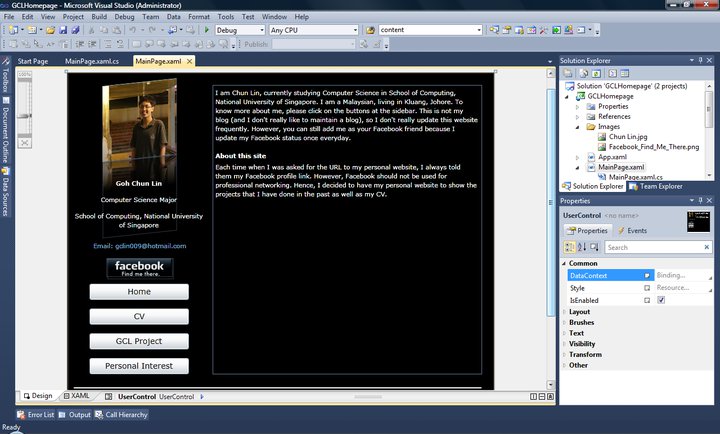
Building Silverlight Web Pages in Visual Studio 2010

I built it using Silverlight. Yup, I know that there are a lot of people who don’t like Silverlight. However, I still think a Silverlight site is cool, especially it provides an easy way to do simple animation, for example, storyboard.

The site has four sections. You can view my CV, GCL projects done before and so on.

Future Work

Since there are a lot of computer users not installing Silverlight in their computer, I decide to have a normal HTML page for my website also.

Also, I am still finding a place to host this personal homepage.

What do I learn from doing this project?

Silverlight. Yes, the only thing I learnt is Silverlight. Since I am not allowed to take CS3216, so the only way that I can learn Silverlight is self-learning. In addition, I received a Silverlight reference book from Microsoft as a gift in January. Hence, I think I should spend time on learning Silverlight well. =)