I like to explore interesting new technologies. I also love to learn more from the materials available on Microsoft Virtual Academy, Google Developers channel, and several other tech/dev events.
Yesterday night, I was updating Windows 8 to Windows 8.1 to enjoy the new exciting features offered in the latest version of Windows.
Although it’s said to be very simple to update to Windows 8.1 for those who were already using Windows 8, I was stuck in the first step. I couldn’t find the Windows 8.1 update on Windows Store. The update should be provided as free on Windows Store. After reading the help, it turned out that the reason why the update wasn’t available was due to the fact that some important Windows updates were not installed on the computer, especially the KB2871389. Thus, before getting the Windows 8.1 update, I downloaded the required Windows updates in PC Settings.
Downloading Windows Update (20 minutes)
After successfully installed the updates and restarted my computer, I finally could see the Windows 8.1 update in the Windows Store!
Windows 8.1 Update for free!
It took about one and half hour to finish downloading the update. After that it took another few hours to complete the installation and setup. I went to sleep after starting the update. So by the time I woke up, Windows 8.1 was already ready to use!
I attended the first Google DevFest in 2008. It should be the first Google hackathon in South East Aaia (Oops, Asia). During the event, we got the chance to try out the new APIs, such as Google Maps API and YouTube API. That was how I started one of my favourite personal projects, the YouTube RePlayer (latest version is hosted on OpenShift at http://replayer-chunlin.rhcloud.com/).
YouTube Re-Player (Localhost) 1.0, the first version of the app which was done after attending Google DevFest 2008
This year, Google DevFest was back to Singapore again on last Saturday. So, I decided to attend to get inspired and explore new ideas and opportunities to network. The topics of this year event are listed below.
Running Android OS on Raspberry Pi (nothing much covered);
Angular JS (I skipped the AngularJS talk to take some rest);
Google BigQuery with Cloud Storage;
Google Developers.
Before going into each of the topics above, I would like to comment about the (free) food offered in the event. In the 2008 event, the organizer dabao Singapore chicken rice only for us as dinner. This year, they provided delicious breakfast, lunch, and afternoon tea!
Talk #1: Intro to OpenCV in Android
The talk was given by Badrinath Kulkarni, an Android developer from GDG Bangalore. The talk basically just covered some general image processing functions available in OpenCV as well as steps to install the OpenCV library in Eclipse for Android app development.
He started the tutorial by showing us a simple and frequently used image processing operation, image smoothing. He demo it using the medianBlur() to reduce noise of the image taken with a smartphone camera.
Image Registration is also covered in this talk. The reason to do Image Registration is to find out a geometrical transformation that aligns points in one view of an object in an image with corresponding points in another view of that object. There are some online resources that discuss Image Registration in detail.
In short, this is more like a talk about image processing. However, the speaker does have an interesting blog at http://ibadrinath.in/.
The talk was delivered by Jiten Jain from India. During his talk, he further demonstrated how he could easily get the contact information, messages, and account usernames of the users using his Android app. Yup, now it is important to find out what the apps on our phone can actually do. Not just graphical implementation of the apps, but all the tasks that can be done by the apps.
The first lesson learnt from this talk given by Dr S P T Krishnan from I²R is that Google BigQuery is not a magic wand. Hmm, I thought it was a magic. Oh well.
The first time I heard about Big Data was during the Linus Lee’s talk on Analytics Stack at Twitter back in January. He shared with us the role and responsibilities of a data scientist and the working evironment in Twitter. For more details about his talk, there is an online article about it at e27.
There was a YouTube video shared with us during the talk also. It is about how Google Play helps Colopl, a very cool Japanese company.
A Fruitful Event
Because of Google DevFest 2008, I got to know more about the cool Google APIs, which later help me on developing many useful applications on my own. This time, the event once again opens my eyes to the exciting new technologies out there. Yup, so I am looking forward to the next Google DevFest. =)
Presentation Materials from Google DevFest Singapore 2013
It’s my mistake again. It’s morning and I realized my little code as shown below did not work properly on IE 7 and IE8.
var i = $('#someStuff').html().indexOf("<a>");
It turns out that in IE 7 and IE 8, the HTML tags returned by .html() are all in uppercase. Thus the result is not as expected. Luckily, this is not the case anymore in the latest version, IE 10. So, in order to solve the problem, the code has to be modified to be as follows by converting the result to have lowercase.
var i = $('#someStuff').html().toLowerCase().indexOf("<a>");
Actually this is an known issue in older version of IE. It’s just that I forgot about it.
Meanwhile, I also found some interesting articles about this.
In the past, there were people having a debate on whether the weird behavior of innerHTML or html() in IE 7/8 is a feature or bug. For example, there is a discussion on this in 2008: Bug of Feature – Live .innerHTML in IE.
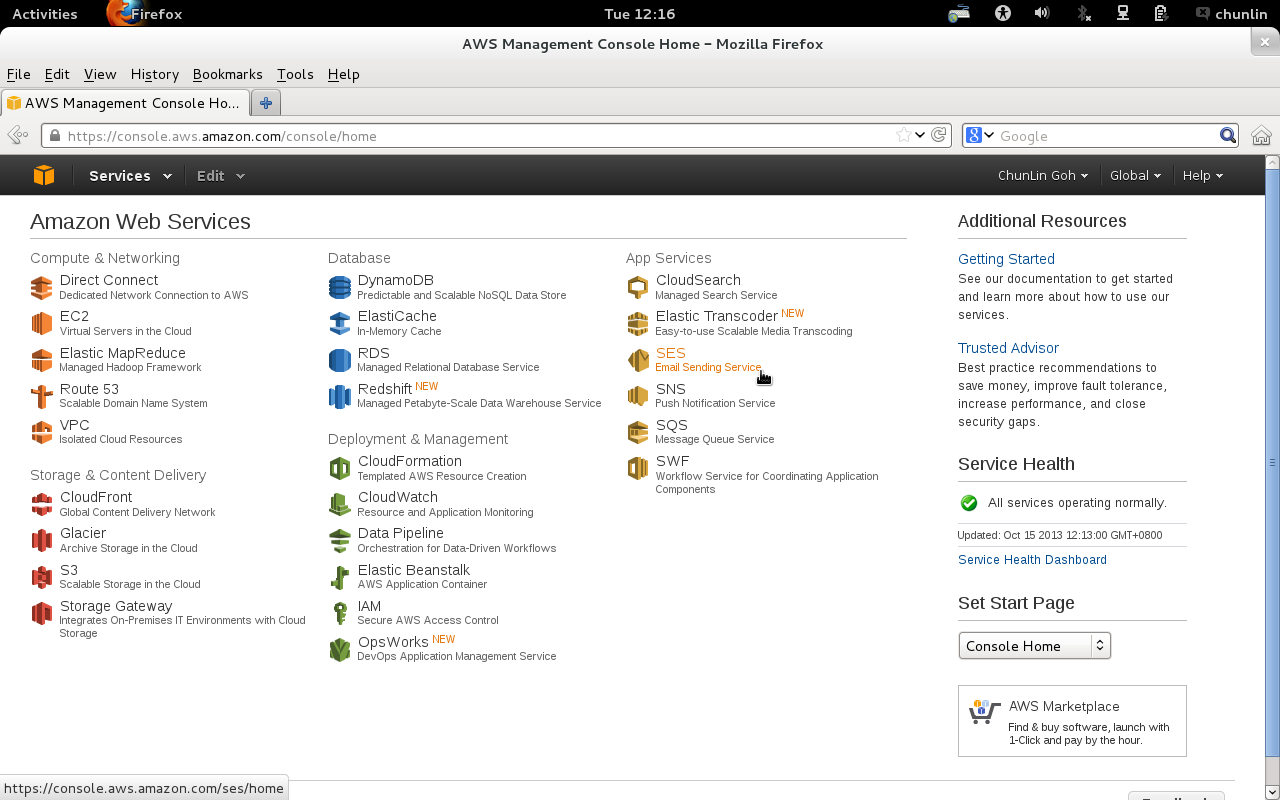
Amazon SES can be found in the AWS Management Console. If this is the first use, there will be message saying the SES account currently only had “sandbox” access. Although full access to the Amazon SES API is available in the sandbox mode, only 200 emails, at most, to be sent out each day. Also, the email addresses of sender and recipients can only be those from the verified email addresses and domains. Thus, there is a need to request a production access to the Amazon SES.
To apply for the production access, we need to submit a registration form to Amazon. After that, their team will review the application before approving it. For my previous application, they approved it the day after I submitted the form. Thus, the reviewing process is actually very fast. The registration form is simple. We only need to provide some user information as well as the types of emails that will be sent using Amazon SES, such as marketing, subscription, transactional, and system notifications.
After the application is approved, we have to create SMTP credentials to start sending emails. The credentials will be used when we connect to the Amazon SES SMTP interface later. To do so, just click on the “SMTP Settings” tab located at the left hand side of the web page. The SMTP credentials created can all be found in the AWS Identity and Access Management (IAM) page.
After all these have been done, we just need to use the SMTP credential in our existing programs to send emails.
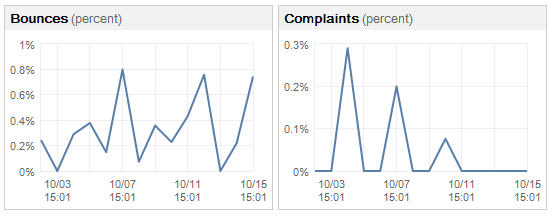
Finally, there are graphs available to understand the statistics regarding the number of emails that are sent successfully, rejected, bounced back or marked as complaints. There is a thing that needs to be taken note is that if there are too many bounces and complaints, our Amazon SES account would be terminated. Thus, it is necessary to keep monitoring the bounce and complaint rates and keep them as low as possible. Currently, the average bounce rate of one of my SES accounts is around 0.5% and the average complaint rate is less than 0.5%. It should still be fine, I guess?
Bounces and Complaints Graphs
So, why are there bounces and complaints? As stated on Amazon SES FAQs, bounces are usually caused by attempting to send a nonexistent recipient. For complaints, they arise when our emails go into recipients’ spam box. That means the recipients indicate that they do not want to receive our message. Normally, a notification email will be sent from Amazon (complaints@email-abuse.amazonses.com) to tell us to look into the problem and recommend us to stop emailing to those email accounts.
Yup, this concludes what I have learnt so far about the Amazon SES. Besides smtp.gmail.com, now there is another option to choose to use as SMTP.



 cuteprogramming