I like to explore interesting new technologies. I also love to learn more from the materials available on Microsoft Virtual Academy, Google Developers channel, and several other tech/dev events.
This post is to continue the story of my MongoDB self-learning back in January. Also, the theme for March self-learning is about Windows Azure, thus I guess it’s a good opportunity to combine these two knowledge together. So, let’s continue the story now.
Basically, after the one-month MongoDB learning in January, I have successfully built a simple web application allowing users to add pinpoints on Google Map and store those info on MongoDB. However, all those are happening in local machine. So, how to do that if we would like to deploy it on, for example, Azure for the public to access?
Fortunately, with the help of Microsoft WebMatrix, the whole process is rather simple and straight-forward.
Deploy The Website in 3 Simple Steps
Firstly, there is a Publish feature available on WebMatrix. After adding your Windows account on WebMatrix, there is a simple Publish interface which allows you to publish our current website to either a new site or existing site on Azure.
Create a new website on Windows Azure with WebMatrix.
Secondly, we need to create new MongoDB database on cloud. Windows Azure Store offers a web-based cloud MongoDB management tool, called MongoLab. Currently, MongoLab provides a free sandbox plan for the developers to try out MongoDB on Windows Azure. It also provides some other plans with Replica Set cluster on shared or dedicated Azure VMs. Normally those are for large and heavy traffic sites. For learning purpose, a free plan with 0.5 GB of storage is enough.
MongoLab: One of the MongoDB hosting platforms available on Windows Azure.
Thirdly, once the MongoLab service is added, we can now happily get the Connection Info of the database and then paste it to our code in WebMatrix.
var dbc = monk('mongodb://GCLMongoDB:.../GCLMongoDB');
Connection Info can be found on Windows Azure Portal.
Finally, we can just hit the Publish button on WebMatrix to launch the website on Windows Azure with MongoDB. Ta-da!
MongoLab Helpful Features
In MongoLab, we get to see the documents either in list view or even the table view. List view allows us to read all the documents stored in the collection in JSON format. We can scroll through a consecutive set of documents each in its entirely. By clicking on a document, we then can edit and delete the selected document.
Documents can be presented as JSON List View in MongoLab.
In table view, we get to choose the format of the displayed table by defining how to translate JSON documents in the collection into a 2D table. This is especially useful for those who are familiar with relational database but are still new to document database.
Documents can be shown as table in MongoLab as well.
In addition, there is an editor provided to do query. A friendly quick reference of query displayed at the side of the page to guide new developers along on how to do query also.
We can write queries in MongoLab too!
For the database backup, there is a charge of $0.50 per run + $0.02 per run per GB if we store our backups in MongoLab-owned cloud container. Hence, even for a small-sized database that I have above (2.49 KB), I will already be charged for around $15 monthly for 30 backups.
Conclusion
My friend once said that I used too much Microsoft developer tools and products without knowing what have really been handled by them in the background secretly. I think it’s kind of true. As we can see, to deploy both the website and MongoDB on Windows Azure, it took only a few simple steps as shown above. Thus, I’d encourage to learn in this way only if you are totally new to MongoDB and you would just like to have an overview of how a Node.JS website can work together with MongoDB on the cloud.
If you want to learn more about MongoDB, you can also checkout the following slides from the presentation in Singapore MongoDB User Group Meetup #2. The first half of the slides basically cover some fundamental knowledge about MongoDB which is quite useful for those who are new to this document database.
February is a short month so I have to plan my self-learning accordingly so that I can get myself more focused. Due to the fact that I can only spend on average one hour per day to work on my personal project and self-learning, I choose to learn not only something which is easier, faster to learn, but also a technology that is more interesting. So, the topic of February self-learning is HTML5! (Notice/Joke: ! is exclamation mark here. It doesn’t mean 5! which equals to 120).
I do a firefly animation by using this new <canvas> element in a simple way. Firstly, I draw some fireflies on the canvas.
cxt.globalAlpha = 0.4;
cxt.beginPath();
cxt.arc(x, y, ((fireflyLightMaxDiameter - fireflyDiameter) * brightnessRatio) + fireflyDiameter, 0, Math.PI * 2, true);
cxt.closePath();
var grd = cxt.createRadialGradient(x, y, 1, x, y, 4);
grd.addColorStop(0, "#FFFFFF"); // white
grd.addColorStop(1, "#FFFF00"); // yellow
cxt.fillStyle = grd;
cxt.fill();
cxt.globalAlpha = brightnessRatio;
cxt.fillStyle = "#99FF00";
cxt.beginPath();
cxt.arc(x, y, fireflyDiameter, 0, Math.PI * 2, true);
cxt.closePath();
cxt.fill();
Secondly, I will redraw the whole canvas for every 60 milliseconds. Then in each redraw function, I randomly assign flying speed and direction to every single firefly. Also, there is a counter set so that the firefly won’t change its direction too often.
dx = Math.floor(Math.random() * fireflyMaxSpeed);
dy = Math.floor(Math.random() * fireflyMaxSpeed);
firefliesDx[i] = dx;
firefliesDy[i] = dy;
x += dx * directionX[i];
y += dy * directionY[i];
if (callCounter % 40 == 0) { // Don't change the flying direction too often
    directionX[i] = ((Math.floor(Math.random() * 10) < 5) ? 1 : -1);
    directionY[i] = ((Math.floor(Math.random() * 10) < 5) ? 1 : -1);
}
Thirdly, I set a counter to do the brightness changing of each firefly.
So, yup, that’s the basic idea on how I do firefly animation in <canvas>. Since this year is the tourism year in my country, I apply the firefly animation in a page about watching fireflies in Kuala Selangor, Malaysia. To get the source code, you can visit my page of this animation in the Mozilla Demo Studio. Don’t forget to click “Like It” button if you really like it. =P
Firefly HTML5 Animation: The page is to promote Kuala Selangor, the world’s biggest firefly colony
Popcorn.js: Integrating Video and the Web Content
However, promoting just one attraction in my country is not enough. So, I am thinking of building a page which will guide the viewer through different places in Malaysia.
I get a promotional video about Malaysia tourism from YouTube. In the video, it shows several famous tourist attractions in Malaysia. I want to build a web page showing a short introduction as well as a map (or even street view) about those places. I thus chose Popcorn.js.
Popcorn.js is an open-source HTML5 video framework which allows us to create time-based interactive media on the web. So, we can now bring content in a web page into a video easily. People watching a video on the website now can also read a web page content which is relevant to the video content. So, this JavaScript library basically allows to add value to a video.
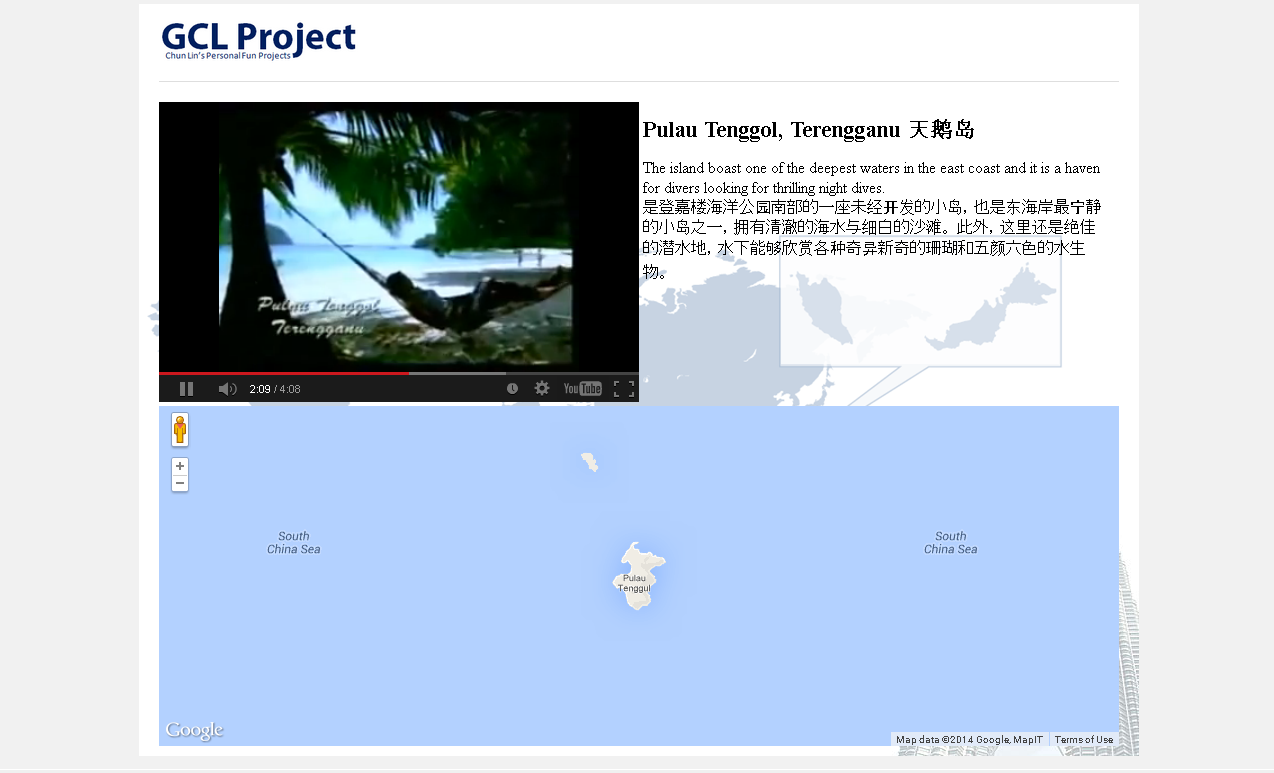
The following screenshot shows how the page looks when the video is displaying a picture of Pulau Tenggol.
Popcorn.js in action.
YouTube Plug-in Issue in Popcorn.js
There is a problem if we are using the YouTube plug-in offered in the Popcorn.js. After the video ends, the YouTube player will show a group of relevant videos. So it basically allows the viewer to change the content of the video player. Hence, to solve this problem, I added one value to the playerVars in popcorn.js.
Although it’s not encouraged to use CSS to do complicated drawing on the web pages, thanks to the CSS3, we can now create animations with CSS by using @keyframes. For example, the following is part of my CSS which does the animation of the name of each attraction in the web page.
So, if you haven’t visited Malaysia before, please bring your family and friends to this lovely country and join us in this grand tourism celebration. However, before that, kindly vote for my following two demos by clicking the “Like It” button. Thanks. =D
Enjoy the HTML5 firefly animation here.Take a tour to Malaysia with HTML5 here.
The first meetup organized by local MongoDB user group was held at Hackerspace Singapore on last Tuesday. During the meetup, Matias Cascallares, consulting engineer from MongoDB, shared with us the importance of schema design in a “schemaless” MongoDB, the use cases of different schema design approach, and ended his talk with the new features that will be released in MongoDB 2.6.
Documents and Collections
MongoDB is an open-source document oriented database, an example of the NoSQL database, which is non-relational and horizontally scalable. Many of the databases currently in use are based on relational database model where we have tables and each table has columns and keys defined in database schema.
In my job, I deal with relational database. Sometimes there is a need to store two types of records in the same table. Even though they share some fields with one another, each of them also has its own unique elements. So, I simply combine all the fields and defined them as the columns in the table, leaving unused fields empty or null.
Not all records have discount info in the table
MongoDB stores the data in documents. Documents are stored on disk in BSON, a binary representation of JSON objects. A grouping of documents is called a collection, which is equivalent of a table in relational database model. So documents in MongoDB are equivalent of rows in a table. Because of “schemaless”, collections do not enforce document structure. Documents within a collection can have different fields. Thus, it’s allowed to write the two records shown in the image above into two documents as follows.
I use relational database in my work. I realize that when the tables are growing bigger and bigger, it’s getting harder and harder to adjust the schema. I always hope to have the columns to be dynamic. Hence, the concept of schemaless database in MongoDB interests me a lot.
In relational database, we can use stuff like joins to provide results to a query. However, in MongoDB, joins are not supported. The data is either denormalized or stored together with related data in the same document. In addition, we can also use the _id field of one document in another document as a reference. The application just needs to run a second query to return the referenced data. Hence, it’s like doing a reverse engineering when we are designing schema in MongoDB because now we have to ask “What question will I have”.
Also, due to fact that documents can have different fields, we cannot describe the collection. Instead, we have to look into the codes to find out the schema information of the collections. Even though when we query with a key not existing in any of the document in the collection, it will still not raise an error. It just won’t return anything. So, it is impossible to describe the collection as how we do in relational database.
Shards and Shard Keys
Normally, we use the strongest servers we have to host our databases. We do vertical scaling by adding more CPU, RAM and storage resources to increase capacity. This gets expensive quickly. There is where horizontal scaling can come into play. Horizontal scaling, aka sharding, does a horizontal partition in a database. Instead of just increase the capacity of the one server, we add more servers. The data is then distributed to multiple database servers, aka shards.
MongoDB is built with horizontal scaling in mind. Sharding is implemented in MongoDB with the help of sharded cluster which consits of three components: shards, config server, and router. Router is in charge of routing the reads and writes from applications to the shards by refering to the metadata stored in the config server.
To shard a collection, shard key is needed to divide a collection’s data across the cluster’s shards. During the talk, Matias analyzed three different approaches of schema design for a social network application which has to support a great amount of read and write operations. By just changing the shard key used in the shard and the schema, we manage to get 3 different solutions. One of them is good at writing performance. One is good at reading performance with lots of random IO. Final one is good at reading performance with no random IO but with more work in write. For more details about these three schema design approaches, please read the blog post “Schema Design for Social Inboxes in MongoDB”.
Data Expiration
Data expiration is mentioned in the second half of the talk about schema design.
Data expiration is useful and important because some data stored in database will not be used anymore. However, data won’t expire itself.
In MS SQL Server, we create scheduled jobs with stored procedures to erase the data which has been there for more than 2 months, for example.
In Matias’ talk, I came to know about the feature that was introduced back in MongoDB 2.2, the Time To Live (TTL) Collection. By just specifying a value in the expireAfterSeconds index option, the documents in the TTL Collection will automatically removed after specific period of time.
That’s All
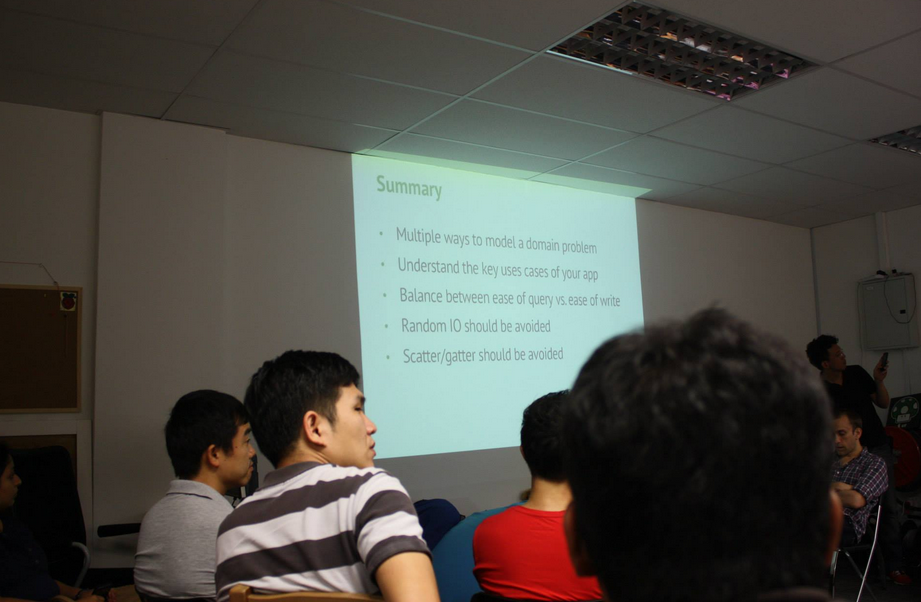
Important slide, the summary. Photo Credit: Singapore MongoDB User Group
The talk is very interesting. I agree that schema design in MongoDB is not trivial. As mentioned during the talk, it does require a lot of practices to get really, really good at schema design in MongoDB and know how to balance between the read performance and write performance. Thus, the talk is actually just a starting point for a beginner like me. It’s now up to me to find out more about MongoDB and other database technologies myself. Hopefully one day I’ll be so imba that I have the opportunity to give a talk about MongoDB as well.
For those who were there will now realize that I do not cover everything of the talk in this post. Firstly, I don’t want my post to be too lengthy. Most of the readers will just tl;dr. Secondly, I just started to learn MongoDB last month, so I try not to “act smart” here. Thirdly, it’s to encourage people to join our Singapore MongoDB User Group to find out more (such as the upcoming talks and other activities) instead of just reading my post. =P
I’d also like to take this opportunity to thank my friend, Laurence, for inviting me to attend this amazing talk. I’m now already looking forward to the next meetup in April.
I am web developer. I do .NET stuff at work. However, it is always good to try something new and different. Thus, in December 2013, I planned a rough schedule for programming self-learning in the first two months of 2014. In January, I decided to spend one hour per day to learn about Node.js and MongoDB.
I only started to learn JavaScript when I was in the first year of my university life. It turns out that it’s a very useful skill that I have because JavaScript is used very widely in my current job. However, I never tried to use JavaScript in server environment before. Here I choose Node.js because it is a very well-known server-side JavaScript example.
For MongoDB, I decided to learn it because I was invited by my friend to join a local MongoDB user group last year. It’s a group formed by developers who are very keen on learning MongoDB and other related new web technologies. After reading through their posts online, I decided to spend sometime on learning MongoDB too. Plus, the first meet up of the group that I’m always looking forward to is going to be held in this coming month, so learning MongoDB will at least help me to communicate with other members better.
Getting Started: Installing Stuff
The web development tool that I use is WebMatrix 3. The reasons that I choose WebMatrix are free, easy-to-use, and Azure-connected. In addition, WebMatrix also comes with Node.js supports and templates. Thus, with the help of WebMatrix, a simple Node.js web application can be done without too much pain.
Node.js Website Templates
There are three templates available for Node.js project. The Empty Site template gives a blank website setup with Node.js. This option threw me error saying “This product did not download successfully: The remote server returned an error: (404) Not Found”. According to the installer log, the error happened when downloading file ‘http://download.microsoft.com/download/6/F/4/6F439734-9589-4859-AADE-B88B0B84401E/NodeJsSite.zip‘ because the URL basically just returns error 404. Well done, Microsoft.
The good thing about Starter Site template is that without writing a single line of code, a beautiful web app is ready to use. Just click on the Run button in WebMatrix, the sample site will be launched in web browser. From there, you get to learn many new howtos. For example, how mobile-friendly web pages are made, how to design a web page layout with a template engine called Jade, how to enable Facebook and Twitter logins on a website, and also how to use client-side socket.io libraries to implement a chat feature in the website.
The Sample Website from NodeJS Starter Template
As a start, I don’t think it is a good idea to learn so many new knowledge in one month. Thus, I chose the third available template, which is the Express Site. It basically just provides a website setup with Node.js and Express without too many random stuff as what Starter Site offers.
For the modules that I use in my web app, such as Express, Jade, Mongoose, and Monk, they all can be easily installed in the NPM Gallery in WebMatrix. npm stands for Node Packaged Modules, an official package manager for Node.js and online repository for publishing packages. There is one thing that I would like to highlight is that when I didn’t run WebMatrix as administrator, the NPM Gallery seemed to have some problems. I only got to install the modules when I run WebMatrix as administrator.
Designing Web Pages
In the homepage, I would like to show a map of the place that I am currently at.
Firstly, I add the following lines in the layout.jade which is in charge of defining the general look-and-feel of each web page in my web app.
doctype html
html
  head
    title= title + "!"
    link(rel='stylesheet', href='/stylesheets/style.css')
  body
    div(style="background-color: orange; color: white; height: 40px;")
        div(style="padding-top: 12px; padding-left: 5px; font-weight: bold;") #{title}
    block content
Secondly, I proceed to the content block for index.jade, the page displaying the map. The code below basically just loads the Google Maps API library and shows the map on the web page.
extends layout

block content
    div(style="padding: 50px;")
        h1= title
        span Welcome to #{title}!
    div(id="map-canvas")
    script(type='text/javascript', src='https://maps.googleapis.com/maps/api/js?key=...&sensor=true')
    script(type='text/javascript', src='/javascripts/initGoogleMap.js')
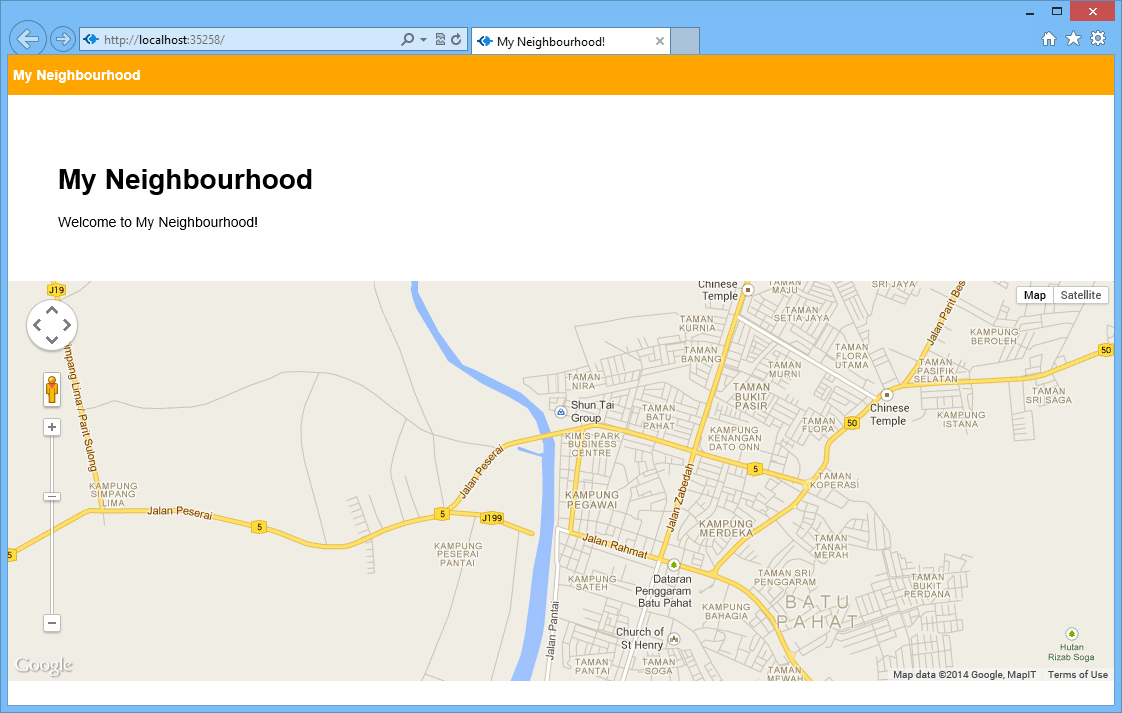
With such simple codes, a page with Google Maps showing the neighbourhood of user’s current location is done.
Can you guess where I’m now? =)
Bringing Data Into The App
A map showing user’s current location is not interesting enough. The next step will be adding an ability for the user to add marker to the map by specifying latitude and longitude.
After that, in the newlocation.jade, I create the form to submit the data to addlocation.js.
Interface to add new location.
In the addlocation.js, there will be code to add those user-entered data to the database. With Monk, it can be done easily as shown as follows.
exports.add = function (dbc) {
    return function (req, res) {
        ...
        // Set our collection
        var collection = dbc.get('LocationInfo');

        // Submit to the DB
        collection.insert({
            "locationLatitude": locationLatitude,
            "locationLongitude": locationLongitude,
            "locationInfo": locationInfo
        }, function (err, doc) {
            if (err) {
                // If it failed, return error
                res.send("There was a problem adding the information to the database. Reason: " + err);
            }
            else {
                // If it worked, set the header so the address bar doesn't still say /addlocation
                res.location("");
                // And forward to the homepage
                res.redirect("");
            }
        });

    }
}
Finally, I just need to retrieve the value from the database and show it in the homepage.
var collection = dbc.get('LocationInfo');

collection.find({}, {}, function (e, locations) {
    res.render('index', {
         "title": "My Neighbourhood",
         "listOfLocations": locations
    });
});
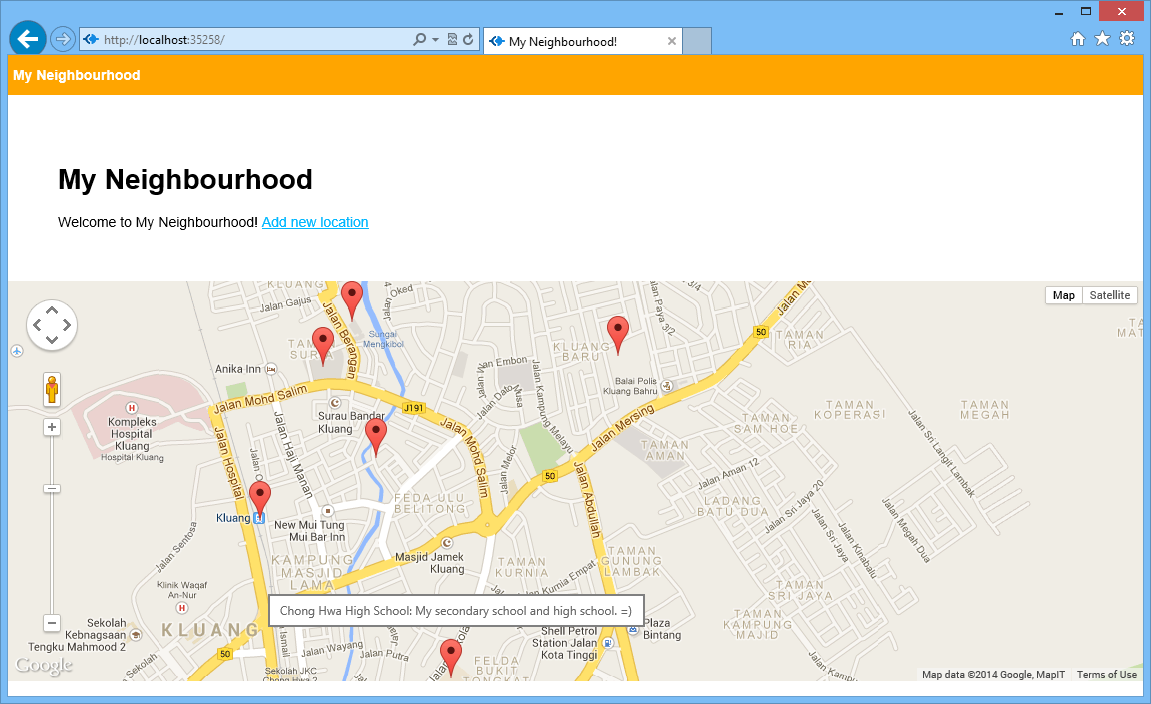
Places that I frequently visit in Kluang.
So with the help of Monk, there is even no need to define a schema at all. Even the collection LocationInfo does not need to be defined.
Since I have only one hour per day to do this self-learning, so it’s quite challenging to learn all these new things in one month. In addition, there were days that I needed to work OT. So, I’m quite happy that I manage to complete this first monthly self-learning successfully. =)










 cuteprogramming