Journey to ASP .NET MVC 5

When I first worked as web developer after graduation, I used to think what I knew about web development was already enough. However, as I learned more from friends and colleagues, I realized how difficult the field is, even though in Easibook.com we were just dealing with ASP .NET for web development.

New Ideas

Singapore .NET Developers Community meetup
Singapore .NET Developers Community meetup (Photo Credit: .NET Developers Singapore)

I participated in the Singapore .NET Developers Community meetup with my colleagues on 28 January. The theme is about web development. We had the chance to learn about ASP .NET MVC 5, Dependency Injection and how ASP .NET MVC 5 works with Angular JS.

What interested me is the ASP .NET MVC 5 talk given by Nguyen Quy Hy. In work, I was always using ASP .NET Web Forms. When I first started the ASP .NET MVC project in Visual Studio, I was already shocked by new terminologies like Razor, Identity, Scaffold, and all sort of folders, such as Models, Views, Controllers, App_Start, etc. Those are basically not found in my existing Web Forms project.

Working in a startup, there is always more to do and even more to learn, no matter the size of business. In many ways, my job changes frequently. I have to always take time to learn and challenge myself to play with new technology. Hence, learning ASP .NET MVC becomes my new challenge in this year.

I thus decided to write this post to share about what I’ve learned in my ASP .NET MVC 4/5 projects in February.

Bootstrap

Let’s start with simple stuff first. The GUI.

It’s nowadays quite common that people want a website which is responsive and mobile friendly. Luckily, there are frameworks to help. A even better news is that Visual Studio web application template by default is using Bootstrap, a framework providing design and theming features.

Previously we were using VS 2008. There was no such thing as bootstrap in our Web Forms application. Hence, I only started playing with Bootstrap when I did my first ASP .NET MVC 4 project in VS 2012.

ASP .NET web server controls can no longer be seen in ASP .NET MVC project. I was once asked about how GridView and paging were going to be handled in ASP .NET MVC without the use of the web server controls. I found some online discussions and articles which gave good answer to the question.

  1. Grid Controls for ASP .NET MVC
  2. Bootwatch: Free themes for Bootstrap including table and paging themes
  3. Paging, Searching, and Sorting in ASP .NET MVC 5
  4. ASP .NET MVC Paging Done Perfectly with @Html.PagedListPager()

12-Column Grid System is another thing I learnt when playing with Bootstrap. The grid system allows us to easily create complex grid layouts for different devices.

Grid System of Bootstrap 3

With the help of Bootstrap, even before I do anything, my web application is already responsive and mobile friendly. It’s true that technology is just a tool but with the right tools, we are able to work more efficiently and productively. =)

Native Support of Clean URL: Good News for SEO

My colleague, who was doing SEO, always received requests to do URL Rewrite in our existing Web Forms applications. Whenever there is a new page created, he has to add a new rule to web.config, sometimes just to get rid of the .aspx thingy.

<urlrewritingnet rewriteOnlyVirtualUrls="true" contextItemsPrefix="QueryString" defaultPage="default.aspx" xmlns="http://www.urlrewriting.net/schemas/config/2006/07">
    <rewrites>
        <add name="RedirectInDomain" virtualUrl="^http\://(.*)/SomethingFriendly"
            rewriteUrlParameter="IncludeQueryStringForRewrite" 
            destinationUrl="~/test.aspx" ignoreCase="true" 
            redirectMode="Permanent" rewrite="Domain" />
        ...
 
     </rewrites>
 </urlrewritingnet>

If there are one thousand pages, then there will be same amount of rules. So in the end, we even need to create separate config file just to keep the rules for URL rewrite.

In ASP .NET MVC 5, with the help of ASP .NET Routing, URLs no need to be mapped to specific web pages. Hence, in MVC web application, we can always see clean URLs which is friendly to not only the web crawler but also sometimes to the users. This is one of the features that I love in ASP .NET MVC.

Identity and Social Network Login

Whenever I visit an online store, I always find it more customer-friendly to accept Facebook or Google login.

Fortunately, ASP .NET Identity is powerful enough to not just accept application-wise user name and password, but also allows the connections from social websites like Facebook, Twitter, and Google+.

I only need to create a Facebook app and then key in the https URL of my website. After that, I put both the application ID and secret key to Startup.Auth.cs. Tada, users can now login to my website with their Facebook credentials.

app.UseFacebookAuthentication(
    appId: "<Facebook app ID here>",
    appSecret: "<Facebook app secret here>");
Localhost HTTPS URL is also accepted! =)

Just in case if you also encounter exception saying “Object reference not set to an instance of an object” on the line with AuthenticationManager.GetExternalLoginInfoAsync(), as shown in the following screenshot, please update Microsoft.Owin.Security.Facebook Nuget package.

Facebook Login Exception. Boom!
Update nuget.org - Microsoft.Owin.Security.Facebook
Update nuget.org – Microsoft.Owin.Security.Facebook

Entity Framework Code First

Due to the fact that my project is a new one. So, I used Code First to help me create tables in a new database according to my Model definition.

There is also a video on MSDN Data Developer Center website where they give an introduction to Code First development.

I like how easy it is to have all my tables created auto-magically by just defining model using classes. Then after that, I can create new views and controller by adding Scaffold.

Easily create MVC controller and views with Scafolding

Headache with Migrations

In order to have database scheme updated when the model is changed, I have enabled migration by running the Enable-Migrations command.

Ran Enable-Migrations command in the Package Manager Console

After that, whenever I changed my model classes, I will run Update-Database to have database schema updated as well. However, soon I encountered a problem.

When I was working on an ASP .NET MVC 4 project with VS2012, the Id in the Users table is integer. So, in VS2013, I assumed it to be the same when I created the model classes and updated the database. Unfortunately, nope. The default web application of VS2013 uses GUID for user ID. There is an online tutorial on how to change the primary key of Users back to integer, if you are interested.

Due to the fact that my project is a totally new project, so what I am going to do is just to change my model classes to use GUID as the type of storing user ID in other tables. However, when I ran the Update-Database command, the console prompted me an error message, saying “Operand type clash: int is incompatible with uniqueidentifier”. To quickly get rid of this problem, I deleted my tables (Don’t do this at home. =P) from the database. Then when I ran Update-Database command again, it complaint the table was missing. Finally, I had no choice but deleting the relevant records in __MigrationHistory table before making Update-Database to work again. =P

Yay, successfully updated database schema after deleting migration history.

Yay with Entity Framework

Before using Entity Framework, I played with stored procedure for few years. My colleagues have always been complaining that sometimes the logic was being hidden in stored procedures and thus made the debugging difficult. Also, having logic in stored procedures means that our business logic is actually split up into both C# and SQL. So, sometimes the developers need to spend a few hours debugging the C# code before realizing the store procedure was actually the culprit.

With Entity Framework, I am now able to modify the table structure and logic all in C# code which helps developers to easily find out where goes wrong.

Still, sometimes it is good to group related functions into one well-defined stored procedure so that the system only needs to call to the database once to get all the work done. However, after reading a 400-line store procedure once, I decided that doing this may not be the best option because no one in my team was interested to debug SQL code.

Review a long stored procedure?

There are more related topics online regarding Entity Framework vs. Stored Procedures, as listed below. If you are interested, feel free to check them out.

  1. Entity Framework Vs Stored Procedures – Performance Measure
  2. Stored Procedure or Entities?

Using MySQL Instead of Default SQL Server: I Was Having a Hard Time

By default, the data provider of ASP .NET Identity with Entity Framework is set to be MS SQL in VS 2013. However, MS SQL Server is not free. So, I decided to use MySQL instead. Hence, I need to find ways to configure Entity Framework on my project to work with MySQL.

The first tutorial that I started with is a detailed step-by-step guide on ASP .NET website regarding how to use use MySQL Storage with an Entity Framework MySQL Provider. It mainly involves steps on changing the web.config. Some important steps are listed below.

Change database connection string.

<add name="DefaultConnection" connectionString="Server=localhost;Uid=root;Pwd=password;Database=mediablog;" providerName="MySql.Data.MySqlClient" />

Configure Entity Framework to use MySQL.

<entityFramework codeConfigurationType="MySql.Data.Entity.MySqlEFConfiguration, MySql.Data.Entity.EF6">
    <defaultConnectionFactory type="System.Data.Entity.Infrastructure.SqlConnectionFactory, EntityFramework" />
    <providers>
        <provider invariantName="MySql.Data.MySqlClient" type="MySql.Data.MySqlClient.MySqlProviderServices, MySql.Data.Entity.EF6, Version=6.9.5.0, Culture=neutral, PublicKeyToken=c5687fc88969c44d" />
    </providers>
</entityFramework>
<system.data>
    <DbProviderFactories>
        <add name="MySQL Data Provider" invariant="MySql.Data.MySqlClient" description=".Net Framework Data Provider for MySQL" type="MySql.Data.MySqlClient.MySqlClientFactory, MySql.Data, Version=6.8.3.0" />
    </DbProviderFactories>
</system.data>

However, if I am not wrong, part of these can be done easily by just including the related MySQL nuget packages. I chose four of them to be installed in my project: MySQL.Data, MySQL.Data.Entity, MySQL,Data.Entities, and MySQL.Web.

Install related NuGet packages to make Entity Framework Code First works with MySQL.

After changing web.config, I followed the tutorial to introduce two new classes in the project. One is MySqlHistoryContext.cs which will sync the model changes with the database schema using MySQL standard and not MS SQL.

According to an online post, I added extra one line to the OnModelCreating method MySQLHistoryContext.cs. It’s to fix the exception of the famous Error 0040: The Type nvarchar(max) is not qualified with a namespace or alias. Only primitive types can be used without qualification.

modelBuilder.Properties<String>().Configure(c => c.HasColumnType("longtext"));

However, the Error 0040 didn’t disappear because of this line. I will share later the other steps I took to fix this problem.

The famous Error 0040 encountered when doing migrations for MySQL.

Another new class is called MySqlConfiguration which is used to make sure the Entity Framework will use MySqlHistoryContext, instead of the default one.

Besides, I also made changes to Configuration.cs. Remember the Error 0040? A discussion thread on Github actually suggested to add the following line to fix it.

SetSqlGenerator("MySql.Data.MySqlClient", new MySql.Data.Entity.MySqlMigrationSqlGenerator());

This didn’t fix the Error 0040 on my project too.

In the end, I found a Chinese post which said the following.

此时只需要将Data层的Migrations的文件夹删掉即可。因为SqlServer做过一些迁移,有些数据类型与MySql不兼容。

The sentence basically says that due to the fact that the migration earlier done in SQL Server and thus some data types are not compatible with MySQL, we need to delete the Migrations folder. So, after I excluded the 201502231459263_InitialCreate.cs file (which was created when I am still using MS SQL for my project) in Migrations folder from the project, the Error 0040 was gone when I did Update-Database. Yay!

So yup, sometimes it’s very, very useful to know more than one language. And yup, I spent half of my holiday to figure out how to make Entity Framework to work with MySQL. =)

Oh well, half day gone just to make MySQL work in my little project.

By the way, the Chinese web page mentioned above was already not available. What I shared with you is actually a link to its Google cached copy. I am not sure if the cache is still around when you visit it.

Self Learning ASP .NET MVC on MVA during Chinese New Year

The talks given during the community meetup are good. However, in order to learn more, I also need to get advice from my colleagues who have more experience with ASP .NET MVC.

In addition, during Chinese New Year period, instead of watching the new year shows, I stayed in front of my computer to complete the introductory series of ASP .NET MVC delivered by two Microsoft experts, Christopher Harrison and Jon Galloway. It’s definitely a good starting point for beginners. And yup, the two speakers are very good at explaining the key concepts and they also tell good jokes so you shouldn’t find the course to be boring. =P

Yup, people from Malaysia are watching the live too!

The End of the Beginning

I am now still a beginner in ASP .NET MVC. I always find that there are many new things to learn in just web development. Actually, it’s very challenging. For example, to get Entity Framework Code First to work with MySQL already takes me half day to figure it out.

Anyway, this is just a post sharing how I get started on ASP .NET MVC. In the future, I will do my best to share with you all more about what I learn in this cool technology. =)

Fixed Issues in Entertainment Connect (Android)

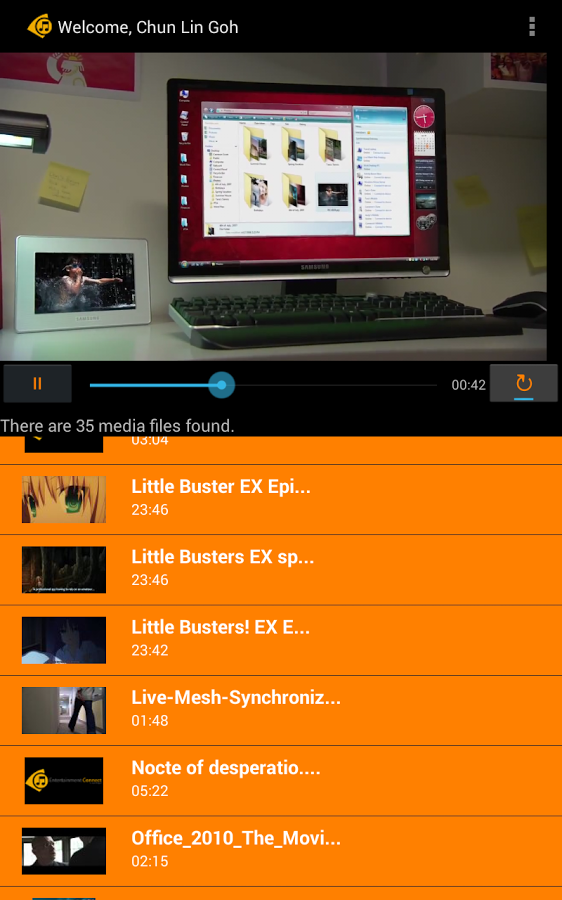
After my Android app, Entertainment Connect, was completed in the beginning of this month, I tested it on tablet. It turned out the VideoView size didn’t scale accordingly to the screen size. That was when I started to learn about Layout Weight.

Fix the Layout: Make Video Displays Nicely

Previously, I set a fixed value for the height of Video View. So, that caused the video appeared to be very small on a bigger screen of tablet.

<VideoView
    android:id="@+id/videoView2"
    android:layout_width="fill_parent"
    android:layout_height="200dp"
    android:paddingTop="50dp"
    android:keepScreenOn="true" />

It turns out that both VideoView and ListView are put in linear layout with vertical orientation. So, I just need to assign some nonzero values to the layout weight of them and the video now looks very nice on Android tablet.

Entertainment Connect on Galaxy Tab 4

Log Out and Go Back

Entertainment Connect retrieves media files from the user’s OneDrive. Hence, there is a need to handle user login and logout activities correctly. Android devices all have this Back button. Hence, in the first version of Entertainment Connect, user can log out from the app and then click the Back button to view the media list again. To prevent that, I added following two lines in the logout method.

intent.setFlags(Intent.FLAG_ACTIVITY_CLEAR_TOP); // To clean up all activities
finish();

FLAG_ACTIVITY_CLEAR_TOP helps to clean all the activities and thus prevent user to go back to the Player Activity after logging out. There is an interesting discussion on StackOverflow regarding this.

Calling finish() because the current activity (Player Activity) is done and should be closed after logout. Interestingly, without calling it, the user can still go back to the Player Activity after logging out even though FLAG_ACTIVITY_CLEAR_TOP is used.

Don’t agree with my methods? Feel free to correct me on Github: https://github.com/goh-chunlin/EntertainmentConnectAndroid.

Available on Play Store

Entertainment Connect is now already available on Google Play Store: https://play.google.com/store/apps/details?id=gclproject.onesong&hl=en. It’s free, so please download it now!

Install Entertainment Connect on your Android now!
Install Entertainment Connect on your Android devices now!

Translate PBE Codes from Java to C#

It’s great to accept online payment via your website, right? However, during the implementation of payment gateway on e-commerce website, we sometimes will receive requests from bank to enhance the security of our payment process.

Payment gateway is important on e-commerce.

One of the requests we received is to provide their API a new value to verify the integrity of the payment process request. According to the requirement, the new value is using a Password-Based Encryption (PBE). The value must be encrypted using MD5 and DES algorithm with Base64 encoding.

The bank provided us a sample code of the encryption in Java.

private static int ITERATIONS = 1000;

public static String encrypt(char[] password, String plaintext, String algorithm)
    throws Exception {
    byte[] salt = new byte[8]; 
    Random random = new Random(); 
    random.nextBytes(salt);

    PBEKeySpec keySpec = new PBEKeySpec(password);
    SecretKeyFactory keyFactory = SecretKeyFactory.getInstance(algorithm);
    SecretKey key = keyFactory.generateSecret(keySpec);
    PBEParameterSpec paramSpec = new PBEParameterSpec(salt, ITERATIONS); 

    Cipher cipher = Cipher.getInstance(algorithm); 
    cipher.init(Cipher.ENCRYPT_MODE, key, paramSpec);
    byte[] ciphertext = cipher.doFinal(plaintext.getBytes("UTF-8"));

    BASE64Encoder encoder = new BASE64Encoder();
    String saltString = encoder.encode(salt);
    String ciphertextString = encoder.encode(ciphertext); 

    return saltString + ciphertextString;
}

To use that, the documentation suggests us the following codes.

import java.util.Random;
import javax.crypto.Cipher;
import javax.crypto.SecretKey;
import javax.crypto.SecretKeyFactory;
import javax.crypto.spec.PBEKeySpec;
import javax.crypto.spec.PBEParameterSpec;
...
    String password = "xxxxxxxxxx";
    String textToEncrypt = "Hallo, world!";
    String algorithm = "PBEWithMD5AndDES";
...
    encrypt(password, textToEncrypt, algorithm);

As stated in the sample above, the algorithm is called “PBEWithMD5AndDES”, the password-based encryption as defined in RSA Security Inc. It takes a user-chosen password string and combine it with salt to generate the key by doing MDF hashing. It then applies the key on DES (Data Encryption Standard) cipher.

It looks complicated to me. Fortunately, I found a diagram describing the PBE encryption. I re-draw it so that it looks clearer.

PBE Encryption
PBE Encryption

What interest me are two items. One of them is Iteration, which has a value 1000 set to it without further explanation in the given sample code. There is already a discussion about this on StackOverflow. According to the discussion, iteration count is the number of times that the password is hashed during the generation of key. It is said that a higher iteration count will make the brute force hacking the key harder.

Another item that interests me is the salt. As shown in the diagram above, it does not use raw password to generate the key. Salt, a randomly generated bytes, is appended to the password. This is to prevent dictionary attacks.

Emulating PBE with C#

Unfortunately, our e-commerce website is built with .NET technology. Hence, I need to find out a way to encrypt data in C# in the same way as Java PBEWithMD5AndDES algorithm.

Firstly, I found a very helpful code from Bob Janova, a graduate from the University of Cambridge, on CodeProject. The code basically helps us to handle the key generation with MD5. It also takes care of the DES part with the help of DESCryptoServiceProvider class. As stated in the web page, it is very easy to use.

PKCSKeyGenerator kp = new PKCSKeyGenerator();
ICryptoTransform crypt = kp.Generate(
    password,
    salt, // salt
    1000, // iterations of MD5 hashing
    1); // number of 16-byte segments to create. 1 to mimic Java behaviour.

Right after crypt is instantiated, I do the following to make sure it is Base64 encoded. Similar code can be found on a discussion on StackOverflow regarding how to encrypt a string in .NET.

MemoryStream memoryStream = new MemoryStream();

CryptoStream cryptoStream = new CryptoStream(memoryStream, crypt, CryptoStreamMode.Write);

byte[] plainBytes = Encoding.ASCII.GetBytes(textToEncrypt);

// Encrypt the input textToEncrypt string
cryptoStream.Write(textToEncrypt, 0, plainBytes.Length);

// Complete the encryption process
cryptoStream.FlushFinalBlock();

// Convert the encrypted data from a MemoryStream to a byte array
byte[] cipherBytes = memoryStream.ToArray();

memoryStream.Close();
cryptoStream.Close();

// Convert the encrypted byte array to a base64 encoded string
string cipherText = Convert.ToBase64String(cipherBytes, 0, cipherBytes.Length);

Finally, we get the encrypted data as stored in cipherText.

Yup, it is quite straight-forward, right? =)

Entertainment Connected to Android

GCL Project + Android + OneDrive

It has been two months since I completed Entertainment Connect for Windows 8 platform. Entertainment Connect is an application that is able to play those MP3 and MP4 media files stored in your Microsoft OneDrive storage.

Soon after I completed the application for Windows, I found out that more and more of my family and friends were buying Android phones. Thus, I decided to build another version of Entertainment Connect for Android.

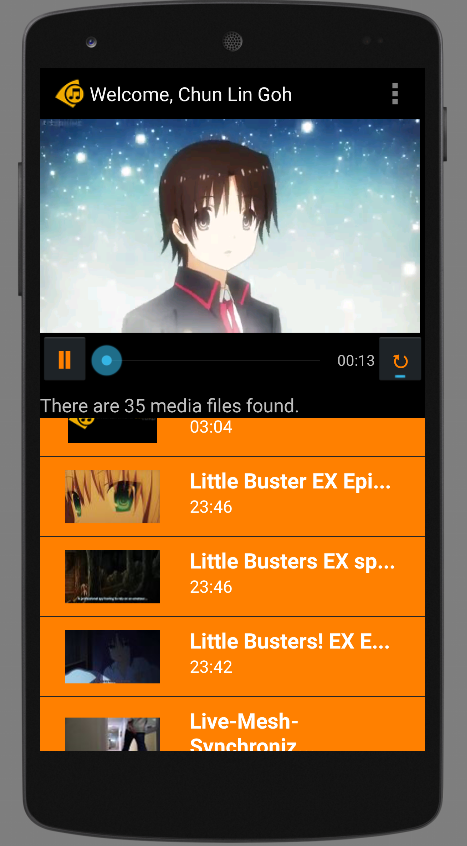
Entertainment Connect is now available on Android devices!

Today, I would like to share what I had learnt in developing my first personal Android app which makes use of Microsoft Live SDK for Android.

New IDE: Android Studio

I have been using Eclipse for Android app development in my work. Coding with Eclipse is not easy. Luckily, Google just released Android Studio, an official IDE built specifically for Android with much powerful GUI designer. In addition, due to the fact that Google encourages developers to migrate to Android Studio, I decided to try it out.

Android Studio with the login page of Entertainment Connect.

Working with Microsoft Live SDK

Yesterday, I just received notifications from Live SDK Github saying that the team was going to support and migrate to Android Studio. Finally. When I started this project, the Live SDK only supports Eclipse ADT.

It is very easy to include Live SDK to the project in Android Studio. Firstly, I need to download the Live SDK. Just download the whole project via ZIP is enough. The project consists of some useful samples which teach us how to properly use the SDK.

Secondly, I need to add new module under Project Structure.

Add new module in Project Structure.

Thirdly, I just choose the “Import Existing Project” option which will import the Eclipse project (Live SDK) as a module.

Import existing Eclipse project as module.

Finally, to make my application being able to use the Live SDK, I need to create introduce a module dependency to my app module, as shown in the screenshot below.

Introduce module dependency between app and src (Live SDK).

That’s all. If you would like to know more details about adding SDK in Android Studio, please checkout a post in StackOverflow about the import of Facebook SDK.

Can It Be More Complicated?

When I did Entertainment Connect for Windows 8 using WinJS, to create a media player, I basically just used the following codes.

var playerContainer = document.getElementById('playerContainer');
videoPlayer = document.createElement('video');
videoPlayer.id = videoStaticUrl;
videoPlayer.controls = "controls";
var videoSource = document.createElement('source');
videoSource.src = videoUrl;
videoSource.type = 'video/mp4; codecs="avc1.42E01E, mp4a.40.2"';
videoPlayer.appendChild(videoSource);
playerContainer.appendChild(videoPlayer);

With these few lines of code, I can already get a working media player with all the controls, such as play, pause, progress bar, etc.

However, this is not the case in Android app development. I am using VideoView. Hence, I also need to build my own play/pause functions and progress bar.

Also, I realized there was a bug if I switched from playing video file to audio file on VideoView. The image part of the previous video will stay even though the audio starts playing already. Hence, I added the following few lines of code to reset the background image of the VideoView so that the image of previous video will be “erased”.

videoPlayer.setBackgroundColor(Color.TRANSPARENT);
if (availableMedia.get(position).getmMediaFileName().toLowerCase().endsWith(".mp3")) {
    videoPlayer.setBackgroundColor(Color.BLACK);
}

Loading the thumbnail of media from OneDrive is also a headache in Android.

In Windows 8 app, after adding the items returned from Live SDK to a collection, I can easily bind the items to the template easily. After that, the thumbnails will be automatically shown on the screen smoothly.

<!-- Template of the list items to show available music/videos -->
<div id="mediumListIconTextTemplate" data-win-control="WinJS.Binding.Template" style="display: none">
    <div class="mediumListIconTextItem">
        <img onerror="this.src='/images/default-video-preview.png';" class="mediumListIconTextItem-Image" data-win-bind="src : picture" />
        <div class="mediumListIconTextItem-Detail">
            <h4 data-win-bind="innerText: name"></h4>
            <h6 data-win-bind="innerText: duration"></h6>
        </div>
    </div>
</div>

In Android, I have to create a background worker to retrieve the thumbnail with the following code. Then sometime when I scroll the list, the thumbnail won’t be updated immediately. Also, I need to use some tricks to make sure the correct images are displayed on the list view.

URL thumbnailUrl = new URL(imageView.getTag().toString());
HttpsURLConnection imageConnection = (HttpsURLConnection) thumbnailUrl.openConnection();
imageConnection.setDoInput(true);
imageConnection.connect();
InputStream inputStreamOfImage = imageConnection.getInputStream();
return BitmapFactory.decodeStream(inputStreamOfImage);

Building Android App Is Fun

Yes, it is fun. However, it’s slower than Windows 8 app development. It’s just too bad that not a lot of my friends really go Windows Store to download desktop apps. So I have no choice but to build Android version of my app also.

I will try to publish Entertainment Connect to Google Play soon after I have fixed my debit card issue. Currently, I still encounter problems on paying developer registration fee with Google Wallet. Oh well.

Meanwhile, feel free to read rest of Entertainment Connect (Android) code on Github: https://github.com/goh-chunlin/EntertainmentConnectAndroid.

Entertainment Connect (Android) GitHub Banner