During the Labour Day holiday, I had a great evening chat with Marvin, my friend who had researched a lot about Artificial Intelligence and Machine Learning (ML). He guided me through steps setting up a simple ML experiment. Hence, I decided to note down what I had learned on that day.
The tool that we’re using is Azure Machine Learning Studio. What I had learned from Marvin is basically creating a ML experiment through drag-and-dropping modules and connecting them together. It may sound simple but for a beginner like me, it is still important to understand some key concepts and steps before continuing further in the ML field.
Azure ML Studio
Azure ML Studio is a tool for us to build, test, and deploy predictive analytics on our data. There is a detailed diagram about the capability of the tool, which can be downloaded here.
Before we began, we need to understand why we are using ML for?
Here, I’m helping a watermelon stall to predict how many watermelon they can sell this year based on last year sales data.
Step 1: Preparing Data
As shown in the diagram above, the first step is to import the data into the experiment. So, before we can even start, we need to make sure that we have at least a handful of data points.
Daily sales of the watermelon stall and the weather of the day.
Step 2: Importing Data to ML Studio
With the data points we now have, we then can import them to ML Studio as a Dataset.
Datasets available in Azure ML Studio.
Step 3: Preprocessing Data
Firstly, we need to perform a cleaning operation so that missing data can be handled properly without affecting our results later.
Secondly, we need to “Select Columns in Dataset” so that only selected columns will be used in the subsequent operations.
Step 4: Splitting Data
This step is to help us to separate data into training and testing sets.
Step 5: Choosing Learning Algorithm
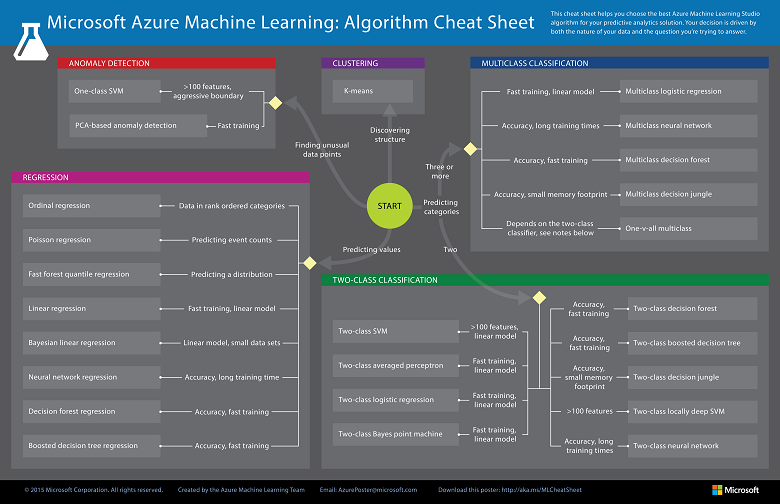
Since we are now using the model to predict number of watermelons the stall can sell, which is a number, we’ll use Linear Regression algorithm, as recommended. There is a cheat sheet from Microsoft telling us which algorithm we need to choose based on different scenarios. You can also download it here.
Learning algorithm cheat sheet. (Image Credits: Microsoft Docs)
Step 6: Partitioning and Sampling
Sampling is an important tool in machine learning because it reduces the size of a dataset while maintaining the same ratio of values. If we have a lot of data, we might want to use only the first n rows while setting up the experiment, and then switch to using the full dataset when you build our model.
Step 7: Training
After choosing the learning algorithm, it’s time for us to train the data.
Since we are going to predict the number of watermelons sold, we will select the column, as shown in the following screenshot.
Select the one column that we need to predict in Train Model module.
Step 8: Scoring
Do you still remember that we split our data into two sets in Step 4 above? Now, we need to connect output from Split Data module and output from Train Data module to the Score module as inputs. Doing this step is to score prediction for our regression model.
Step 9: Evaluating
We finally have to generate scores over our training data, and evaluate the model based on the scores.
Step 10: Deploying
Now that we’ve completed the experiment set up, we can deploy it as a predictive web service.
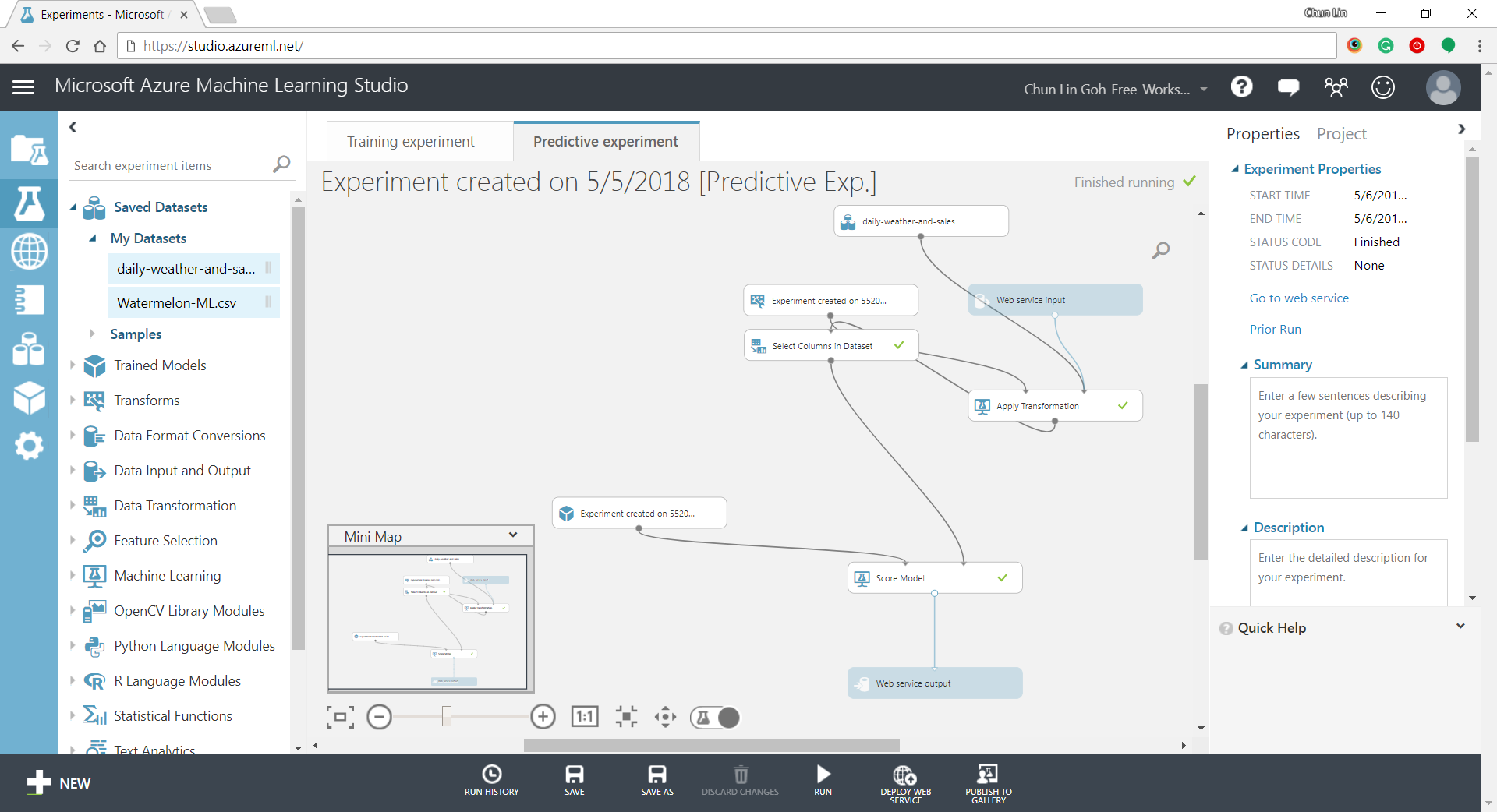
Generated predictive experiment.
With that deployed, we then can easily predict how many watermelons can be sold on a future date, as shown in the screenshot below.
Yes, we can sell 25 watermelons on 7th May if the temperature is 32 degrees!
Conclusion
This is just the very beginning of setting up a ML experiment on Azure ML Studio. I am still very new to this AI and ML stuff. If you spot any problem in my notes above, please let me know. Thanks in advance!
KOSD, or Kopi-O Siew Dai, is a type of Singapore coffee that I enjoy. It is basically a cup of coffee with a little bit of sugar. This series is meant to blog about technical knowledge that I gained while having a small cup of Kopi-O Siew Dai.
I first learnt about the term “Machine Learning” when I was taking the online Stanford AI course in 2011. The course basically taught us about the basics of Artificial Intelligence. So, I got the opportunity to learn about Game Theory, object recognition, robotic car, path planning, machine learning, etc.
We learnt stuff like Machine Leaning, Path Planning, AI in the online Stanford AI course.
Meetup in Microsoft
I was very excited to see the announcement from Azure Community Singapore saying that there would be a Big Data expert to talk about Azure Machine Learning in the community monthly meetup.
Doli was telling us story about Azure Machine Learning. (Photo Credit: Azure Community Singapore)
The speaker is Doli, Big Data engineer working in Malaysia iProperty Group. He gave us a good introduction to Azure Machine Learning, and then followed by Market Basket Analysis, Regression, and a recommendation system works on Azure Machine Learning.
I found the talk to be interesting, especially for those who want to know more about Big Data and Machine Learning but still new to them. I will try my best to share with you here what I have learned from Doli’s 2-hour presentation.
Ano… What is Machine Learning?
Could we make the computer to learn and behave more intelligently based on the data? For example, is it possible that from both the flight and weather data, we can know which scheduled flights are going to be delayed? Machine Learning makes it possible. Machine Learning takes historical data and make prediction about future trend.
This Sounds Similar to Data Mining
During the meetup, there was a question raised. What is the difference between Data Mining and Machine Learning?
Data Mining is normally carried out by a person to discover the pattern from a massive, complicated dataset. However, Machine Learning can be done without human guidance to predict based on previous patterns and data.
Gmail is also using supervised learning to find out which emails are spam or need to be prioritized. In the slides of Introduction to Apache Mahout, it uses YouTube Recommendation an example of supervised learning. This is because the recommendation given by YouTube has taken videos explicitly liked, added to favourites, rated by the user.
I love watching anime so YouTube recommended me some great anime videos. =P
Unlike supervised learning, unsupervised learning is trying to find structure in unlabeled data. Clustering, as one of the unsupervised learning techniques, is grouping data into small groups based on similarity such that data in the same group are as similar as possible and data in different groups are as different as possible. An example for unsupervised learning is called the k-means Clustering.
Clearly, the prediction of Machine Learning is not about perfect accuracy.
Azure Machine Learning: Experiment!
With Azure Machine Learning, we are now able to perform cloud-based predictive analysis.
Azure Machine Learning is a service that developer can use to build predictive analytic models with training datasets. Those models then can be deployed for consumption as web service in C#, Python, and R. Hence, the process can be summarized as follows.
Data Collection: Understanding the problem and collecting data
In fact, there are quite a number of sample datasets available in Azure Machine Learning Studio too. During the presentation, Doli also showed us how to use Reader to connect to a MS SQL server to get data.
Get data either from sample dataset or from reader (database, Azure Blob Storage, data feed reader, etc.).
To see the data of the dataset, we can click on the output port at the bottom of the box and then select “Visualize”.
Visualize the dataset.
After getting the data, we need to do pre-processing, i.e. cleaning up the data. For example, we need to remove rows which have missing data.
In addition, we will choose relevant columns from the dataset (aka features in machine learning) which will help in the prediction. Choosing columns requires a few rounds of experiments before finding a good set of features to use for a predictive model.
Let’s clean up the data and select only what we need.
Train and Analyze
As mentioned earlier, Machine Learning learns from a dataset and apply it to new data. Hence, in order to evaluate an algorithm in Machine Learning, the data collected will be split into two sets, the Training Set for Machine Learning to train the algorithm and Testing Set for prediction.
Doli said that the more data we use to train the model the better. However, they are many people having different opinions. For example, there is one online discussion about the optimal ratio between the Training Set and Testing Set. Some said 3:2, some said 1:1, and some said 3:1. I don’t know much about Statistical Analysis, so I will just make it 1:1, as shown in the tutorial in Machine Learning Studio.
Randomly split the dataset into two halves: a training set and a testing set.
So, what “algorithm” are we talking about here? In Machine Learning Studio, there are many learning algorithms to choose from. I won’t go into details about which algo to choose here. =)
Choose learning algorithm and specify the prediction target.
Finally, we just hit the “Run” button located at the command bar to train the model and make a prediction on the test dataset.
After the run is successfully completed, we can view the prediction results.
Visualize results.
Deploy
From here, we can improve the model by changing the features, properties of algorithm, or even algorithm itself.
When we are satisfied with the model, we can publish it as a web service so that we can directly use it for new data in the future. Alternatively, you can also download an Excel workbook from the Machine Learning Studio which has macro added to compute the predicted values.
Oh ya, in case you would like to know more about how-old.net which is using Machine Learning, please visit the homepage of Microsoft Project Oxford to find out more about the Face APIs, Speech APIs, Computer Vision APIs, and other cools APIs that you can use.
Please correct me if you spot any mistake in my post because I am still very, very new to Machine Learning. Please join our meetup too, if you would like to know more about Azure.





 cuteprogramming