Micro Frontend with Single-SPA

In order to build applications which utilise the scalability, flexibility, and resilience of cloud computing, the applications are nowadays normally developed with microservice architecture using containers. Microservice architecture enables our applications to be composed of small independent backend services that communicate with each other over the network.

Project GitHub Repository

The complete source code of this project can be found at https://github.com/goh-chunlin/Lunar.MicroFrontEnd.SingleSpa.

Why Micro Frontend?

In general, when applying a microservice architecture, while backend systems are split up into microservices, frontend is still often developed as a monolith. This is not a problem when our application is small and we have a strong frontend team working on its frontend. However when the application grows to a larger scale, a monolithic frontend will start to be inefficient and unmaintainable due to the following reasons.

Firstly, it is challenging to keep the frontend technologies used in a large application up-to-date. Hence, with micro frontend, we can upgrade the version of the frontend on a functional basis. It also allows developers to use different frontend technologies to different functions based on the needs.

Secondly, since the source code of the micro frontend is separated, the source code of the individual frontend component is not as much as the monolith version of it. This improves the maintainability of the frontend because smaller code is easy to understand and distribute.

Thirdly, with micro frontend, we can split the frontend development team into smaller teams so that each team only needs to focus on relevant business functions.

Introduction of single-spa

In micro frontend architecture, we need a framework to bring together muliple JavaScript micro frotnends in our application. The framework we’re going to discuss here is called the single-spa.

The reason why we choose single-spa is because it is a framework allowing the implementation of micro frontend by supporting many popular JavaScript UI frameworks such as Angular and Vue. By leveraging the single-spa framework, we are able to register micro frontends such that the micro frontends are mounted and unmounted correctly for different URLs.

In single-spa, each micro frontend needs to implement their lifecycle functions by defining the actual implementation for how to bootstrap/mount/unmount components to the DOM tree with JavaScript or a different flavour of the JavaScript framework.

In this article, single-spa will work as an orchestrator to handle the micro frontend switch so that individual micro frontend does not need to worry about the global routing.

The Orchestrator

The orchestrator is nothing but a project holding single-spa which is responsible for global routing, i.e. determining which micro frontends get loaded.

We will be loading different micro frontends into the two placeholders which consume the same custom styles.

Fortunately, there is a very convenient way for us to get started quickly, i.e. using the create-single-spa, a utility for generating starter code. This guide will cover creating the root-config and our first single-spa application.

We can install the create-single-spa tool globally with the following command.

npm install --global create-single-spa

Once it is installed, we will create our project folder containing another empty called “orchestrator”, as shown in the following screenshot.

We have now initialised our project.

We will now create the single-spa root config, which is the core of our orchestrator, with the following command.

create-single-spa

Then we will need to answer a few questions, as shown in the screenshots below in order to generate our orchestrator.

We’re generating orchestrator using the single-spa root config type.

That’s all for now for our orchestrator. We will come back to it after we have created our micro frontends.

Micro Frontends

We will again use the create-single-spa to create the micro frontends. Instead of choosing root config as the type, this time we will choose to generate the parcel instead, as shown in the following screenshot.

We will be creating Vue 3.0 micro frontends.

To have our orchestrator import the micro frontends, the micro frontend app needs to be exposed as a System.register module, as shown below on how we edit the vue.config.js file with the following configuration.

const { defineConfig } = require('@vue/cli-service')
module.exports = defineConfig({
  transpileDependencies: true,
  configureWebpack: {
    output: {
      libraryTarget: "system",
      filename: "js/app.js"
    }
  }
})
Here we also force the generated output file name to be app.js for import convenience in the orchestrator.

Now, we can proceed to build this app with the following command so that the app.js file can be generated.

npm run build
The app.js file is generated after we run the build script that is defined in package.json file.

We then can serve this micro frontend app with http-server for local testing later. We will be running the following command in its dist directory to specify that we’re using port 8011 for the app1 micro frontend.

http-server . --port 8011 --cors
This is what we will be seeing if we navigate to the micro frontend app now.

Link Orchestrator with Micro Frontend AppS

Now, we can return to the index.ejs file to specify the URL of our micro frontend app as shown in the screenshot below.

Next, we need to define the place where we will display our micro frontend apps in the microfrontend-layout.js, as shown in the screenshot below.

<single-spa-router>
  <main>
    <route default>
      <div style="display: grid; column-gap: 50px; grid-template-columns: 30% auto; background-color: #2196F3; padding: 10px;">
        <div style="background-color: rgba(255, 255, 255, 0.8); padding: 20px;">
          <application name="@Lunar/app1"></application>
        </div>
        <div>

        </div>
      </div>
      
    </route>
  </main>
</single-spa-router>

We can now launch our orchestrator with the following command in the orchestrator directory.

npm start
Based on the package.json file, our orchestrator will be hosted at port 9000.

Now, if we repeat what we have done for app1 for another Vue 3.0 app called app2 (which we will deploy on port 8012), we can achieve something as follows.

Finally, to have the images shown properly, we simply need to update the Content-Security-Policy to be as follows.

<meta http-equiv="Content-Security-Policy" content="default-src 'self' https: localhost:*; img-src data:; script-src 'unsafe-inline' 'unsafe-eval' https: localhost:*; connect-src https: localhost:* ws://localhost:*; style-src 'unsafe-inline' https:; object-src 'none';">

Also, in order to make sure the orchestrator indeed loads two different micro frontends, we can edit the content of the two apps to look different, as shown below.

Design System

In a micro frontend architecture, every team builds its part of the frontend. With this drastic expansion of the frontend development work, there is a need for us to streamline the design work by having a complete set of frontend UI design standards.

In addition, in order to maintain the consistency of the look-and-feel of our application, it is important to make sure that all our relevant micro frontends are adopting the same design system which also enables developers to replicate designs quickly by utilising premade UI components.

Here in single-spa, we can host our CSS in one of the shared micro frontend app and then have it contains only the common CSS.

Both micro frontend apps are using the same design system Haneul (https://haneul-design.web.app/).

Closing

In 2016, Thoughtworks introduced the idea of micro frontend. Since then, the term micro frontend has been hyped.

However, micro frontend is not suitable for all projects, especially when the development team is small or when the project is just starting off. Micro frontend is only recommended when the backend is already on microservices and the team finds that scaling is getting more and more challenging. Hence, please plan carefully before migrating to micro frontend.

If you’d like to find out more about the single-spa framework that we are using in this article, please visit the following useful links.

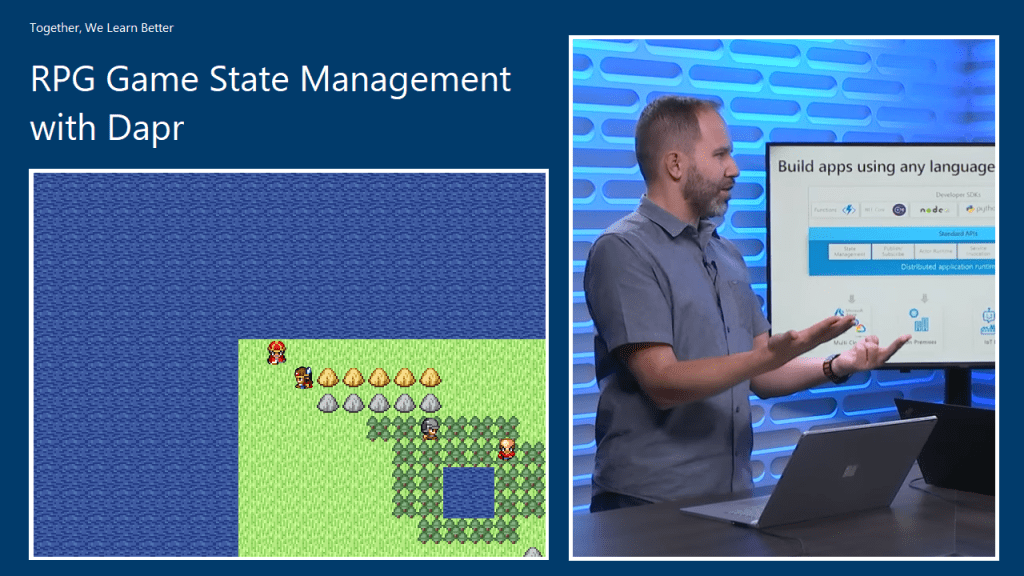
RPG Game State Management with Dapr

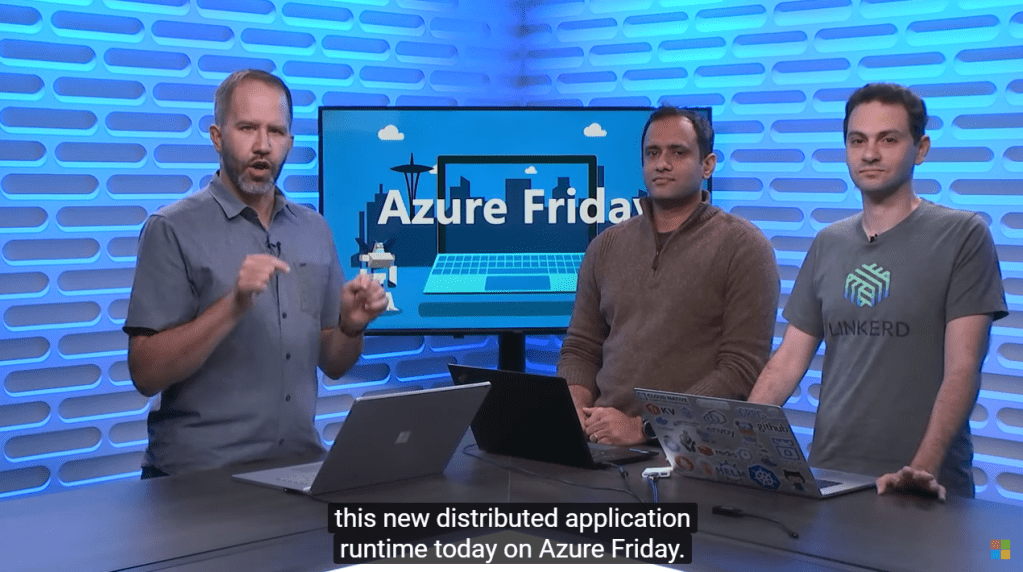
Last month, within one week after .NET Conf Singapore 2019 took place, Microsoft announced their Dapr (Distributed Application Runtime) project. Few days after that, Scott Hanselman invited Aman Bhardwaj and Yaron Schneider to talk about Dapr on Azure Friday.

🎨 Introducing Dapr. (Image Source: Azure Friday) 🎨

Dapr is an open-source, portable, and event-driven runtime which makes the development of resilient micro-service applications easier.

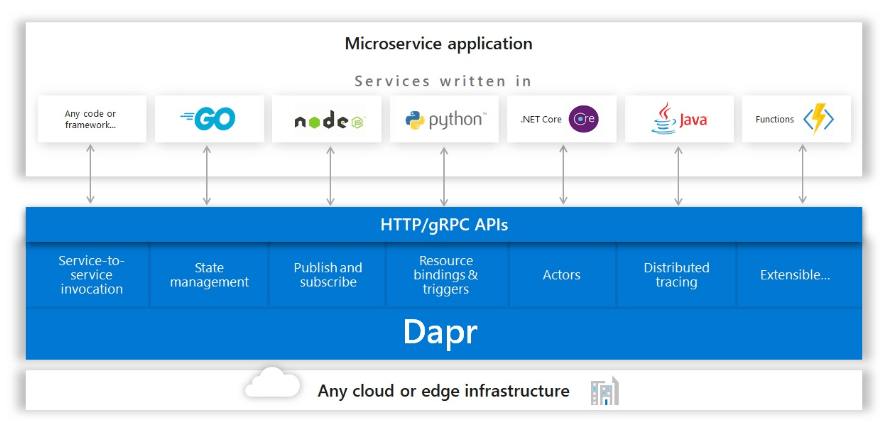
In addition, Dapr is light-weight and it can run alongside our application either as a sidecar process or container. It offers us some capabilities such as state management, which will be demonstrated in this article today, pub-sub, and service discovery which are useful in building our distributed applications.

🎨 Dapr building blocks which can be called over standard HTTP or gRPC APIs. (Image Credit: Dapr GitHub Project) 🎨

Dapr makes developer’s life better when building micro-service application by providing best-practice building blocks. In addition, since building blocks communicate over HTTP or gRPC, another advantage of Dapr is that we can use it with our favourite languages and frameworks. In this article, we will be using NodeJS.

🎨 Yaron explains how developers can choose which building blocks in Dapr to use. (Image Source: Azure Friday) 🎨

In this article, we will be using only the state management feature in Dapr and using one of them doesn’t mean we have to use them all.

Getting Started

We will first run Dapr locally. Dapr can be run in either Standalone or Kubernetes modes. For our local development, we will run it in Standalone mode first. In the future then we will deploy our Dapr applications to Kubernetes cluster.

In order to setup Dapr on our machine locally and manage the Dapr instances, we need to have Dapr CLI installed too.

Before we begin, we need to make sure we have Docker installed on our machine and since the application we are going to build is a NodeJS RPG game, we will need NodeJS (version 8 or greater).

After having Docker, we can then proceed to install Dapr CLI. The machine that I am using is Macbook. On MacOS, the installation is quite straightforward with the following command.

curl -fsSL https://raw.githubusercontent.com/dapr/cli/master/install/install.sh | /bin/bash

After the installation is done, we then can use the Dapr CLI to install the Dapr runtime with the following command.

dapr init

That’s all for setting up the Dapr locally.

Project Structure

The NodeJS game that we have here is actually copied from the html-rpg project done by Koichiro Mori on GitHub. The following architecture diagram illustrates the components that make up our application.

🎨 Architecture diagram, inspired by the hello-world sample of Dapr project. 🎨

For the project, we have two folders in the project root, which is backend and game.

🎨 Project structure. 🎨

The game project is just a normal NodeJS project where all the relevant codes of the html-rpg is located in the public folder. Then in the app.js, we have the following line.

app.use(express.static('public))
🎨 Four character types (from top to bottom): King, player, soldier, and minister. 🎨

We also update the code of html-rpg so that whenever the player encounters the soldier or the minister face-to-face, the player HP will drop 10 points. To do so, we simply send HTTP POST request to the Dapr instance which is listening on port 4001 (will explain where this port number comes from later).

...
var data = {};
data["data"] = {};
data["data"]["playerHp"] = map.playerHp;

// construct an HTTP request
var xhr = new XMLHttpRequest();
xhr.open("POST", "http://localhost:4001/v1.0/invoke/backend/method/updatePlayerHp", true);
xhr.setRequestHeader('Content-Type', 'application/json; charset=UTF-8');

// send the collected data as JSON
xhr.send(JSON.stringify(data));
...

In the backend project, we will have the code to handle the /updatePlayerHp request, as shown in the code below.

app.post('/updatePlayerHp', (req, res) => {
    const data = req.body.data;
    const playerHp = data.playerHp;

    const state = [{
        key: "playerHp",
        value: data
    }];

    fetch(stateUrl, {
        method: "POST",
        body: JSON.stringify(state),
        headers: {
            "Content-Type": "application/json"
        }
    }).then((response) => {
        console.log((response.ok) ? "Successfully persisted state" : "Failed to persist state: " + response.statusText);
    });

    res.status(200).send();
});

The code above will get the incoming request and then persist the payer HP to the state store.

CosmosDB as State Store

By default, when we run Dapr locally, Redis state store will be used. The two files in the components directory in the backend folder, i.e. redis_messagebus.yaml and redis.yaml are automatically created when we run Dapr with the Dapr CLI. If we delete the two files and run Dapr again, it the two files will still be re-generated. However, that does not mean we cannot choose another storage as state store.

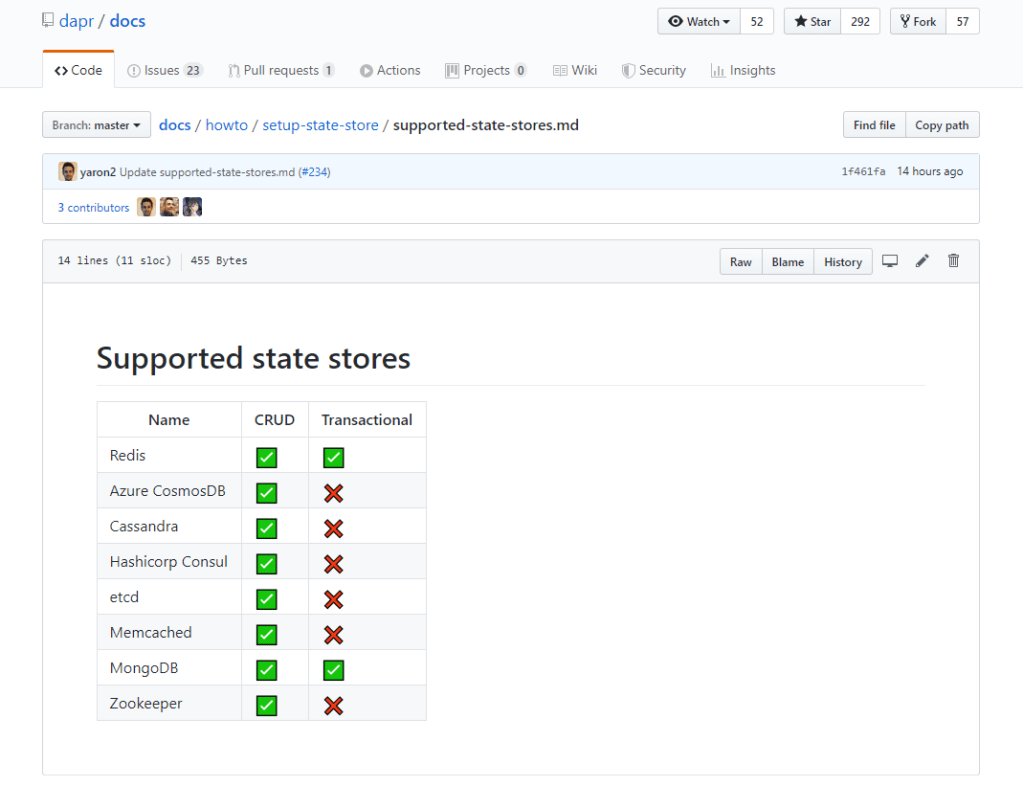
Besides Redis, Dapr also supports several other types of state stores, for example CosmosDB.

🎨 Supported state stores in Dapr as of 9th November 2019. I am one of the contributors to the documentation! =) 🎨

To use CosmosDB as state store, we simply need to replace the content of the redis.yaml with the following.

apiVersion: dapr.io/v1alpha1
kind: Component
metadata:
   name: statestore
spec:
   type: state.azure.cosmosdb
   metadata:
   - name: url
     value: <CosmosDB URI> 
   - name: masterKey
     value: <CosmosDB Primary Key>
   - name: database
     value: <CosmosDB Database Name>
   - name: collection
     value: <CosmosDB Collection Name> 

The four required values above can be retrieved from the CosmosDB page on the Azure Portal. There is, however, one thing that we need to be careful, i.e. the Partition Key of the container in CosmosDB.

🎨 Partition Key is a mandatory field during the container creation step. 🎨

When I was working on this project, I always received the following error log from Dapr.

== APP == Failed to persist state: Internal Server Error

Since Dapr project is quite new and it is still in experimental stage, none of my friends seem to know what’s happening. Fortunately, Yaron is quite responsive on GitHub. Within two weeks, my question about this error is well answered by him.

I had a great discussion with Yaron on GitHub and he agreed to update the documentation to highlight the fact that we must use “/id” as the partition key.

So, after correcting the partition key, I finally can see the state stored on CosmosDB.

🎨 CosmosDB reflects the current HP of the player which has dropped from 100 to 60. 🎨

In the screenshot above, we can also clearly see that “backend-playerHP” is automatically chosen as id, which is what being explained in the Partition Keys section of the documentation.

References

Front-end Development in dotnet.sg

yeoman-bower-npm-gulp

The web development team in my office at Changi Airport is a rather small team. We have one designer, one UI/UX expert, and one front-end developer. Sometimes, when there are many projects happening at the same time, I will also work on the front-end tasks with the front-end developer.

In the dotnet.sg project, I have chance to work on front-end part too. Well, currently I am the only one who actively contribute to the dotnet.sg website anyway. =)

Screen Shot 2017-01-29 at 12.49.23 AM.png
Official website for Singapore .NET Developers Community: http://dotnet.sg

Tools

Unlike the projects I have in work, dotnet.sg project allows me to choose to work with tools that I’d like to explore and tools that helps me work more efficiently. Currently, for the front-end of dotnet.sg, I am using the following tools, i.e.

  • npm;
  • Yeoman;
  • Bower;
  • Gulp.

Getting Started

I am building the dotnet.sg website, which is an ASP .NET Core web app, on Mac with Visual Studio Code. Hence, before I work on the project, I have to download NodeJs to get npm. The npm is a package manager that helps to install tools like Yeoman, Bower, and Gulp.

After these tools are installed, I proceed to get a started template for my ASP .NET Core web app using Yeoman. Bower will then follow up immediately to install the required dependencies in the web project.

screen-shot-2017-01-28-at-9-03-10-pm
Starting a new ASP .NET Core project with Yeoman and Bower.

From Bower with bower.json…

Working on the dotnet.sg project helps me to explore more. Bower is one of the new things that I learnt in this project.

To develop a website, I normally make use of several common JS and CSS libraries, such as jQuery, jQuery UI, Bootstrap, Font Awesome, and so on. With so many libraries to manage, things could be quite messed up. This is where Bower comes to help.

Bower helps me to manage the 3rd party resources, such as Javascript libraries and frameworks, without the need to locate the script files for each resources myself.

For example, we can do a search of a library we want to use using Bower.

Screen Shot 2017-01-28 at 9.44.47 PM.png
Search the Font Awesome library in Bower.

To install the library, for example Font Awesome in this case, then with just one command, we can easily do it.

$ bower install fontawesome

The libraries will be installed in the directory as specified in the Bower Configuration file, .bowerrc. By default, the libraries will be located at the lib folder in wwwroot.

screen-shot-2017-01-28-at-10-08-44-pm
Downloaded libraries will be kept in wwwroot/lib as specified in .bowerrc.

Finally, to check the available versions of a library, simply use the following command to find out more about the library.

$ bower info fontawesome

I like Bower because checking bower.json into the source control ensures that every developer in the team has exactly the same code. On top of that, Bower also allows us to lock the libraries to a specific version. This will thus prevent some developers to download some different version of the same library from different sources themselves.

…to npm with package.json

So, now some of you may wonder, why are we using Bower when we have npm?

Currently, there are also developers supporting the act to stop using Bower and switch to npm. Libraries such as jQuery, jQuery UI, and Font Awesome, can be found on npm too. So, why do I still talk about Bower so much?

Screen Shot 2017-01-28 at 11.30.58 PM.png
Searching for packages in npm.

For ASP .NET Core project, I face a problem on referring to node_module from the View. Similar as Bower, npm will position the downloaded packages in a local folder also. The folder turns out to be node_module, which is on the same level as wwwroot folder in the project directory.

As ASP .NET Core serves the CSS, JS, and other static files from the wwwroot folder which doesn’t have node_module in it, the libraries downloaded from npm cannot be loaded. One way will be using Gulp Task but that one is too troublesome for my projects so I choose not to go that way.

Please share with me how to do it with npm in an easier way than with Bower, if you know any. Thanks!

Goodbye, Gulp

I first learnt Gulp was when Riza introduced it one year ago in .NET Developers Community Singapore meetup. He was then talking about the tooling in ASP .NET Core 1.0 projects.

Riza Talking about Gulp.png
Riza is sharing knowledge about Gulp during dotnet.sg meetup in Feb 2016.

However, about four months after the meetup, I came to a video on Channel9 announcing that the team removed Gulp from the default ASP .NET template. I’m okay with this change because using BundleMinifier to do bundling and minifying of CSS and JS now without using Gulp because using bundleconfig.json in BundleMinifier seems to be straightforward.

Screen Shot 2017-01-28 at 11.59.18 PM.png
Discussion on Channel 9 about the removal of Gulp in Jun 2016.

However, the SCSS compilation is something I don’t know how to do it without using Gulp (Please tell me if you know a better way. Thanks!).

To add back Gulp to my ASP .NET Core project, I do the following four steps.

  1. Create a package.json with only the two compulsory properties, i.e. name and version (Do this step only when package.json does not exist in the project directory);
  2. $ npm install --save-dev gulp
  3. $ npm install --save-dev gulp-sass
  4. Setup the generated gulp.js file as shown below.
var gulp = require('gulp');
var sass = require('gulp-sass');

gulp.task('compile-scss', function(){
    gulp.src('wwwroot/sass/**/*.scss')
        .pipe(sass().on('error', sass.logError))
        .pipe(gulp.dest('wwwroot/css/'));
})

//Watch task
gulp.task('default', function() {
    gulp.watch('wwwroot/sass/**/*.scss', ['compile-scss']);
})

After that, I just need to execute the following command to run gulp and changes made to the .scss files in the sass directory will trigger the Gulp Task to compile the SCSS to corresponding CSS.

$ gulp

There is also a very detailed online tutorial written by Ryan Christiani, the Head Instructor and Development Lead at HackerYou, explaining each step above.

Oh ya, in case you are wondering what is the difference between –save and –save-dev in the npm commands above, I like how it is summarized on Stack Overflow by Tuong Le, as shown below.

  • –save-dev is used to save the package for development purpose. Example: unit tests, minification.
  • –save is used to save the package required for the application to run.

Conclusion

I once heard people saying that web developers were the cheap labour in software development industry because they are still having the mindset that web developers just plug-and-play modules on WordPress.

After working on the dotnet.sg project and helping out in front-end development at work, I realize that web development is not an easy plug-and-play job at all.

IBM Connect 2015: SoftLayer and Bluemix

IBM Connect 2015 - SoftLayer - Bluemix

With different challenges emerging every other day, startups nowadays have to innovate and operate rapidly in order to achieve exponential growth in a short period of time. Hence, my friends working in startups always complain about the abuse of 4-letter word “asap”. Every task they receive always come with one requirement: It must be done asap. However, as pointed out in the book Rework by Jason Fried from Basecamp, when everything is expected to be done asap, nothing in fact can be really asap. So, how are startups going to monetize their ideas fast enough?

To answer the question, this year IBM Connect Singapore highlighted two cloud platforms, SoftLayer and Bluemix, which help to assist startups to build and launch their products at speed.

IBM Connect 2015 at Singapore Resorts World Sentosa

SoftLayer, IaaS from IBM

SoftLayer is a very well-known IaaS cloud service provider from IBM. Currently, SoftLayer has data centres across Asia, Australia, Europe, Brazil, and United States. William Lim, APAC Channel Development Manager at SoftLayer, stated during the event that there will be two new data centres are introduced for every two months on average. In addition, each data centre is connected to the Global Private Network which enable startups to deploy and manage their business applications worldwide.

With Global Private Network, SoftLayer users won’t be charged for any bandwidth usage across the network. Yup, free! Bandwidth between servers on the Global Private Network is unmetered and free. So, with this exciting feature, startups are now able to build true disaster recovery solutuion which requires file transfer from one server to another.

William Lim sharing story about Global Private Network.

What excites me during the event is the concept of Bare Metal Server. With Microsoft Azure and Amazon Web Services (AWS), users do not get predictable and consistent performance especially for I/O intensive tasks when their applications are running on virtual-machine based hosting. In order to handle I/O intensive workloads, IBM SoftLayer offers their users a new type of server, Bare Metal Server.

A Bare Metal Server is a physical server which is fully dedicated to one single user. Bare Metal Server can be setup with cutting-edge Intel server-grade processors which can then maximize the server processing power. Hence, for those startups that would like to build Big Data applications, they can make use of Bare Metal Server from SoftLayer to perform data-intensive functions without worrying about latency and overhead delays.

Bluemix, PaaS from IBM

As a user of Microsoft Azure Cloud Service (PaaS), I am very glad to see the Bluemix, PaaS developed by IBM, is also being introduced in the IBM Connect event.

Amelia Johasky, IBM Cloud Leader (ASEAN), sharing how Bluemix works together with three key open compute technologies: Cloud Foundry, Docker, and OpenStack.

One of the reasons why I prefer PaaS over IaaS is because in a startup environment, developers always have too many todos and too little time. Hence, it is not a good idea to add the burden of managing servers to the developers. Instead, developers should just focus on innovation and development. In the world of PaaS, tons of useful libraries are made available and packaged nicely which allows developers to code, test, and deploy easily without worrying too much about the server configuration, database administration, and load balancing. (You can read about my pain of hosting web applications on Azure IaaS virtual machines here.)

After the IBM Connect event, I decide to try out Bluemix to see how it’s different from Azure Cloud Service.

The registration process is pretty straightforward. I started with the Web Application Template. In Bluemix, there are many programming languages supported, including the latest ASP .NET 5, the new open-source and cross-platform framework from Microsoft team!

Many web development platforms are available on Bluemix!

I like how Bluemix is integrated with Git. It allows us to create a hosted Git repository that deploys to Bluemix automatically. The entire Git setup process is also very simple with just one click of the “Git” button. So every time after I push my commits to the repository, my app will be automatically updated on the server as well. Cool!

Bluemix enables us to deploy our web apps with Git.

You can click on the button below to try out my simple YouTube related web app deployed on Bluemix.

Try out my app hosted on Bluemix at http://youtube-replayer.mybluemix.net/.

Bluemix is underlined by three key open compute technologies, i.e. Cloud Foundry, Docker, and OpenStack. What I have played with is just the Cloud Foundry part. In Bluemix, there is also an option to enable developers to deploy virtual machines. However, this option is currently beta and users can only have access to it if they are invited by IBM. Hence, I haven’t tried their VM option.

Finally, Bluemix currently only offers two regions, UK and US South. So for those who would like to have their apps hosted in other parts of the world, it may not be a good time to use Bluemix now.

YouTube RePlayer is now hosted on Bluemix.