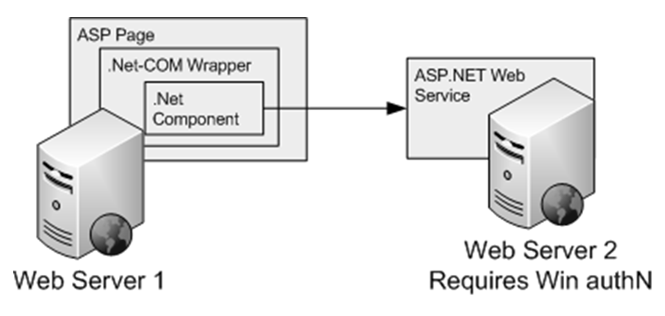
Validation of Viewstate MAC Failed

This is a story of me and my friend fixing a problem occurred in one of my ASP.NET web applications. It happened last year. One day, when he browsed my new web app, he realized that there was a very strange server error. It said “validation of viewstate MAC failed”, as shown in the following screenshot.

Server Error: Validation of Viewstate MAC Failed

When he showed me this error, I was like what the hash is going on. I spotted the words “Web Farm” and “cluster”. However, I’m not using any web farm and cluster. Also, what is “viewstate MAC”?

Viewstate and MAC

What is Viewstate?

According to MSDN, Viewstate is a mean to store information directly in the web page so that the page and control will not be lost with each round trip. This is because a Web application is states and thus a new instance of the Web page class will be created each time the page is requested from the server. So, Viewstate can be used to store values that have to be retained during postback, for example the value entered by the user into a textbox on the web page.

By default, Viewstate data is stored in a hidden field on the web page. However, it is very easy for a malicious user to get access to the contents of a hidden field and modify it. Thus, there is a need to secure our Viewstate data. The way it’s done is through creating a hash value of the Viewstate data with MAC (Machine Authentication Code) key and using the hash to check whether the data has been corrupted or not.

Solution

Okai, now I sort of knowing what Viewstate is and why MAC is mentioned in the error message.

The next step will be finding the solution to this problem. You should be able to find a list of articles and forum threads discussing about this problem on Google.

The first article I found is a blog post “Validation of viewstate MAC failed error” on MSDN. One of the workarounds suggested is setting enableEventValidation to false and viewStateEncryptionMode to Never. This method is basically just throwing away the viewstate validation and opening a hole in the security of the web app. If I use this method in my work, I guess I will be beaten by my manager.

Example of Getting Beaten (?). Image Credits: Rewrite

The second workaround mentioned in the article can only work if the problem happens because the postback occurs before the EventValidation field has been rendered. This is no longer an issue in the modern ASP web app. The third and fourth workarounds are also just re-ordering the position of the hidden field storing Viewstate data to the beginning of the form to prevent postback happens before the hidden field is rendered. So, they do not really help.

For my case, the problem is most probably caused by the browser caching. My friend’s browser was using the cached version of the web pages. However, expecting the users to clear their cache and cookies is totally not acceptable. So, the solution I chose is adding a machine key to web.config. There are also online tutorials on how to do that, for example an article written by Adam in 2009, “How To Fix the: “Validation of viewstate MAC failed” Error (ASP.NET MVC)“. The online tool that I use to generate a random machine key is http://aspnetresources.com/tools/machineKey (EDIT on 11 Dec 2014: This link is reported to be dead by one of our readers, Naveen, in the comment section below. You can now try https://www.insitesystems.com/services/tools/machine-key-generator.html).

<configuration>
    ...
    <system.web>
        ...
        <machineKey validationKey="..." decryptionKey="..." validation="SHA1" decryption="AES" />
...

Yup, so that is basically how I solved it until someone hacks my server and gets to know the value of my machine key. =P

p/s: My friend was staying at Hong Kong and thus I named this problem the “Hong Kong Friend’s Problem”.

Using Session in ASP.NET

Recently I encounter some problems while using Session in my ASP.NET web application project. Although most of the problems have been solved, there are still rooms of improvement to gain more stability because it should be stable enough to use for real-world high-load business transactions.

Before working on the future improvement, I would like to write down stuff that I learnt from the project as well as interesting and useful articles that I found so that I can share them with my friends.

By the way, the project is basically about building an online shop that sells anime products, for example anime key chains. Also, there would be white-label service available. This means that we use the same website for other local anime shops to re-brand the website so that it appears as if they made it. Thus, the way I differentiate between the sources of transaction is using Session variables.

Phone_Strap
From my anime product collection: A phone strap featuring Saya Tokido from Little Busters! EX.

Why Session State?

HTTP is a stateless protocol, as we all know. Thus, we can’t store client information on a page. Nowadays, there is a newly available option that allows us to work against stateless nature of HTTP. It is the HTML5 Web Storage. However, personally I don’t like to spend time on figuring how to make my web application to be backwards compatible.

One of the main reasons why I choose to use Session State is because it is extremely easy to implement and any type of object can be stored in the Session. For example, I can just throw the entire online shopping cart into one Session variable easily with just one line of code.

Session["dsCart"] = new ShoppingCart(); // Store the shopping cart into Session

In addition, Session State is secure and the actual state is hidden from the client because it is stored on the server side.

Problem with Safari + Iframe

The way I do white-label website is that I provide the URL of the web application homepage to the anime shops. What they need to do is just embedding it in an iframe.

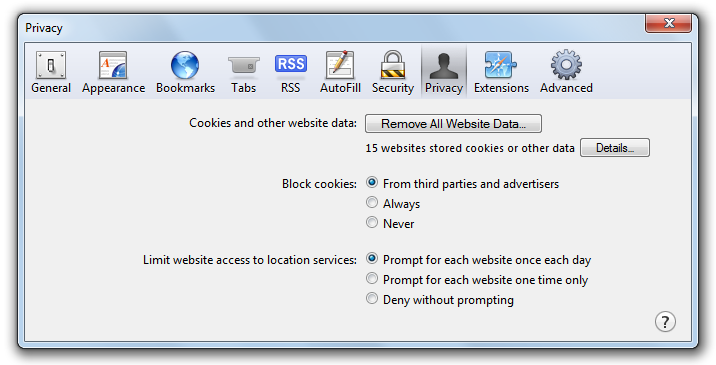
Everything worked fine until we realized that it did not work in Safari. The reason is because Safari has enforced its cookie policy with 5.1.4. By default, Safari blocks cookies from third parties and advertisers. But wait… Why should I care about the cookie policy when I am just using Session State?

Safari - Privacy Settings
By default, Safari blocks all cookies coming from third parties.

The reason is very simple. The Session State relies on the cookies. Of course, there are cookieless sessions available and cookieless sessions are there because users may have disabled the cookies on their browsers. However, cookieless session has a security problem because it makes the session ID easier to be retrieved.

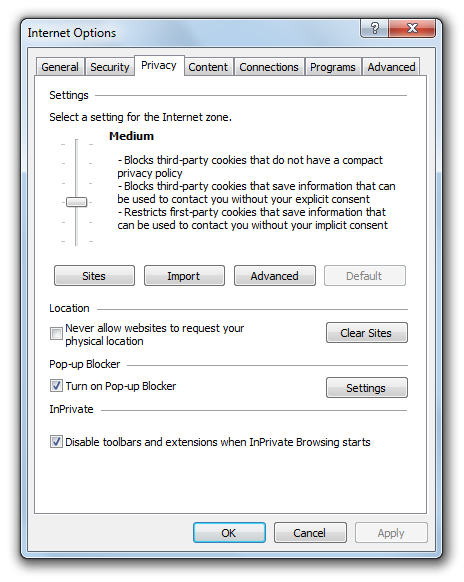
In fact, IE9 has the same problem as well. The Privacy Settings in IE9 is by default set to “Medium” where all third-party cookies are blocked. However, due to the fact that only those which do not have a compact privacy policy will be blocked, I can easily solve it by having IIS to send a compact policy in HTTP header.

IE9 Privacy Settings
IE9 Privacy Setting is set to Medium, by default.

For Safari, having a compact policy does not help at all. Safari can no longer be tricked with that since the release of version 5.1.4. Fortunately (or maybe unfortunately), there are some (ugly) ways to solve the problem. For example, the one I found on StackOverflow is using JavaScript to open a new window to set a cookie for the domain (used in iframe). I do not like this solution very much. However, so far, I have not found any better way yet. So, no choice, I have to continue using it.

Session Timeout Issue

Another problem that I encountered in this project is the session timeout. If our customer does not refresh or make a server request by clicking on a button, for example, within a certain period of time (usually it is 20 minutes), then the sessions will end. Hence, we will loss all the information stored in the Session variables, including the shopping cart. Even worse, part of the system will just not work because Session variables are now all storing null value.

Hence, in the CodeBehind of all the web pages, I have this method, ShowSessionTimeoutMessage(), which takes in the Session State object as parameter and returns a JavaScript code which will be taken care by ScriptManager.RegisterClientScriptBlock. What it does is basically just prevent user from using the system once the Session has ended. This is to avoid the null reference errors in the application when the Session variables are all null. Also, it will show a message telling the user to start his/her online purchase from the first page again.

public static string ShowSessionTimeoutMessage(System.Web.SessionState.HttpSessionState session)
{
    string msgSession = "Your Session Has Timed Out";

    // Time to block GUI, 10 seconds before session ends
    int int_MilliSecondsTimeReminder = (session.Timeout * 60000) - 10000;

    return @"
        var myTimeReminder; 
        clearTimeout(myTimeReminder);
        var sessionTimeReminder = " + int_MilliSecondsTimeReminder.ToString() + @";
        function doReminder(){ $.blockUI({ message: '" + msgSession + @"' , 
        css: {border: 'none', padding: '15px', backgroundColor: '#000', '-webkit-border-radius': '10px', 
        '-moz-border-radius': '10px', opacity: .5, color: '#fff', 'text-align': 'left', cursor: 'default', 
        top: ($(window).height() - 600) /2 + 'px', left: ($(window).width() - 600) /2 + 'px', width: '600px' }
        }); }
        myTimeReminder=setTimeout('doReminder()', sessionTimeReminder);";
}

Here, I am using the jQuery BlockUI  plugin from M. Alsup to prevent user from interacting with the web application after Session ends.

Future Work

Personally, I do not like how I solve the Safari cookie policy problem. Thus, I will be finding better ways to solve it in the future. Also, if possible, I will try to make my entire ASP.NET web application to not use Session variables at all. Then I will not have all the problems mentioned above. Ah-ha!

The Disappearance of Parameters?

Last week after uploading an updated version of my ASP web app to the server, it showed an error at the place where data is inserted into the database using a stored procedure.

The error message is “Procedure or Function ‘A’ expects parameter ‘@B’, which was not supplied”.

I double checked my code. Yes, all the required parameters present in the web service code. Yes, the stored procedure is written correctly. Yes, the code does supply the parameter. So, why is there an error?

I searched on Google and found that there were many people facing this problem. Yet, their solutions are all different from each other. So, I decided to share those I found. Besides, in the end, I will also talk about how I solved it eventually.

ASP Web Service
ASP Web Service. Image Credits: Alik Levin’s

Case #1: Stored Procedure Is Written Wrongly

CS Code

publiv void insertData()
{
 SqlConnection con = new SqlConnection(str_con);
 con.Open();
 SqlCommand cmd = new SqlCommand();
 cmd.CommandText = "InsertInfo";
 cmd.CommandType = CommandType.StoredProcedure;
 cmd.Connection = con;

 string name = Convert.ToString(txtName.Text);

 cmd.Parameters.Add("@s_name", SqlDbType.VarChar).Value = name;

 cmd.ExecuteNonQuery();
 con.Close();
}

Stored Procedure

SET ANSI_NULLS OFF
GO
SET QUOTED_IDENTIFIER OFF
GO
ALTER PROCEDURE [dbo].[bkg_Insert_Members_FromCompanyID] 
@s_name varchar(50)
AS
-- Variable Declaration
DECLARE @iReturn INT
INSERT INTO Members (member_name) Values (@s_name)
SET @iReturn = @@error
RETURN @iReturn

Although both CS code and stored procedure are written correctly, due  to the fact that there is one line “exec <stored procedure name>” at the end of the stored procedure, the error happens. To solve the problem, just need to remove the unnecessary line.

Reference: Procedure or Function ‘InsertInfo’ expects parameter ‘@s_name’, which was not supplied.

Case #2: Null Value Is Passed

If a null value needs to be inserted into database table using stored procedure, DBNull.Value should be used as demonstrated below.

cmd.Parameters.Add("@s_name", SqlDbType.VarChar).Value = DBNull.Value;

The error will be raised if null value is passed instead of DBNull.Value.

Reference: Procedure expects parameter which was not supplied

Case #3: Wrong CommandType

When the program is calling a stored procedure, the CommandType should be set to StoredProcedure as shown below.

cmd.CommandType = CommandType.StoredProcedure;

Due to the fact that the default value of CommandType is Text, so if  this line is missing, it will cause the same error as well.

References:

  1. Procedure expects parameter which was not supplied
  2. Procedure or function expects parameter which was not supplied

Case #4: Name Mismatched

The same error will be thrown if the name of the data field used in the CS code is different from the parameter name of the stored procedure or the name of the field in the table. I don’t know what to say besides \bat the programmer.

Reference:

  1. Procedure or function expects parameter ‘@parm’, which was not supplied
  2. Procedure or function ‘login’ expects parameter ‘@username’, which was not supplied.

Case #5: Wrong Order

Yes, there is a value assigned to the parameter of the stored procedure in the CS code. However, the SQLCommand object is later replaced. Oh my… I have no comment about this.

Reference: Procedure or Function expects parameter, which was not supplied.

Ah-ha-ha-ha, problem solved!
Ah-ha-ha-ha, problem solved!. Image Credits: Little Busters! EX

So, how about my one? It turns out that it is because my web service project is not updated after doing the compilation. After rebuilding the web service project, everything is working again.

Building Mobile Version for My ASP Website

I enjoy watching YouTube on my Android because I don’t sit in front of my PC for a long time. I found that the mobile version of YouTube was quite simple, straight-forward and easy. It is very easy to look for videos in Subscriptions, personal Playlists, History and Favourites. I like how YouTube handles playlists which are very long (having more than 12 videos in it). Instead of showing all the videos in a long playlist, the mobile version of YouTube shows only the first few. The user then has to click on the “Show more videos” button at the bottom of the page to view more of the playlist. This is a bit troublesome for the user but that feature helps in showing the playlist videos page faster. This feature is introduced because of the smaller display we have in mobile phones.

Usability
Recently, I am doing the mobile version for an existing ASP website. Learning from YouTube mobile and some other mobile website online tutorials, I introduce a few changes in the mobile version of the ASP website:

  1. Remove large images, especially not-so-useful advertisement pictures shown on the original site and background images. This helps in reducing the bandwidth;
  2. Make the mobile version of the website to be single column. The original site has a multi-column layout. This makes the user needs to scroll a lot (horizontally and vertically) on the phone just to view the entire web page. The what-the-hash moment comes when the page contains too much unnecessary content, and the user has to spend time on scrolling and finding the important info on the page;
  3. Increase the click-able area. It will never be a good idea to ask user to zoom in to the page just to click on the tiny check-box or radio button. So, I have a large table cells there to replace the radio buttons and check-boxes so that user has a wider area to click on. Drop-down list can also be used to replace radio buttons because it is easier to choose item from the drop-down list in the mobile phone;
  4. No Flash and Silverlight. Removing all the animation thingy is a good choice;
  5. Build a fluid layout. Since different types of the mobile phones have different screen size, so it is good to fix the width of the display area;
  6. Have a “Back” button to go to the previous page. The original site has a section where the user has to go through several steps to get to see their results. So, a “Back” button is important in section like this on mobile version.

Besides, the links should be avoided for any important call to action. YouTube mobile still has this problem. Previously, they even placed the “Sign out” link very close to the “Show more videos” button. So, there are many times I accidentally clicked on the “Sign out” link. In the latest version, YouTube mobile has changed the position of the “Sign out” link. However, it is still placed not far from the frequently used buttons and they still do not ask for conformation when user clicks on the “Sign out” link. Haiz…

YouTube Mobile Not-so-good Design
The "Sign out" link in YouTube mobile is still close to the "Show more videos" button. Argg...

Also, I am thinking of having the functionality of allowing the user to view the address on the map on smartphone. This is to help user find out the actual position of the place easily. Allow users to automatically call the number when they click on the number on the web page is also helpful. I think some users will go crazy if they have to first note down the number on paper and then type the number on the phones just to call the person.

Detect the Mobile Device
Since it is an ASP website, I decided to use ASP to do the device detection.

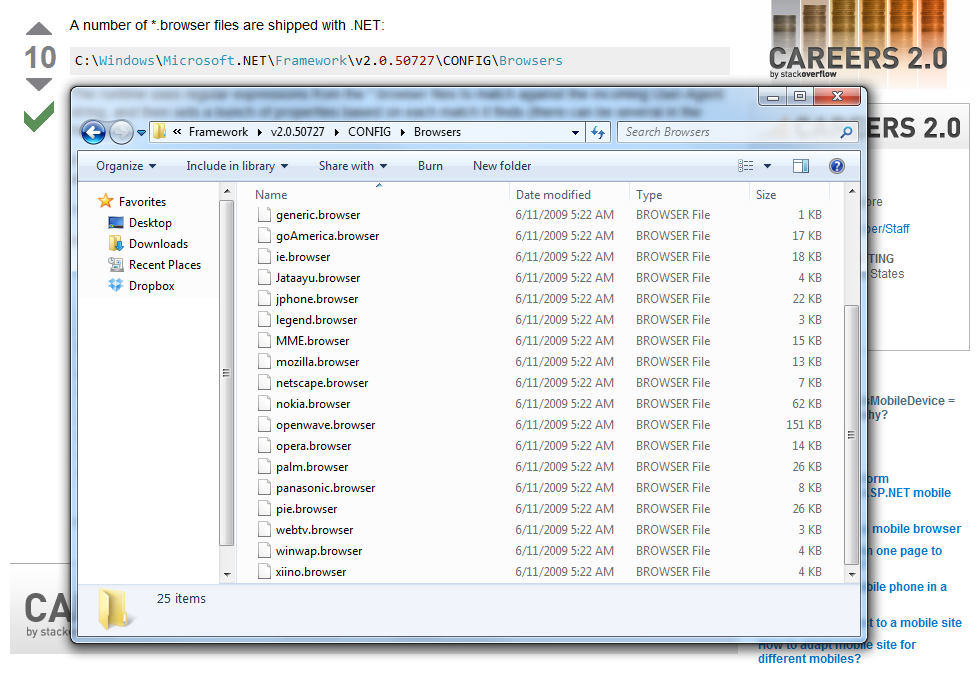
MSDN shows a very easy tutorial to do that: http://msdn.microsoft.com/en-us/library/fhhycabe.aspx. The tutorial shows how to use Request.Browser[“IsMobileDevice”] to check if it is a mobile device that is accessing the page right now. According the a discussion thread on the StackOverflow (http://stackoverflow.com/questions/1829089/how-does-ismobiledevice-work), by calling Request.Browser[“IsMobileDevice”], the runtime uses regular expression from the *.browser files to match against the incoming User-Agent string. However, this does not work at my side.

The *.browser files shipped with .NET
I then tried another solution found on another thread ASP.NET Forums (http://forums.asp.net/t/1175390.aspx):

An advanced version of code to check the device being used
The method suggested by anantjains uses several stuff to check: IsMobileDevice, HTTP_X_WAP_PROFILE, HTTP_ACCEPT and HTTP_USER_AGENT. The code actually works when I use User Agent Switcher on Firefox to test it. Yup, so I will use the code for now.

Meanwhile, according to a page in ASP.NET (http://www.asp.net/mobile), there is a third-party project on detecting the mobile devices, including those which are just released recently. The project is an open-source project and it is called 51degree.mobi Foundationhttp://51degrees.codeplex.com/. I have not tried it yet though.

Testing Mobile Website on PC
I usually tested my ASP and C# code on localhost first before deploy it on the server. So, for the mobile ASP website, I need a way to test it on my PC also.

True mobile browsing can be done on Firefox with the help of User Agent Switcher add-on (https://addons.mozilla.org/en-US/firefox/addon/user-agent-switcher/). With just the User Agent and a short description in the User Agent Switcher, a new user agent option can then be added to the list. By switching to the correct mobile user agent, the mobile version of the page can be viewed properly.

User Agent Switcher Add-on for Firefox

There is also an online article about testing mobile website on Firefox using this add-on and Modify Headers add-on: http://mobiforge.com/testing/story/testing-mobile-web-sites-using-firefox.