Since Visual Studio 2012, we can always find this file called modernizr-(version).js in the default ASP .NET 4.5 MVC template. So, what is Modernizr (can be downloaded from Nuget)?
With this information, we will then be able to provide alternative look-and-feel for those users who are using older versions of browser instead of telling those users “Best view in version xxx of browser yyy”.
With YepNope.js, we will also be able to tell Modernizr what to test and then what JS/CSS to load if the test passes or fails.
Finally, please remember that Modernizr only provides us information about which features are (not) supported. It won’t magically enable those features for us. We need to write corresponding JS/CSS to provide alternative views when the features are not supported on the browser.
In short, Modernizr is a good tool for designers to implement the idea of Progressive Enhancement.
The famous border-radius feature in CSS3 is supported in modern browsers like IE11, Edge, Chrome, and Firefox but it’s not supported in Internet Explorer 7 and 8. Does this stop us from using border-radius in our website? Nope. This is because for users who are still using IE7/8, they can still use the website in the same way as those who are using modern browsers. Just that those who are using old browsers cannot see the beautiful effect of border-radius.
I first said hi to ASP .NET MVC in the beginning of this year. On 28th January, I attended the .NET Developers Singapore meetup and listened to Nguyen Quy Hy’s talk about ASP .NET MVC. After that, I have been learning ASP .NET MVC and applying this new knowledge in both my work and personal projects.
After 6 months of learning ASP .NET MVC, I decided to again write down some new things that I have learnt so far.
URL in ASP .NET MVC and Google Recommendation
According to Google recommendation on URLs, it’s good to have URLs to be as simple as possible and human-readable. This can be easily done with the default URL mapping in ASP .NET MVC. For example, the following code allows to have human-readable URL such as http://www.example.com/Ticket/Singapore-Airlines.
In addition, Google also encourages us to use hyphens instead of underscores in our URLs as punctuation to separate the words. However, by default, ASP .NET MVC doesn’t support hyphens. One of the easy solutions is to extend the MvcRouteHandler to automatically replace underscores with hyphens.
Then in the RouteConfig.cs, we will replace the default route map to the following mapping.
routes.Add(
    new Route("{controller}/{action}/{id}",
    new RouteValueDictionary(
        new { controller = "Home", action = "Index", id = UrlParameter.Optional }),
        new HyphenatedRouteHandler())
);
By doing this, we can name our controllers and actions using underscores and then we set all the hyperlinks and links in sitemap to use hyphens.
There are actually many discussions about this online. I have listed below some of the online discussions that I found to be interesting.
Previously when I was working on WPF projects, I learnt the MVVM design pattern. So, it confused me when there was also a “View Model” in MVC. I thought with the use of View Model in ASP .NET MVC, I would be using MVVM too. It later turns out to be not the case.
Why is ViewModel able to provide the V a single object? This is because ViewModel can shape multiple entities from different data models into a single object.
public class CartViewModel
{
    ...

    public List<CartItems> items { get; set; }

    public UserProfile user { get; set; }
}
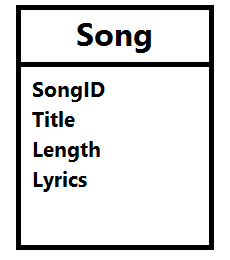
Besides, what I like about ViewModel is that it contains only fields that are needed in the V. Imagine the following model Song, we need to create a form to edit everything but the lyrics, what should we do?
The Song model.
Wait a minute. Why do we need to care about this? Can’t we just remove the Lyrics field from the edit form? Well, we can. However, generally we do not want to expose domain entities to the V.
If people manage to do a form post directly to your server, then they can add in the Lyrics field themselves and your server will happily accept the new Lyrics value. There will be a bigger problem if we are not talking about Lyrics, but something more critical, for example price, access rights, etc.
By using ViewModel, we need to having mapping code to map between the view model and the domain model. However, writing mapping code is very troublesome especially when there are many properties involved.
Luckily, there is AutoMapper. AutoMapper performs object-object mapping by transforming an input object of one type into an output object of another type.
Mapper.CreateMap<Location, LocationViewModel>();
AutoMapper has a smart way to map the properties from view model and the domain model. If there is a property called “LocationName” in the domain model, AutoMapper will automatically map to a property with the same name “LocationName” in the view model.
Session, ViewData, ViewBag, and TempData
In my first e-commerce project which is using ASP .NET, Session is widely used. From small things like referral URL to huge cart table, all are stored in Session. Everyone in the team was satisfied with using Session until the day we realized we had to do load balancing.
Another problem of using In-Process Session State is that once there is a restart on IIS or the server itself, the session variables stored on the server will be gone. Hence, for every deploy to the server, the customers will be automatically logged out from the e-commerce website.
Then you might wonder why we didn’t store session state in a database. Well, this won’t work because we store inserialisable objects in session variables, such as HtmlTable. Actually, there is another interesting mode for Session State, called StateServer. I will talk more about it in my another post about Azure load balancing.
This is to return an instance of the JsonResult class.
(4) success
If you are calling the GetAllMovies() through AJAX, probably you can do something as follows to check if there is any exception or error thrown.
$.ajax({
url:'/GetAllMovies',
success: function(data){
// No problem},
error: function(XMLHttpRequest, textStatus, errorThrown){
var obj = JSON.parse(jqXHR.responseText);
alert(obj.error);}});
The error callback above will only be triggered when the server returns non-200 status code. I thus introduced another status field to tell the caller more info, for example an exception raised in C# code or any invalid value being passed to GetAllMovies method through AJAX. Hence, in the AJAX call, we just need to update it to
$.ajax({
url:'/GetAllMovies',
success: function(data){
if (data.success) {
// No problem
} else {
alert(data.message);
}},
error: function(XMLHttpRequest, textStatus, errorThrown){
var obj = JSON.parse(jqXHR.responseText);
alert(obj.error);}});
To send email from my MVC project, I have the following code to help me out. It can accept multiple attachments too. So I also use it to send email with report generated using the code above attached. =)
public Task SendEmail(
    string sentTo, string sentCC, string sentBCC,  string subject, string body,
    string[] attachments = null)
{
    // Credentials:
    var credentialUserName = "<username provided by Amazon SES>;
    var sentFrom = "no-reply@mydomain.com";
    var pwd = "<password provided by Amazon SES>";

    // Configure the client:
    System.Net.Mail.SmtpClient client =
        new System.Net.Mail.SmtpClient("email-smtp.us-west-2.amazonaws.com");
    client.Port = 25;
    client.DeliveryMethod = System.Net.Mail.SmtpDeliveryMethod.Network;
    client.UseDefaultCredentials = false;

    // Create the credentials:
    System.Net.NetworkCredential credentials =
        new System.Net.NetworkCredential(credentialUserName, pwd);
    client.EnableSsl = true;
    client.Credentials = credentials;

    // Create the message:
    var mail = new System.Net.Mail.MailMessage(sentFrom, sentTo);
    string[] ccAccounts = sentCC.Split(new char[] { ';' }, StringSplitOptions.RemoveEmptyEntries);

    foreach (string ccEmail in additionalCcAccounts)
    {
        mail.CC.Add(ccEmail);
    }

    string[] bccAccounts = sentBCC.Split(new char[] { ';' }, StringSplitOptions.RemoveEmptyEntries);

    foreach (string bccEmail in additionalBccAccounts)
    {
        mail.Bcc.Add(bccEmail);
    }

    mail.Subject = subject;
    mail.Body = body;
    mail.IsBodyHtml = true;

    if (attachments != null)
    {
        for (int i = 0; i < attachments.Length; i++)
        {
            mail.Attachments.Add(new System.Net.Mail.Attachment(attachments[i]));
        }
    }

    client.SendComplete += (s, e) => client.Dispose();
    return client.SendMailAsync(mail);
}
To send an email without attachment, I just need to do the following in action method.
var emailClient = new Email();
await emailClient.SendEmail(
    "to@mydomain.com", "cc1@mydomain.com;cc2@domain.com", "bcc@mydomain.com",
    "Email Subject", "Email Body");
To send email with attachment, I will then use the following code.
string[] attachmentPaths = new string[1];

var reportServerPath = Server.MapPath("~/report");

attachmentPaths[0] = reportServerPath + "\\Report.xls";

var emailClient = new Email();
await emailClient.SendEmail(
    "admin@mydomain.com", "", "",
    "Email Subject", "Email Body", attachmentPaths);
Yup, that’s all what I have learnt so far in my MVC projects. I know this post is very, very long. However, I am still new to MVC and thus I am happy to be able to share with you what I learn in the projects. Please correct me if you find anything wrong in the post. Thanks! =)




 cuteprogramming